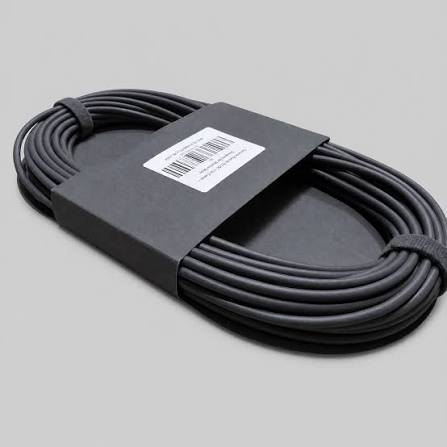
15 m Starlink Mini DC Power Cable
Shop 15 m Starlink Mini DC Power Cable in Uganda for reliable Mini power connection, replacement and flexible installation. Order yours today.
Contact us for current pricing in Uganda
Contact us for current pricing in Uganda
Product Details
15 m Starlink Mini DC Power Cable: 7 Powerful Benefits
15 m Starlink Mini DC Power Cable in Uganda
Power is an essential part of every Starlink Mini installation.
Although the Mini combines its satellite antenna and WiFi router into one compact unit, it still needs a reliable electrical connection.
The 15 m Starlink Mini DC Power Cable provides that connection between the Mini and its standard power system.
Starlink includes this same 15 m cable with the standard Mini Kit. The official kit contains the Mini with integrated WiFi, kickstand, Pipe Adapter and Flat Mount, DC Power Cable, power supply and Starlink Plug.
Customers can also obtain the 15 m cable separately when they need to replace a damaged cable or keep an additional cable available for another installation.
What Is the 15 m Starlink Mini DC Power Cable?
The 15 m Starlink Mini DC Power Cable is a dedicated power cable compatible with Starlink Mini.
Its primary job is to deliver DC power to the Mini terminal.
The cable measures:
15 metres / 49.2 feet
Starlink specifically describes the separately available cable as a replacement for the 15 m DC Power Cable supplied with the Starlink Mini Kit.
This means customers do not necessarily need to replace their entire Mini Kit if the original power cable becomes damaged.
Table 1: 15 m Starlink Mini DC Power Cable Specifications
| Specification | Details |
|---|---|
| Product | Mini DC Power Cable |
| Compatibility | Starlink Mini |
| Cable Length | 15 m |
| Length in Feet | 49.2 ft |
| Primary Function | Power connection |
| Package Dimensions | 156 × 285 × 32 mm |
| Package Dimensions in Inches | 6.1 × 11.2 × 1.3 in |
| Package Weight | 0.5 kg |
| Package Weight in Pounds | 1.1 lb |
| Standard Mini Kit Length | 15 m |
These specifications come directly from Starlink's Mini Accessories Guide.
Included with the Starlink Mini Kit
Customers purchasing a standard Starlink Mini Kit already receive one 15 m DC Power Cable.
Starlink's current Mini installation guide lists the following components:
- Starlink Mini with integrated WiFi
- Kickstand
- Pipe Adapter and Flat Mount
- 15 m DC Power Cable
- Power Supply
- Starlink Plug
Therefore, customers purchasing the cable separately generally need it as a replacement or additional cable, rather than as an essential accessory missing from a new Mini Kit.
This distinction is useful when planning a purchase.
Why Buy an Additional 15 m Cable?
Starlink specifically identifies two main reasons for purchasing the separately available 15 m Mini DC Power Cable:
Replacing a damaged original cable
or
Keeping an extra cable outside the existing installation.
For example, a customer may use Mini between a home and a holiday property.
Instead of removing the permanently routed power cable every time the Mini is moved, an additional cable may be kept at the second location.
The Mini terminal can then be transported between locations while each installation maintains its own cable arrangement.
Replacement for a Damaged Cable
Power cables can become damaged through poor handling or inappropriate routing.
Potential problems include:
- Severe kinks
- Crushing
- Door damage
- Connector damage
- Cuts
- Excessive bending
- Improper modifications
Starlink warns that cable damage can affect service and specifically recommends keeping its cables free from kinks, debris and door-jamb damage.
If the original Mini cable has been physically damaged, replacing it with the appropriate Starlink Mini cable is generally preferable to attempting an improvised repair.
15 m Cable Length
Fifteen metres provides substantial flexibility for many installations.
It allows the Mini to be positioned outdoors while the power supply remains in a more appropriate location.
For example, the terminal might be placed on:
- A roof
- Exterior wall
- Pole
- Balcony
- Compound
- Temporary stand
- Camping location
The cable can then run toward the available power source.
The actual usable distance will depend on the building layout and cable-routing path.
15 m vs 30 m Mini DC Power Cable
Starlink also lists a longer 30 m (98.4 ft) Mini DC Power Cable.
The 30 m version is specifically intended to replace the standard 15 m cable when additional distance is needed.
Table 2: 15 m vs 30 m Starlink Mini DC Power Cable
| Feature | 15 m Cable | 30 m Cable |
|---|---|---|
| Length | 15 m | 30 m |
| Length in Feet | 49.2 ft | 98.4 ft |
| Compatibility | Starlink Mini | Starlink Mini |
| Main Purpose | Standard/replacement length | Extended installation length |
| Package Weight | 0.5 kg | 1.3 kg |
| Package Dimensions | 156 × 285 × 32 mm | 200 × 182 × 81 mm |
| Suitable for Replacement | Yes | Yes, when extra length is needed |
Both are Mini-specific power cables.
Customers should select the length according to the actual installation rather than automatically choosing the longest option.
15 m Cable for Home Installation
A 15 m cable can be suitable for many residential installations.
For example, Mini may be positioned on an exterior section of the property with the power equipment indoors.
Before installing, determine the entire route.
Consider:
Mini location → cable path → wall entry → power supply location
This should be planned before permanently mounting the terminal.
A badly planned installation can result in discovering that the cable is too short only after drilling and mounting work has already been completed.
15 m Cable for Roof Installation
Roof-mounted Mini installations need careful cable routing.
The cable should travel from the terminal toward the building entry point without being left loose across the roof.
Avoid unnecessary exposure to sharp roofing edges.
Cable routing should also account for rainwater flow, roof access and future maintenance.
If the terminal will be mounted using a Mini Pivot Mount or another permanent mounting accessory, the power-cable route should be considered as part of the installation rather than afterwards.
15 m Cable for Wall Installation
A wall installation can sometimes provide a shorter and cleaner cable route than a roof installation.
Mini can be mounted on an appropriate exterior wall while the cable enters the building relatively close to the terminal.
However, the mounting location still needs an adequate view of the sky.
The convenience of the cable route should never be the only factor used to choose the Starlink location.
Satellite visibility remains essential.
15 m Cable for Pole Installation
Starlink Mini can also be installed using compatible pole-mounting equipment.
When Mini is elevated on a pole, cable routing becomes particularly important.
The cable should be secured appropriately down the installation rather than hanging freely.
Allow sufficient cable for the complete route from the Mini to the power location.
Remember that a 15 m cable does not necessarily provide 15 m of straight-line separation because some length will be consumed by routing around building features and toward the power source.
Cable Routing Best Practices
Good cable management improves the overall quality of the installation.
Table 3: Mini DC Power Cable Routing Guide
| Practice | Recommendation |
|---|---|
| Sharp Bends | Avoid |
| Severe Kinks | Avoid |
| Door Jambs | Do not trap cable |
| Heavy Objects | Do not place on cable |
| Sharp Metal Edges | Avoid direct contact |
| Loose Roof Cable | Secure appropriately |
| Cable Modification | Not recommended |
| Underwater Installation | Not suitable |
| Direct Burial | Not rated for burial |
| Correct Starlink Cable | Recommended |
Starlink states that its cable is not rated to be buried or placed underwater and warns that damage may affect service quality.
Do Not Cut or Extend the Cable Improperly
Customers may sometimes consider cutting a cable and joining additional wire to increase its length.
Starlink does not recommend modifying its cables or combining them with other cables to extend the connection.
Starlink explains that its cables are specifically power-rated for the relevant hardware and use protective sealing and locking mechanisms. Third-party modifications can compromise the installation and may cause water damage.
Where 15 m is insufficient, the better solution is to consider Starlink's dedicated longer cable option.
For Mini, Starlink lists a 30 m DC Power Cable for installations requiring additional length.
15 m DC Cable vs Mini USB-C Cable
Starlink Mini can also be powered using its dedicated USB-C accessory with an appropriate power source.
However, the standard 15 m DC Power Cable and optional USB-C cable serve different applications.
Table 4: 15 m DC Cable vs Mini USB-C Cable
| Feature | 15 m Mini DC Cable | Mini USB-C Cable |
|---|---|---|
| Primary Use | Standard Mini power | Portable USB-C power |
| Length | 15 m / 49.2 ft | 5 m / 16.4 ft |
| Included with Standard Mini Kit | Yes | No |
| Replacement Accessory | Yes | Optional alternative |
| Best for Fixed Installation | Excellent | Depends on power source |
| Portable Battery Use | Standard power arrangement | Better with compatible USB-PD source |
| Mini Compatibility | Yes | Yes |
Starlink Mini's specifications state that its USB-PD configuration requires a compatible 100W, 20V/5A minimum source when using the Starlink USB-C-to-barrel-jack accessory.
The 15 m DC cable remains the normal cable supplied with the Mini Kit.
15 m DC Cable vs Mini Car Adapter
Customers using Starlink Mini inside a vehicle may have different power requirements.
The standard 15 m DC cable is primarily associated with the standard Mini power arrangement.
A dedicated vehicle power accessory can be more practical when the system needs to operate directly from an appropriate automotive power source.
Therefore, the correct accessory depends on where Mini will be used:
Fixed installation → 15 m DC Cable
Portable USB-C setup → Mini USB-C Cable
Vehicle setup → appropriate Mini vehicle power accessory
Customers who use Mini in several environments may own more than one power accessory.
Understanding Starlink Mini Power
Starlink Mini is designed around relatively modest power requirements compared with larger Starlink hardware.
Starlink currently lists Mini's average power consumption at approximately 25–40W, with an input rating of 12–48V and 60W maximum.
Table 5: Starlink Mini Power Reference
| Power Specification | Starlink Mini |
|---|---|
| Standard Power Type | DC |
| Average Consumption | Approx. 25–40W |
| Input Range | 12–48V |
| Maximum Input Rating | 60W |
| Standard DC Cable | 15 m |
| Longer DC Cable Option | 30 m |
| USB-PD Option | 100W, 20V/5A minimum with correct accessory |
These figures are useful when planning backup-power and off-grid Mini installations.
Using the Cable with Backup Power
A power outage does not necessarily mean Starlink Mini has to stop working.
Mini can be incorporated into a suitable backup-power system.
Possible sources include:
- UPS systems
- Portable power stations
- Battery systems
- Solar power systems
- Compatible DC systems
The exact configuration depends on the output available from the backup system.
The 15 m DC Power Cable remains the connection between the standard Mini power arrangement and the terminal.
For highly portable systems, customers may instead consider the dedicated USB-C or vehicle power accessories.
Using the Cable in Solar Installations
Starlink Mini can be useful in locations where grid electricity is unavailable or unreliable.
A typical solar-powered setup may include:
Solar Panels → Charge Controller/Power System → Battery → Compatible Mini Power Arrangement → Starlink Mini
The 15 m cable provides useful separation between the Mini and its standard power equipment.
However, designing a solar system requires more than simply multiplying the Mini's wattage by operating hours.
Customers should account for battery capacity, conversion losses, other connected devices and available solar generation.
Spare Cable for Travellers
Although 15 metres is longer than many portable users need, carrying a spare DC cable can be useful for customers who rely heavily on Starlink Mini.
Examples include:
- Remote workers
- Field engineers
- Researchers
- Survey teams
- Construction teams
- Overlanders
- Remote project managers
If the primary cable is damaged while operating far from normal infrastructure, a spare cable can reduce downtime.
The spare should be stored carefully rather than tightly folded or mixed with sharp tools.
Spare Cable for Businesses
Businesses operating Starlink Mini equipment at multiple locations may also benefit from maintaining spare cables.
For example, a field-services company might operate several Mini kits.
Keeping replacement cables available can make equipment management easier if one cable is damaged.
This is especially relevant where the Starlink connection supports operational communications.
Instead of waiting until damage occurs, businesses can keep commonly required accessories ready.
Moving Mini Between Two Locations
An additional 15 m cable can also simplify moving one Mini between two regularly used sites.
For example:
Location A: Permanent cable routing already installed.
Location B: Second permanent cable routing already installed.
The customer can then move the Mini terminal between the two setups without repeatedly removing and reinstalling the same cable.
Starlink specifically describes the separate 15 m cable as suitable where an extra cable outside the existing installation is needed.
Cable Protection Outdoors
The Mini terminal itself is designed for outdoor operation when installed correctly.
Starlink lists Mini with an IP67 Type 4 environmental rating when the DC Power Cable and Starlink Plug/cable are installed.
This makes correct connector installation important.
However, the cable should still be protected from unnecessary physical damage.
Do not interpret the terminal's environmental rating as permission to bury the cable or place it underwater. Starlink specifically states that its cable is not rated for either application.
Inspecting the Cable
Before installing a replacement cable, inspect it.
Check:
- Connectors
- Cable jacket
- Entire cable length
- Signs of cuts
- Crushing
- Severe bends
- Contamination around connectors
The same inspection is useful whenever Mini is moved between locations.
Portable Starlink equipment is connected and disconnected more frequently than permanently installed equipment, increasing the importance of routine cable checks.
Storing a Spare Cable
A spare 15 m cable should be stored carefully.
Coil it loosely and avoid creating sharp folds.
Keep connectors away from dirt and moisture during storage.
Do not place heavy equipment directly on top of the cable.
A dedicated Starlink accessory bag or equipment case can help keep cables separate from tools and other items.
For field teams, cables can also be labelled according to the kit or site they belong to.
When Should You Replace the Cable?
Replacement may be appropriate where the cable has:
- Visible cuts
- Damaged connectors
- Severe crushing
- Repeated intermittent power issues associated with cable movement
- Significant physical deterioration
Do not continue relying on a visibly damaged power cable simply because Mini occasionally powers on.
A proper replacement is preferable to an improvised repair.
When Should You Choose the 30 m Cable Instead?
Choose the longer cable when the planned installation genuinely requires more distance.
Table 6: Which Mini Cable Should You Choose?
| Installation Requirement | Recommended Option |
|---|---|
| Standard Mini replacement | 15 m DC Cable |
| Same length as original | 15 m DC Cable |
| Spare for another site | 15 m DC Cable |
| Long roof-to-power route | Consider 30 m |
| Power equipment far from Mini | Consider 30 m |
| Portable USB-C battery | Mini USB-C Cable |
| Vehicle power | Appropriate vehicle accessory |
| Damaged original 15 m cable | 15 m replacement |
Starlink designed the 30 m version specifically for situations where additional cable length is required.
Why Buy the 15 m Starlink Mini DC Power Cable?
The cable is useful for customers who want:
- A direct replacement for the original Mini cable
- An additional Mini power cable
- The standard 15 m installation length
- A spare for field operations
- A second cable at another property
- Cleaner Mini installation planning
- Original Mini-specific compatibility
Because the cable is designed specifically for Starlink Mini, customers avoid relying on improvised extensions that may compromise power delivery or weather protection.
Why Buy from Starlink Uganda Installers?
Starlink Uganda Installers can help customers determine whether they actually need the standard 15 m replacement, longer 30 m cable or another Mini power accessory.
A normal home installation may only require the 15 m cable.
A longer roof installation may require 30 m.
A portable power-bank setup may be better served by the Mini USB-C Cable.
A vehicle installation may require a dedicated vehicle power solution.
Selecting the appropriate cable before installation helps avoid unnecessary purchases and complicated cable modifications.
Frequently Asked Questions
1. What is the 15 m Starlink Mini DC Power Cable?
The 15 m Starlink Mini DC Power Cable is the standard-length DC power cable designed for Starlink Mini. It measures 15 m (49.2 ft) and is available separately as a replacement or additional cable.
2. Is the 15 m DC Power Cable included with Starlink Mini?
Yes. Starlink's standard Mini Kit includes a 15 m DC Power Cable together with the Mini, kickstand, Pipe Adapter and Flat Mount, power supply and Starlink Plug.
3. How long is the Starlink Mini DC Power Cable?
The cable is 15 metres or 49.2 feet long.
4. Can I buy the 15 m cable separately?
Yes. Starlink lists it as a separate accessory intended to replace a damaged original Mini cable or provide an additional cable for another installation.
5. Is there a longer Starlink Mini power cable?
Yes. Starlink also lists a 30 m (98.4 ft) Mini DC Power Cable, designed for installations where more distance is required than the standard 15 m cable provides.
6. Can I extend the 15 m Mini cable myself?
Starlink does not recommend modifying its cable or combining it with another cable to gain additional length. For Mini installations requiring more distance, Starlink provides a dedicated 30 m cable option.
7. Can the Mini DC Power Cable be buried underground?
No. Starlink states that its cable is not rated to be buried or placed underwater. Appropriate routing and physical protection should therefore be used.
8. How much does the 15 m Starlink Mini DC Cable weigh?
Starlink lists the packaged weight at approximately 0.5 kg (1.1 lb), with package dimensions of approximately 156 × 285 × 32 mm.
9. Does the 15 m cable work with other Starlink models?
Starlink lists the 15 m Mini DC Power Cable specifically as compatible with Starlink Mini. Customers should use hardware-specific cables for Standard, Enterprise and Performance Starlink systems rather than assuming cross-generation compatibility.
10. Where can I buy a 15 m Starlink Mini DC Power Cable in Uganda?
Customers can contact Starlink Uganda Installers to enquire about the 15 m Mini DC Power Cable and other Mini accessories, including the 30 m cable, USB-C power accessories, vehicle power solutions, mounts and replacement equipment.
Conclusion
The 15 m Starlink Mini DC Power Cable is the standard power-cable length supplied with Starlink Mini and is also available separately when the original cable becomes damaged or an additional cable is required. It measures 15 m (49.2 ft), weighs approximately 0.5 kg packaged, and is specifically listed as compatible with Starlink Mini.
For installations requiring greater distance, Starlink also offers a 30 m Mini DC Power Cable. Customers should use the appropriate cable instead of cutting, modifying or combining the original cable with unsupported extensions. Starlink warns that inappropriate cable modification can compromise power delivery and weather protection, while its cables are not rated for burial or underwater installation.
For the 15 m Starlink Mini DC Power Cable in Uganda, contact Starlink Uganda Installers for replacement cables, Mini power accessories and professional installation support. Visit Starlink Uganda Installers for more information.