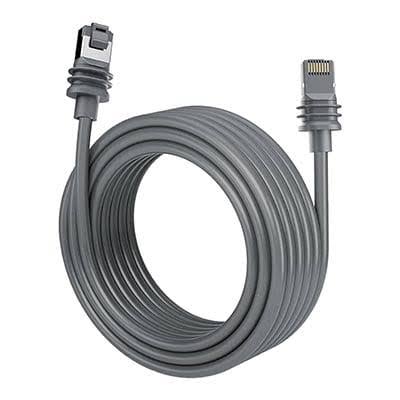
Standard Starlink Cable 15 m
Shop Standard Starlink Cable 15 m in Uganda for reliable Starlink connectivity, replacement installations and clean cable routing. Order yours today.
Contact us for current pricing in Uganda
Contact us for current pricing in Uganda
Product Details
Standard Starlink Cable 15 m: 7 Powerful Connection Benefits
Standard Starlink Cable 15 m in Uganda
The cable connecting a Starlink terminal to the rest of the system is one of the most important parts of an installation.
A perfectly positioned Starlink terminal cannot provide a reliable connection if its cable is damaged, incorrectly connected or incompatible with the hardware.
The Standard Starlink Cable 15 m provides approximately 49.2 feet of cable length, making it suitable for many residential and commercial installations where the Starlink terminal is relatively close to the building entry point and networking equipment.
Starlink's current Standard installation documentation lists a 15 m Starlink cable as part of the Standard kit configuration.
What Is the Standard Starlink Cable 15 m?
The Standard Starlink Cable is the dedicated cable used between compatible Starlink Standard hardware components.
Its 15-metre length gives installers enough flexibility for many common installations without leaving excessive unused cable.
Typical applications include:
- Roof installations
- Wall-mounted Starlink
- Ground-level installations
- Residential properties
- Small offices
- Shops
- Farms
- Lodges
- Temporary project sites
The actual cable route should always be measured rather than estimating the distance in a straight line.
A Starlink terminal mounted only five metres from the router may still require considerably more than five metres of cable once vertical drops, corners, wall entry and indoor routing are included.
Standard Starlink Cable 15 m Specifications
Table 1: Standard Starlink Cable 15 m Overview
| Specification | Details |
|---|---|
| Product | Standard Starlink Cable |
| Length | 15 m |
| Length in Feet | 49.2 ft |
| Application | Compatible Starlink Standard installation |
| Primary Function | Connects compatible Starlink hardware |
| Suitable Use | Replacement or installation cable |
| Installation Type | Indoor/outdoor routed connection |
| Hardware Compatibility | Must match compatible Standard hardware |
| Cable Modification | Not recommended |
| Best For | Short-to-medium cable routes |
The key point is hardware compatibility. A 15 m cable intended for one Starlink hardware family should not automatically be assumed to work with another generation.
Is This the Cable for Starlink Gen 3?
The terminology around newer Starlink hardware can be confusing.
Many customers still refer to the newer rectangular Standard terminal as:
Starlink Gen 3
Starlink V4
Starlink Version 4
Standard Gen 3
Starlink has updated its naming for newer Standard hardware, including Standard 4 and Standard 4 X terminology.
When buying a replacement cable, the safest approach is therefore to identify the actual terminal and router rather than relying only on an informal generation name.
Why Choose the 15 m Starlink Cable?
Fifteen metres is enough for many installations.
A shorter appropriate cable route can also be easier to manage than installing substantially more cable than the property requires.
For example, consider a Starlink mounted on the exterior wall of a single-storey house.
The cable may travel:
3 m down the wall + 2 m toward the entry point + 4 m indoors = approximately 9 m
A 15 m cable provides reasonable routing flexibility in this example.
There would be little reason to choose a much longer cable unless the installation location required it.
Measure the Cable Route Before Installation
Cable length should be calculated using the actual routing path.
Do not simply measure the straight-line distance between the Starlink terminal and router.
Table 2: Example 15 m Cable Route
| Cable Section | Example Distance |
|---|---|
| From Starlink to roof edge | 2 m |
| Vertical wall drop | 4 m |
| Route toward building entry | 2 m |
| Indoor route | 3 m |
| Connection allowance | 1 m |
| Total | 12 m |
| Remaining from 15 m cable | 3 m |
This example would fit comfortably within a 15 m cable.
However, a taller building or distant router location could require a longer cable.
Standard Starlink Cable for Roof Installations
Roof installation is one of the most common uses.
The Starlink terminal may be installed using a compatible:
- Pivot Mount
- Wall Mount
- Pipe Adapter
- Other approved mounting arrangement
The cable then needs to travel safely from the terminal toward the indoor equipment.
Plan the route before permanently fastening the mount.
Otherwise, an installer may discover after mounting Starlink that the selected cable cannot comfortably reach the router or power equipment.
Standard Starlink Cable for Wall Mounting
A wall-mounted Standard Starlink installation can often work well with a 15 m cable.
The final requirement depends heavily on mounting height.
A terminal installed three metres above ground level consumes less cable on the vertical drop than one mounted eight metres high near a roofline.
The cable also needs enough length to reach the building entry point and then continue to the networking equipment.
Always leave reasonable installation allowance rather than designing the route around the exact 15.0 m maximum.
Standard Starlink Cable for Ground Installation
Customers using an X-Frame Base, kickstand or another appropriate ground-level installation may also use the 15 m cable.
Ground installations can reduce the vertical distance required.
However, the cable may need to travel farther horizontally across the compound.
Cable protection becomes especially important.
A Starlink cable should not simply be left across:
- Driveways
- Walkways
- Vehicle routes
- Garden paths
- Construction areas
where it can be crushed or damaged.
Protect the Starlink Cable from Physical Damage
Cable failure is not always caused by an electrical problem.
Physical damage can also affect connectivity.
Potential hazards include:
- Sharp bends
- Crushed sections
- Door jambs
- Heavy furniture
- Sharp metal edges
- Construction activity
- Animals
- Vehicle traffic
- Repeated pulling
Starlink installation guidance warns users against damaging or improperly modifying Starlink cabling.
A properly planned cable route can prevent many avoidable problems.
Avoid Tight Cable Bends
Starlink cable should not be forced around extremely tight corners.
A cable route should use smooth bends wherever possible.
This is particularly important when routing around:
- Roof edges
- Wall corners
- Conduit
- Ceiling spaces
- Cable trays
- Cabinets
Do not pull the connector around a corner by force.
Plan the route so the connector and cable can pass through safely.
Do Not Trap the Cable in Doors or Windows
Running a Starlink cable through a door or window may appear convenient during temporary testing.
It is not a good long-term installation method if the cable is repeatedly compressed.
Closing a door or window on the cable can damage its outer jacket or internal conductors.
A permanent installation should use an appropriate cable-entry route.
This produces a cleaner installation and reduces the likelihood of future cable faults.
Replacement for a Damaged Starlink Cable
A replacement cable may be required if the existing cable has suffered physical damage.
Common warning signs can include:
- Visible cuts
- Crushed sections
- Damaged connectors
- Intermittent connection
- Terminal unexpectedly going offline
- Cable-related alerts
- Obvious weather or impact damage
However, not every Starlink connectivity problem is caused by the cable.
Before replacing it, inspect the complete system.
The issue may instead involve power, router configuration, Starlink terminal hardware or service status.
Do Not Assume All Starlink Cables Are the Same
This is especially important when buying replacement parts.
Starlink has released multiple generations of terminals and networking equipment.
Their cables are not universally interchangeable.
Table 3: Starlink Cable Compatibility Considerations
| Starlink Hardware | Use Same 15 m Standard Cable? |
|---|---|
| Compatible current Standard hardware | Yes, where specified |
| Starlink Mini | No – Mini uses Mini-specific cabling |
| Standard Actuated / older Gen 2 | Different cable system |
| Enterprise | Check exact hardware/accessory requirement |
| Performance hardware | Different cable system |
| Older circular Starlink | Different generation |
| Unknown terminal | Verify before purchasing |
Always identify the Starlink hardware before ordering a replacement.
Standard Cable vs Mini DC Power Cable
The Standard Starlink Cable 15 m should not be confused with the 15 m Starlink Mini DC Power Cable.
They serve different hardware.
Table 4: Standard Cable vs Mini DC Power Cable
| Feature | Standard Starlink Cable 15 m | Mini DC Power Cable 15 m |
|---|---|---|
| Length | 15 m | 15 m |
| Starlink Standard | Compatible where specified | No |
| Starlink Mini | No | Yes |
| Purpose | Standard hardware connection | Mini power connection |
| Interchangeable | No | No |
| Purchase Check | Standard hardware model | Mini hardware |
The identical 15 m length does not make these cables interchangeable.
Standard Cable vs Ethernet Cable
Another common mistake is confusing the Starlink system cable with a normal Ethernet cable.
The Standard Starlink Cable performs a specific role within the Starlink hardware system.
A standard Ethernet patch cable is used for local networking between Ethernet-compatible equipment.
For example, Ethernet may connect:
Router → Network Switch
Router → Computer
Router → Access Point
The Starlink system cable connects the compatible Starlink hardware itself.
Table 5: Starlink Cable vs Ethernet Cable
| Feature | Standard Starlink Cable | Standard Ethernet Cable |
|---|---|---|
| Main Purpose | Starlink hardware connection | Local network connection |
| Connects Starlink Terminal | Yes, where specified | Not as direct replacement |
| Connects PC to Switch | Not its primary use | Yes |
| Hardware Specific | Yes | Usually standards-based |
| Replacement Choice | Must match Starlink hardware | Based on Ethernet requirements |
Using the correct cable for each part of the network is essential.
Is 15 m Long Enough?
For many homes and smaller offices, yes.
But there is no universal answer.
Consider:
Mounting height + exterior route + building entry + interior route + installation allowance
before choosing the cable.
Table 6: When a 15 m Cable May Be Suitable
| Installation | 15 m Suitability |
|---|---|
| Single-storey home | Often suitable |
| Wall mount close to router | Often suitable |
| Ground setup near building | Often suitable |
| Small office | Often suitable |
| High multi-storey roof | Measure carefully |
| Large commercial building | May require longer routing |
| Terminal far from building | Longer cable may be preferable |
| Remote pole installation | Measure full route first |
The best cable is not automatically the longest available cable.
It is the cable that safely covers the planned installation route.
Avoid Unnecessary Cable Modification
Cutting, splicing or modifying Starlink cables should not be treated as the normal way to solve a cable-length problem.
Improvised modifications can introduce:
- Connection faults
- Moisture problems
- Physical weak points
- Power problems
- Troubleshooting difficulties
Where an appropriate official longer cable is available for the specific hardware, that is generally a cleaner solution than modifying the original cable.
Compatibility should always be verified before purchasing.
Cable Routing Along Exterior Walls
Exterior-wall routing can create a clean installation when done correctly.
The cable should be secured at sensible intervals and protected from sharp edges.
Avoid leaving large loose loops exposed to wind.
Where the cable enters the building, the entry point should be planned to reduce water ingress.
The cable should also avoid gutters, moving roof components and locations where future maintenance workers may accidentally damage it.
Cable Routing Inside the Building
Once indoors, route the cable toward the networking equipment without creating hazards.
Avoid placing loose cable across rooms or walkways.
Suitable routes may include:
- Cable trunking
- Appropriate conduits
- Ceiling spaces
- Dedicated network routes
- Protected wall routes
The exact method depends on the building.
Commercial installations should particularly aim for clean, serviceable cable management.
Cable Management for Offices
Office Starlink installations often require more planning because the Starlink router may eventually connect to additional network equipment.
A typical setup could be:
Starlink Terminal → Standard Starlink Cable → Router → Ethernet Switch → Access Points/Computers
The 15 m cable handles the compatible Starlink connection.
Ethernet infrastructure then distributes the network inside the office.
Keeping these cable roles separate makes troubleshooting much easier.
Cable Management for CCTV Networks
Where Starlink provides internet connectivity for CCTV equipment, the Standard Starlink Cable should not be confused with camera network cables.
A typical arrangement may be:
Starlink → Starlink Cable → Router → Network Switch/PoE Switch → CCTV Equipment
The CCTV cameras may use separate Ethernet cabling.
The Starlink cable simply forms part of the internet connection between the satellite terminal and compatible Starlink equipment.
Standard Starlink Cable for Farms
Farm installations may place Starlink on:
- Farmhouses
- Offices
- Workshops
- Stores
- Poles
- Temporary project structures
A 15 m cable can work well when the terminal is close to the building.
However, farms often have large open compounds.
If Starlink must be positioned far away to avoid trees or other obstructions, the cable distance should be carefully measured before installation.
Do not sacrifice a clear sky view simply to make a short cable reach.
Standard Starlink Cable for Lodges
Lodges and remote accommodation facilities may also use Standard Starlink hardware.
The terminal should be positioned for satellite visibility first.
The cable can then be routed toward the network equipment.
If WiFi needs to cover guest rooms or multiple buildings, additional networking equipment may be necessary.
The 15 m Starlink cable does not determine overall property WiFi coverage.
Its purpose is the Starlink hardware connection.
Standard Starlink Cable for Temporary Sites
A 15 m cable can also be useful for temporary installations.
Examples include:
- Construction offices
- Field operations
- Temporary events
- Remote project sites
- Mobile work camps
Temporary does not mean the cable should be left unprotected.
Even a short-term installation should avoid vehicle traffic, sharp edges and locations where workers can trip over or damage the cable.
Keep Connectors Clean
Connectors should remain clean during installation.
Avoid placing exposed connector ends directly on:
- Soil
- Dusty roofs
- Mud
- Wet surfaces
- Construction debris
Inspect the connector before inserting it.
Foreign material inside a connector can interfere with proper seating or cause other connection problems.
If installation work is still underway, keep cable ends protected until they are ready to be connected.
Do Not Force the Connector
Starlink connectors should be correctly aligned before insertion.
If a connector does not seat properly, do not immediately force it.
Check:
- Orientation
- Debris
- Connector condition
- Port condition
- Correct cable compatibility
Forcing an incompatible or incorrectly aligned connector can damage both the cable and the hardware port.
Troubleshooting a Suspected Cable Problem
If Starlink unexpectedly goes offline, begin with basic checks.
Inspect the cable from end to end where accessible.
Look for visible damage and confirm that connectors are fully seated.
Restarting the Starlink equipment may also help determine whether the problem is temporary.
If the problem continues, the Starlink app and support diagnostics can help distinguish cable, router, terminal and service-related issues.
Replacing a cable without diagnosis may not solve the underlying problem.
15 m Cable vs Longer Cable
The decision should be based on installation distance.
A 15 m cable is attractive because it keeps excess cabling manageable.
A longer cable is useful when the terminal must be located farther from the indoor equipment.
Do not coil large amounts of unnecessary cable simply because the longest option seems safer.
Measure first.
Then select the cable that gives enough installation allowance without creating unnecessary excess.
Why Choose the Standard Starlink Cable 15 m?
The Standard Starlink Cable 15 m is useful for customers who need:
- A replacement Standard cable
- Approximately 49.2 ft of cable
- Residential Starlink installation
- Office Starlink installation
- Roof-to-router connectivity
- Wall-mounted Starlink cabling
- Ground-level Starlink setup
- Cleaner cable routing
- Replacement of a damaged compatible cable
- A manageable cable length for smaller installations
The most important requirement remains compatibility with the actual Starlink hardware.
Why Buy from Starlink Uganda Installers?
Buying the correct cable can prevent unnecessary installation delays.
Starlink Uganda Installers can help identify the customer's Starlink hardware before supplying a replacement cable.
This is particularly useful because customers often describe their equipment using terms such as Gen 2, Gen 3, Gen 4, V4 or Standard without knowing Starlink's exact hardware designation.
Installation assistance can also include cable routing, mounting, router setup, WiFi configuration and troubleshooting.
Frequently Asked Questions About Standard Starlink Cable 15 m
1. How long is the Standard Starlink Cable?
The cable is 15 metres long, equivalent to approximately 49.2 feet. This length is suitable for many residential and small-business installations where the Starlink terminal is relatively close to the indoor equipment.
2. Is the 15 m cable compatible with Starlink Gen 3?
The current 15 m Standard cable is associated with compatible rectangular Standard hardware commonly referred to by customers as Gen 3 or V4. Because Starlink has changed product naming and hardware over time, confirm the exact terminal and router before purchasing.
3. Can I use the Standard Starlink Cable with Starlink Mini?
No. Starlink Mini uses its own Mini-specific power and networking cables. A Standard cable should not be purchased as a replacement Mini DC Power Cable simply because both may be available in 15 m lengths.
4. Is 15 m enough for a roof installation?
It can be. Measure the complete route from the terminal, across the roof if necessary, down the wall, through the building entry point and toward the networking equipment. Include additional routing allowance rather than relying on straight-line distance.
5. Can I extend the 15 m Starlink cable myself?
Improvised cable modification or splicing is not recommended. Where a longer compatible official cable is required, selecting the appropriate longer cable is preferable to creating an unsupported modification that could introduce connection, power or weather-protection problems.
6. Can the Standard Starlink Cable be buried underground?
Do not assume a Starlink system cable is rated for direct burial merely because it is suitable for outdoor installation. Where the route must cross an underground section, use an installation method and protection system appropriate to the cable and environment rather than placing it directly into soil without verification.
7. Is the Standard Starlink Cable an Ethernet cable?
It is a dedicated Starlink system cable for compatible Starlink hardware and should not be treated as an ordinary Ethernet patch cable. Standard Ethernet cables are used separately for connections between routers, switches, computers, access points and other network equipment.
8. How do I know if my Starlink cable is damaged?
Possible signs include visible cuts, crushed sections, damaged connectors or intermittent connectivity. However, similar symptoms can also result from router, terminal, power or service problems, so the complete system should be checked before concluding that the cable needs replacement.
9. Should I buy a 15 m or longer Starlink cable?
Choose based on the actual installation route. A 15 m cable is usually preferable when it comfortably reaches the equipment. A longer compatible cable makes more sense when the terminal needs to be farther away to achieve a better sky view or reach the required building entry point.
10. Where can I buy a Standard Starlink Cable 15 m in Uganda?
Customers can contact Starlink Uganda Installers for a compatible 15 m Standard Starlink Cable and assistance with hardware identification, replacement, cable routing and complete Starlink installation.
Conclusion
The Standard Starlink Cable 15 m provides approximately 49.2 feet of cable length, making it a practical option for many Standard Starlink installations. It can be used where the compatible terminal is mounted on a roof, wall or suitable ground-level position and the networking equipment is within a reasonable routing distance. Before purchasing, customers should verify their exact Starlink hardware because different Starlink generations use different cabling systems.
Good cable installation is just as important as choosing the correct length. The route should avoid sharp bends, crushing, vehicle traffic, door jambs and other sources of physical damage. Measure the complete route before installation, protect the cable appropriately and avoid unsupported cutting or splicing. If 15 metres is insufficient, choosing a compatible longer cable is generally preferable to compromising the Starlink terminal's location or modifying the cable.
For a Standard Starlink Cable 15 m in Uganda, Starlink Uganda Installers can assist with cable selection, replacement, routing and complete installations for homes, offices, farms, lodges and business locations.