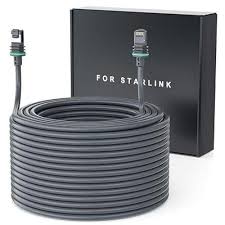
Standard Starlink Cable 46 m
Shop Standard Starlink Cable 46 m in Uganda for longer installations, reliable connectivity and flexible Starlink cable routing. Order yours today.
Contact us for current pricing in Uganda
Contact us for current pricing in Uganda
Product Details
Standard Starlink Cable 46 m: 7 Powerful Long-Range Benefits
Standard Starlink Cable 46 m in Uganda
The location with the clearest view of the sky is not always close to the router.
A customer may discover that the best Starlink position is:
-
On a distant roof section
-
At the opposite end of a large building
-
On a pole away from trees
-
Across a large compound
-
On a farm building
-
On an elevated structure
-
Far from the office network room
In these situations, the standard 15 m cable may not provide enough distance.
The Standard Starlink Cable 46 m, currently specified by Starlink as its 45 m (147.6 ft) Standard Cable, provides a much longer connection between the compatible Standard terminal and router.
What Is the Standard Starlink Cable 46 m?
The Standard Starlink Cable 46 m is a longer replacement cable for compatible Starlink Standard hardware.
Its main purpose is simple:
Provide additional distance between the Starlink installation location and the router.
Starlink specifically describes the current 45 m cable as designed to replace the Standard 15 m cable from the Starlink Kit when additional length is needed between the installation location and router.
It is therefore not simply an extension added onto the original 15 m cable.
It replaces the shorter cable with one continuous longer cable.
Is It 45 m, 45.7 m or 46 m?
Customers may encounter all three descriptions.
Starlink's current Standard Accessories Guide lists the longer Standard Cable as:
45 m (147.6 ft).
An older official Starlink accessories document listed the long Standard cable as:
45.7 m (150 ft).
Because 45.7 metres rounds to approximately 46 metres, retailers and customers may refer to it as a 46 m Starlink Cable.
For current compatibility and installation decisions, use Starlink's current specification for the exact accessory being purchased.
Standard Starlink Cable Specifications
Table 1: Standard Starlink Cable 46 m Specifications
| Specification | Details |
|---|---|
| Product | Standard Starlink Cable |
| Current Official Length | 45 m |
| Length in Feet | 147.6 ft |
| Common Rounded Description | 46 m |
| Older Official Version | 45.7 m / 150 ft |
| Compatibility | Starlink Standard |
| Package Dimensions | 89 × 311 × 324 mm |
| Package Dimensions in Inches | 3.5 × 12.3 × 12.76 in |
| Package Weight | 2.9 kg / 6.4 lb |
| Main Purpose | Longer terminal-to-router installation |
Starlink lists these specifications for its current long Standard Cable.
Designed for Starlink Standard
Cable compatibility matters.
Starlink officially lists the 45 m cable as compatible with Starlink Standard.
The current rectangular Standard hardware is also commonly called:
-
Starlink Gen 3
-
Starlink V4
-
Starlink Version 4
-
Standard Gen 3
Starlink has since simplified its product naming. The hardware commonly called Gen 3 Starlink is now identified within the Standard 4 / Standard 4 X family.
Customers should verify their exact hardware before buying a replacement cable because Starlink has several generations with different cable systems.
Why Choose the Longer Starlink Cable?
The biggest advantage is installation flexibility.
A Starlink terminal needs a clear view of the sky.
Sometimes the location closest to the router is obstructed by:
-
Trees
-
Other buildings
-
Roof sections
-
Walls
-
Water tanks
-
Utility structures
-
Tall vegetation
A longer cable allows the terminal to be positioned farther away without forcing the customer to compromise its satellite visibility merely to remain within a short cable distance.
46 m Cable vs Standard 15 m Cable
The current Standard Starlink ecosystem provides a standard 15 m cable and a longer 45 m option.
Table 2: 15 m vs 45/46 m Standard Starlink Cable
| Feature | Standard 15 m Cable | Standard 45/46 m Cable |
|---|---|---|
| Official Current Length | 15 m | 45 m |
| Approximate Feet | 49.2 ft | 147.6 ft |
| Compatibility | Starlink Standard | Starlink Standard |
| Package Weight | 1 kg | 2.9 kg |
| Package Dimensions | 135 × 50 × 360 mm | 89 × 311 × 324 mm |
| Best For | Shorter installations | Longer installations |
| Replacement Use | Damaged/extra cable | Additional installation distance |
| Standard Kit Length | 15 m supplied | Optional longer cable |
Starlink states that the 15 m cable is intended as a replacement for the cable supplied with the kit or as an extra cable, while the 45 m version is specifically intended when additional distance is needed.
Measure the Actual Cable Route
Do not calculate cable requirements using straight-line distance.
Imagine the terminal is only 25 metres from the router when measured directly.
The actual route might include:
5 m roof route + 8 m wall drop + 12 m exterior route + 8 m indoor route = 33 m
A 15 m cable clearly would not work.
The longer Standard cable provides enough distance for installations that require substantial routing around buildings and other structures.
Table 3: Example Long Cable Installation
| Cable Route | Example Distance |
|---|---|
| Roof routing | 6 m |
| Vertical wall drop | 7 m |
| Exterior wall route | 12 m |
| Building entry to network room | 10 m |
| Connection allowance | 3 m |
| Total Cable Requirement | 38 m |
| Suitable Cable | 45 m Standard Cable |
Always include some installation allowance rather than designing a route that consumes every available centimetre.
Long Cable for Large Homes
Large residential properties may require the terminal to be installed far from the router.
For example, the clearest satellite position may be above one side of the house while the router needs to remain centrally positioned for better indoor WiFi.
Using the longer cable can allow these two requirements to coexist.
The Starlink terminal can remain where satellite visibility is strongest while the router is placed where indoor networking makes more sense.
This is particularly useful in large homes with extended rooflines.
Long Cable for Multi-Storey Buildings
Height quickly consumes cable length.
Consider a terminal installed near the roofline of a multi-storey building.
A significant part of a 15 m cable may be consumed simply travelling vertically from the roof.
There may then be insufficient cable remaining to reach the router.
The longer Standard cable can provide additional flexibility for:
-
High roofs
-
Multi-storey houses
-
Office buildings
-
Lodges
-
Schools
-
Commercial premises
Cable routing should still be carefully planned before installation.
Standard Starlink Cable for Offices
Businesses often want networking equipment in a specific location.
The router may need to be near:
-
Network switches
-
CCTV equipment
-
Servers
-
Access points
-
Office workstations
-
UPS systems
-
Other network infrastructure
However, that network room may not be close to the best Starlink terminal position.
A longer Starlink cable can bridge the distance between the satellite terminal and networking location.
This can produce a cleaner and more organised installation.
Standard Starlink Cable for Farms
Farms are another strong use case for longer Starlink cabling.
Trees and buildings may make the area immediately surrounding the farmhouse unsuitable for Starlink.
The terminal may need to be positioned:
-
On another building
-
On a workshop
-
On a pole
-
Near an open field
-
On a store roof
-
Away from tall vegetation
A longer cable provides more freedom when choosing the installation point.
Satellite visibility should generally take priority over simply placing the terminal as close as possible to the router.
Standard Starlink Cable for Lodges
Remote lodges may have large compounds and several structures.
The building containing networking equipment may not offer the best view of the sky.
A Starlink terminal can potentially be installed on a more suitable section of the property and connected back using the longer compatible cable.
Additional networking equipment can then distribute connectivity through the property.
Remember that a longer Starlink cable only solves the terminal-to-router distance.
It does not automatically extend WiFi throughout multiple buildings.
Standard Starlink Cable for Schools
Schools can also require longer installation routes.
The Starlink terminal may be installed on:
-
Administration blocks
-
Classroom roofs
-
Computer laboratories
-
Library buildings
-
Poles
while networking equipment may need to be located elsewhere.
A longer Standard cable gives installers more flexibility when separating the satellite installation location from the network equipment.
For larger campuses, proper switches, access points and structured Ethernet networking may still be required.
Long Cable for Commercial Properties
Commercial properties often present complicated routing requirements.
A direct cable route may not be possible because of:
-
Building layout
-
Restricted areas
-
Existing services
-
Roof structures
-
Security requirements
-
Equipment rooms
The cable may need to follow a substantially longer protected route.
This is why measuring the actual planned cable path is important before ordering.
Long Cable for Pole Installations
Pole installations can improve Starlink visibility where trees or nearby structures create obstructions.
However, placing Starlink on a pole farther from the building increases cable distance.
The cable must travel:
Down the pole → Across the property → Into the building → To the router
Even when the pole itself is only 20 metres from the building, the complete cable route may exceed 30 metres.
The longer Standard cable can make this type of installation more practical.
Cable Routing Matters
A longer cable creates greater flexibility, but it also creates more cable that needs to be protected.
Avoid:
-
Sharp bends
-
Kinks
-
Crushing
-
Loose cable across walkways
-
Vehicle routes
-
Sharp roof edges
-
Door jambs
-
Areas where construction work can damage it
A 45 m cable should not simply be stretched across a compound because the distance is available.
It should be routed professionally.
Do Not Join the 15 m and 45 m Cables
The longer Standard cable is designed to replace the shorter cable when additional distance is needed. Starlink's wording specifically describes the 45 m cable as replacing the Standard 15 m cable from the kit.
Therefore, the normal installation should be:
Starlink → 45 m Standard Cable → Router
rather than attempting to create:
Starlink → 15 m Cable → Improvised Joint → 45 m Cable → Router
Using the correct continuous cable creates a cleaner installation and avoids introducing unnecessary connection points.
Avoid Cutting and Splicing
Cutting and manually joining Starlink cable should not be the default way of creating a longer installation.
Splicing can introduce:
-
Electrical problems
-
Data faults
-
Moisture entry
-
Weak physical connections
-
Difficult troubleshooting
-
Long-term reliability issues
The availability of a longer official cable is precisely what allows customers to avoid unnecessary cable modifications.
Standard Cable vs Ordinary Ethernet Cable
The Standard Starlink Cable should not be treated as an ordinary Ethernet patch lead.
Starlink's current Standard 4 X specifications identify the Standard cable connection as using Starlink RJ45 to Starlink RJ45 connectors, but it remains part of the specific Starlink hardware system.
Table 4: Standard Starlink Cable vs Ethernet Cable
| Feature | Standard Starlink Cable | Ordinary Ethernet Cable |
|---|---|---|
| Primary Use | Starlink hardware connection | Local network connection |
| Starlink Standard Compatibility | Specifically designed | Not automatically equivalent |
| 45 m Official Option | Yes | Many lengths available |
| Hardware Specific | Yes | Generally standards-based |
| Connects PCs/Switches | Not primary purpose | Yes |
| Replacement Selection | Based on Starlink model | Based on network category/specification |
Use Ethernet separately for local network connections where appropriate.
Standard Cable vs Mini Power Cable
Starlink Mini uses a completely different power architecture.
Table 5: Standard 45/46 m Cable vs Mini Cable
| Feature | Standard 45/46 m Cable | Mini Power Cable |
|---|---|---|
| Starlink Standard | Yes | No |
| Starlink Mini | No | Yes |
| Current Long Length | 45 m | Different Mini options |
| Connects Standard to Router | Yes | No |
| Dedicated Hardware | Standard | Mini |
| Interchangeable | No | No |
Customers should not purchase cables based only on length or connector appearance.
Always verify the exact Starlink kit.
Compatibility with Standard 4 X
Starlink's current Standard 4 X system includes a 15 m Router 3 Starlink Cable in the kit.
Starlink also lists longer cable options for Standard hardware, with the current accessories guide documenting the 45 m Standard Cable.
This makes the longer cable useful where the supplied 15 m length cannot reach between the chosen installation location and router.
Compatibility with Older Standard Actuated
Customers should be careful here.
Starlink states that both Standard 4 X and Standard Actuated kits include approximately 15 m cables, but it also specifies that longer cable options are specific to each kit.
Therefore, do not assume a current Standard 4 X cable is automatically the correct replacement for an older Standard Actuated installation.
Verify the hardware first.
Compatibility with Starlink Mini
The Standard 45 m cable is not listed as compatible with Starlink Mini.
Starlink Mini has its own DC power and Ethernet accessories.
A customer with Mini should purchase Mini-specific cabling rather than a Standard cable.
The physical dimensions of the terminal or similarity of product names do not make the cables interchangeable.
Compatibility with Performance Kits
Starlink Performance hardware also uses its own dedicated cables.
For example, current Performance Gen 3 hardware has separate cable-length options specific to the Performance platform.
Therefore, a Standard 45/46 m cable should not be purchased as a substitute for Performance cabling.
Always match the cable to the exact hardware family.
45 m Cable Package Size and Weight
Long cables are physically larger and heavier.
Table 6: Standard Cable Package Comparison
| Specification | 15 m Cable | 45 m Cable |
|---|---|---|
| Cable Length | 15 m | 45 m |
| Length in Feet | 49.2 ft | 147.6 ft |
| Package Length | 360 mm | 324 mm |
| Package Width | 135 mm | 311 mm |
| Package Height | 50 mm | 89 mm |
| Package Weight | 1 kg | 2.9 kg |
| Primary Purpose | Replacement/extra | Longer installation |
These figures come from Starlink's current Standard Accessories Guide.
Protect Connectors During Installation
A long cable may be pulled through several areas before reaching its final destination.
Protect the connector during this process.
Do not drag exposed connector ends through:
-
Soil
-
Mud
-
Dust
-
Construction debris
-
Standing water
-
Sharp openings
Inspect the connector before making the final connection.
Clean, undamaged connectors help reduce installation problems.
Plan Wall Penetrations Carefully
If the cable needs to enter a building, the opening must accommodate the connector rather than only the cable diameter.
This is an important planning detail.
Do not drill a small hole based solely on cable thickness and then discover that the connector cannot pass through.
Starlink provides dedicated cable-routing accessories and installation resources for Standard 4 X systems.
Professional routing can also help protect the building from unnecessary water ingress.
Keep Excess Cable Organised
A 45 m cable may leave substantial excess cable if the route only requires 30–35 metres.
Do not leave the unused cable scattered on the ground.
Keep excess cable organised in an appropriate protected location while avoiding unnecessarily tight bends or kinks.
Before purchasing, measuring the route accurately can reduce the amount of excess cable.
When Should You Choose the Longer Cable?
Choose the longer Standard cable when:
-
15 m cannot comfortably reach
-
The terminal needs to be farther from the router
-
A pole is located away from the building
-
A high roof consumes significant cable length
-
The router must remain in a network room
-
The clearest sky view is far from the building
-
The actual protected cable route is long
Do not choose it simply because longer sounds better.
For a compact installation requiring only 10 metres, the supplied 15 m cable may be cleaner and easier to manage.
Why Choose the Standard Starlink Cable 46 m?
The Standard Starlink Cable 46 m is particularly useful for customers requiring:
-
Longer Starlink installations
-
Approximately 45 m / 147.6 ft of current official cable length
-
Large residential installations
-
Multi-storey buildings
-
Offices
-
Farms
-
Schools
-
Lodges
-
Pole-mounted Starlink
-
Remote terminal positioning
-
Flexible router placement
-
Replacement of the shorter 15 m cable where additional distance is required
Its primary benefit is allowing the Starlink terminal location to be chosen according to satellite visibility rather than being unnecessarily constrained by the standard cable length.
Why Buy from Starlink Uganda Installers?
Starlink Uganda Installers can help customers verify their Starlink hardware before supplying a long replacement cable.
This is particularly important because Standard, Standard Actuated, Mini, Enterprise and Performance hardware can use different cable systems.
Installation support can also include measuring the route, selecting the appropriate cable length, cable routing, mounting, router placement and connectivity testing.
A correctly selected and installed cable can prevent unnecessary replacement costs and installation delays.
Frequently Asked Questions About Standard Starlink Cable 46 m
1. Is the Standard Starlink Cable actually 46 metres long?
Starlink's current Standard Accessories Guide lists the long cable as 45 m (147.6 ft). Older official documentation listed a 45.7 m (150 ft) Standard cable, which rounds to approximately 46 m and explains the common “46 m” description.
2. What is the Standard 45 m Starlink Cable used for?
Starlink says the cable is designed to replace the 15 m Standard cable supplied with the kit when additional length is needed between the installation location and router.
3. Is the 45/46 m cable compatible with Starlink Gen 3?
It is listed as compatible with Starlink Standard. The newer rectangular hardware commonly called Gen 3 Starlink is now referred to within Starlink's Standard 4 / Standard 4 X naming. Always verify the exact kit before purchasing.
4. Can I connect the 45 m cable to my existing 15 m cable?
The official 45 m cable is designed to replace the 15 m cable when additional length is required, rather than serving as an extension attached to it.
5. How much does the long Standard Starlink Cable weigh?
Starlink lists the current 45 m cable package weight at approximately 2.9 kg (6.4 lb), compared with approximately 1 kg for the 15 m version.
6. Can I use the 46 m cable with Starlink Mini?
No. Starlink Mini uses Mini-specific power and networking cables. The Standard 45 m cable is listed for Starlink Standard, not Mini.
7. Can I use this cable with Standard Actuated Starlink?
Do not assume compatibility. Starlink states that Standard 4 X and Standard Actuated have longer cable options that are specific to each kit. Confirm your hardware before ordering.
8. Should I choose the 15 m or 45 m Standard cable?
Use the 15 m cable when it comfortably covers the complete installation route. Choose the longer cable when the terminal must be substantially farther from the router because of mounting height, building layout or the need to find a clearer satellite view.
9. Can I cut and splice the Standard Starlink Cable?
Cutting and splicing should not be treated as the normal installation method. Using the correct official cable length avoids introducing unnecessary joints that can create physical, electrical or troubleshooting problems.
10. Where can I buy a Standard Starlink Cable 46 m in Uganda?
Customers can contact Starlink Uganda Installers for the longer Standard Starlink Cable and assistance with hardware compatibility, cable-length selection, routing, replacement and complete Starlink installation.
Conclusion
The Standard Starlink Cable 46 m is best understood as Starlink's long Standard cable option. Starlink's current accessories documentation specifies it as 45 m (147.6 ft), while older official documentation listed a 45.7 m (150 ft) version, which is commonly rounded to 46 m. The current cable is compatible with Starlink Standard and is specifically designed to replace the shorter 15 m cable when additional distance is required between the Starlink installation location and router.
The longer cable is particularly valuable for high roofs, large homes, offices, farms, schools, lodges, pole installations and other properties where the clearest satellite location is far from the networking equipment. Measure the actual cable route before choosing between the 15 m and longer option, taking into account roof routing, vertical drops, exterior walls, building entry and indoor routing. The objective is to use enough cable for a clean installation without unnecessary cutting, splicing or improvised extensions.
For a Standard Starlink Cable 46 m in Uganda, Starlink Uganda Installers can assist with cable selection, compatibility checks, professional routing, replacement and complete Starlink installations for homes, offices, farms, lodges, schools and commercial properties.