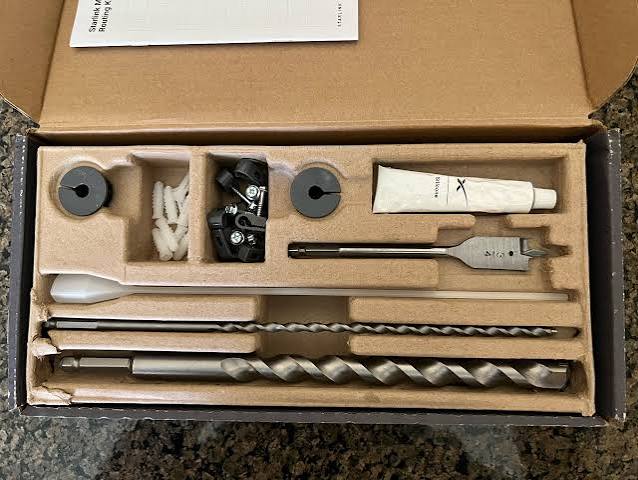
Starlink Cable Routing Kit
Buy Starlink Cable Routing Kit in Uganda for neat wall entry, secure cable routing and professional Starlink installations. Order your kit online today.
Contact us for current pricing in Uganda
Contact us for current pricing in Uganda
Product Details
Starlink Cable Routing Kit: 7 Powerful Install Benefits
Starlink Cable Routing Kit in Uganda
A professional Starlink installation requires more than mounting the terminal where it has a clear view of the sky.
The cable connecting the outdoor Starlink hardware to indoor equipment also needs a safe route into the building.
Passing the cable underneath a door, through a partially open window or through an unfinished hole can leave it vulnerable to crushing, bending, debris and accidental damage.
The Starlink Cable Routing Kit provides a purpose-built alternative.
It gives installers the equipment needed to drill an appropriate wall opening, pass compatible Starlink cabling through it, finish the opening with grommets, seal it and secure the cable along the wall.
What Is the Starlink Cable Routing Kit?
The Cable Routing Kit is a Starlink installation accessory for routing compatible Starlink cabling through a building wall.
Starlink describes it as being designed for drilling through most walls and recommends it particularly for people with previous internet cable-routing and installation experience who are comfortable drilling through walls.
The accessory does not replace the Starlink cable itself.
Instead, it provides installation tools and finishing components that make it easier to create a dedicated cable passage.
A typical installation might follow:
Starlink Terminal → Starlink Cable → Exterior Wall → Cable Routing Kit → Indoor Starlink Equipment
This creates a much cleaner arrangement than simply pushing the cable through an open window.
Starlink Cable Routing Kit Specifications
Table 1: Cable Routing Kit Specifications
| Specification | Details |
|---|---|
| Product | Starlink Cable Routing Kit |
| Primary Purpose | Routing Starlink cable through walls |
| Hole/Spade Bit Size | 3/4 in / 1.9 cm |
| Package Dimensions | 34.9 × 13.3 × 4.4 cm |
| Package Weight | 0.38 kg / 0.83 lb |
| Recommended External Tool | Drill |
| Wall Inspection Tool | Stud / Electrical Finder |
| Masonry Recommended | No |
| Concrete Recommended | No |
| Hard-Coat Stucco Recommended | No |
| Permanent Installation | Yes |
Starlink's support documentation states that a minimum opening of approximately 19.05 mm (3/4 inch) is required for the applicable cable to pass through the wall.
What Comes with the Starlink Cable Routing Kit?
One of the advantages of the kit is that several specialised routing components are supplied together.
Table 2: Cable Routing Kit Contents
| Component | Purpose |
|---|---|
| 3/4 in / 1.9 cm Spade Bit | Creates wall opening |
| Drill Bit | Supports installation |
| Cable Routing Tool | Helps guide cable through wall |
| Silicone Sealant | Helps seal wall penetration |
| Grommets | Finish and protect cable opening |
| Wall Clips | Secure cable along wall |
| Starlink Cable | Not listed as part of routing kit |
| Drill | Required separately |
These contents are specifically listed by Starlink for the Cable Routing Kit.
Recommended Tools
The kit contains several installation components, but you still need appropriate tools.
Starlink recommends:
-
Drill
-
Stud/electrical finder
The stud or electrical finder is particularly important because drilling blindly through a wall can potentially damage hidden electrical wiring or structural components.
Installers should inspect both sides of the proposed cable-entry location before drilling.
Compatible Starlink Hardware
Starlink's accessory documentation has listed the Cable Routing Kit for compatible Standard, High Performance and Flat High Performance installations.
Starlink's current Standard 4 X support resources also include a dedicated Cable Routing Kit Installation Guide, confirming its place within the Standard 4 X installation ecosystem.
However, Starlink has produced several cable and connector designs over different hardware generations.
Always verify the exact cable and kit before installation.
Cable Routing Kit and Standard 4 X
Starlink currently provides Cable Routing Kit installation documentation within its Standard 4 X guides.
Standard 4 and Standard 4 X use a 15 m (49.2 ft) detachable cable between Starlink and Router 3, according to Starlink's current cable guidance.
This means the complete route should be measured before the cable is permanently installed.
The 15 metres needs to cover the real installation path—not simply the straight-line distance between the terminal and Router 3.
Why Use a Cable Routing Kit?
The main benefit is creating a dedicated cable passage.
Without proper routing, installers sometimes run Starlink cables:
-
Through open windows
-
Under doors
-
Around window frames
-
Through oversized unfinished holes
-
Across sharp building edges
These approaches can expose the cable to unnecessary mechanical stress.
Starlink specifically warns that cable damage can affect service quality and says cables should remain free from kinks, debris and door-jambs.
A routing kit provides a more deliberate solution.
Designed for Most Standard Walls
The Cable Routing Kit is designed for drilling through most walls.
This can make it useful for many residential and commercial installations.
However, wall construction varies significantly.
Before drilling, determine:
-
Wall material
-
Wall thickness
-
Electrical wiring location
-
Plumbing location
-
Structural members
-
Indoor finishing
-
Outdoor finishing
The fact that a wall can physically be drilled does not mean every location on that wall is appropriate.
Not Recommended for Concrete or Masonry
This is one of the most important purchasing distinctions.
Table 3: Cable Routing Kit Wall Compatibility
| Wall Type | Standard Cable Routing Kit |
|---|---|
| Suitable conventional wall | Yes |
| Wood-based construction | Generally suitable |
| Masonry | No – use Masonry Routing Kit |
| Concrete | No – use Masonry Routing Kit |
| Hard-Coat Stucco | No – use Masonry Routing Kit |
| Unknown Wall Construction | Inspect before drilling |
Starlink specifically says the standard Cable Routing Kit is not recommended for masonry, concrete or hard-coat stucco.
This distinction is especially important in Uganda, where many homes and commercial buildings use concrete or masonry construction.
Starlink Masonry Routing Kit
If the wall is concrete or masonry, Starlink has a separate Masonry Routing Kit.
Starlink describes that kit as being designed for:
-
Masonry
-
Concrete
-
Hard-coat stucco
Starlink excludes EIFS from that recommendation.
The Masonry Routing Kit also requires additional installation equipment, including a hammer drill and appropriate protective equipment.
Do not buy the standard Cable Routing Kit simply because both products are intended to pass Starlink cabling through a wall.
The wall material determines which option is appropriate.
Cable Routing Kit vs Masonry Routing Kit
Table 4: Cable Routing Kit vs Masonry Routing Kit
| Feature | Cable Routing Kit | Masonry Routing Kit |
|---|---|---|
| Standard Walls | Yes | Possible but specialised |
| Masonry | Not recommended | Yes |
| Concrete | Not recommended | Yes |
| Hard-Coat Stucco | Not recommended | Yes |
| Spade Bit | Included | Included as applicable |
| Silicone Sealant | Included | Included |
| Grommets | Included | Included |
| Wall Clips | Included | Included |
| Drill | Required | Hammer drill required |
| Package Weight | 0.38 kg | Approx. 1 kg |
Starlink lists the Masonry Routing Kit at approximately 1 kg (2.1 lb) with package dimensions of approximately 35.2 × 16.5 × 4.4 cm.
Choosing between the two should start with identifying the wall material.
The 3/4-Inch Wall Opening
Starlink's installation guidance specifies approximately 19.05 mm (3/4 inch) as the minimum diameter needed for the relevant cable to pass through the wall.
The Cable Routing Kit therefore includes a matching 3/4-inch (1.9 cm) spade bit.
This is important because the opening needs to accommodate the connector.
Do not drill based only on the diameter of the cable itself.
The connector is normally the limiting factor when passing the cable through a wall.
Cable Routing Tool
The included cable-routing tool helps installers guide the cable through the wall opening.
This is particularly useful where simply pushing the connector through the opening would be difficult.
Avoid forcing the connector.
Excessive force can potentially damage:
-
Connector housing
-
Cable
-
Locking mechanism
A properly sized opening and correct routing method make the installation easier.
Silicone Sealant
The kit includes silicone sealant.
This helps finish the wall penetration and protect the entry point.
Any opening through an exterior wall can potentially become a route for moisture.
Poorly finished penetrations can contribute to:
-
Water ingress
-
Dampness
-
Damage to interior finishes
-
Deterioration around the opening
Proper sealing should therefore be considered part of the installation rather than an optional cosmetic step.
Grommets
Grommets are also included.
These provide a cleaner interface where the cable passes through the wall.
A raw drilled edge can potentially rub against cable insulation.
A correctly fitted grommet helps create a more finished cable passage while improving the appearance of the installation.
The result is much cleaner than leaving an exposed drilled opening.
Wall Clips
The kit includes wall clips for securing the cable.
These can help prevent the cable from hanging loosely.
Good cable management reduces unnecessary movement and helps keep the installation organised.
Cable clips can be useful along:
-
Exterior walls
-
Interior walls
-
Roof-to-wall routes
-
Routes toward networking equipment
Avoid pulling the cable excessively tight between clips.
Planning the Cable Route
The complete route should be planned before drilling.
Consider:
-
Starlink terminal location.
-
Exterior cable route.
-
Wall entry point.
-
Interior cable route.
-
Router or power-equipment location.
-
Available cable length.
A mistake at the wall-entry stage can force unnecessary cable bends or leave the cable too short to reach the intended equipment.
Measure the actual route rather than estimating.
Starlink Cable Length
Starlink's current cable guidance lists different cable arrangements for different hardware.
Table 5: Selected Starlink Cable Lengths
| Hardware | Included Cable Arrangement |
|---|---|
| Standard Actuated | 15 m detachable cable to router |
| Standard 4 / 4 X | 15 m detachable cable to Router 3 |
| Enterprise | 50 m cable to power supply |
| Mini | 15 m detachable DC power cable |
| Performance Gen 1 / Gen 2 | 25 m cable to power supply |
These are different cable systems, and the routing requirements should be planned around the actual Starlink kit being installed.
Do Not Extend the Cable Improperly
Starlink warns against modifying its cable or combining it with another cable simply to add length.
Starlink notes that its cable includes a water-resistant protective seal with a locking mechanism and is power-rated for the relevant kit. Third-party cable modifications can introduce problems and may cause damage.
If the supplied cable is too short, check for compatible longer cable options rather than improvising.
Do Not Bury the Cable Directly
Starlink states that the cable is not rated to be buried or placed underwater.
This is important for installations where the terminal is mounted away from the building.
For example, a pole-mounted Starlink installation may require the cable to cross outdoor ground before entering the property.
Do not simply bury the Starlink cable because it provides a visually clean route.
Appropriate cable protection and routing methods should be used.
Avoid Door Jambs
Doorways are particularly dangerous for Starlink cabling.
A cable passing underneath or through a closing door can repeatedly be crushed.
Starlink specifically warns users to keep cables free from door-jambs.
The same principle applies to frequently operated windows.
For permanent installations, a dedicated wall entry is generally preferable.
Avoid Kinks
Starlink also specifically warns against cable kinks.
Do not:
-
Fold the cable sharply
-
Pull it tightly around corners
-
Crush it behind furniture
-
Force it through undersized openings
-
Tie it into extremely tight loops
Smooth routing is better for long-term cable integrity.
Protect the Connector During Installation
Keep the Starlink connector clean while routing it.
Avoid exposing it to:
-
Dust
-
Mud
-
Water
-
Construction debris
-
Sealant
Do not apply silicone directly to electrical connector contacts.
The sealant is intended for properly finishing the wall penetration, not filling the Starlink connector.
Cable Routing Kit for Homes
Residential installations can benefit from a dedicated wall entry.
A typical configuration might be:
Roof Starlink → Exterior Cable → Cable Routing Kit → Router 3 Indoors
The entry point should be chosen with both outdoor routing and indoor Router 3 placement in mind.
Avoid placing the cable entry in an inconvenient corner simply because it is easiest to drill.
Router location can influence practical WiFi coverage throughout the home.
Cable Routing Kit for Offices
An office may route Starlink directly toward a network room.
A typical setup could be:
Starlink → Cable Routing Kit → Router/Network Equipment → Switch → Office Network
From there, the connection can serve:
-
Computers
-
Printers
-
Access points
-
CCTV
-
VoIP systems
-
Other network equipment
Structured cable routing provides a cleaner result than running Starlink through an office window.
Cable Routing Kit for Schools
Schools can route the Starlink cable directly into a secure IT or administration area.
The internet connection can then be distributed to:
-
Computer laboratories
-
Administration
-
Classrooms
-
Staff offices
-
CCTV
Keeping the main Starlink cable away from high-traffic areas can also reduce the likelihood of accidental damage.
Cable Routing Kit for Lodges
Lodges may mount Starlink on a roof, pole or exterior wall.
The cable can then enter a network room using the appropriate routing solution.
WiFi can subsequently be distributed using:
-
Network switches
-
Access points
-
Mesh routers
-
Ethernet cabling
The Cable Routing Kit handles the building entry.
It does not replace the internal network infrastructure.
Cable Routing Kit for Farms
Farm installations may involve longer outdoor routes.
Protect the Starlink cable from:
-
Animals
-
Vehicles
-
Farm machinery
-
Sharp tools
-
Repeated foot traffic
Where the cable reaches a building, the routing kit can provide a dedicated entry point.
If the building is concrete or masonry, consider the Masonry Routing Kit rather than the standard Cable Routing Kit.
Cable Routing Kit for Commercial Properties
Commercial installations benefit from organised cable management.
Potential applications include:
-
Shops
-
Offices
-
Warehouses
-
Clinics
-
Restaurants
-
Project sites
-
Remote facilities
A properly routed Starlink cable creates a cleaner installation and makes future troubleshooting easier.
Cable Routing Kit vs Window Routing
Table 6: Cable Routing Kit vs Window Routing
| Feature | Cable Routing Kit | Window Routing |
|---|---|---|
| Dedicated Cable Entry | Yes | No |
| Permanent Installation | Yes | Usually temporary |
| Cable Crushing Risk | Lower when correctly installed | Higher |
| Window Fully Closes | Yes | May not |
| Grommet Finish | Yes | No |
| Silicone Sealing | Included | No |
| Professional Appearance | Better | Basic |
| Drilling Required | Yes | No |
Passing the cable through a window can be useful temporarily while testing Starlink.
For a permanent installation, a purpose-built route is generally more organised.
Does the Cable Routing Kit Improve Starlink Speed?
No.
The Cable Routing Kit does not contain electronics.
It cannot increase:
-
Download speed
-
Upload speed
-
Satellite capacity
-
WiFi coverage
-
Router performance
Its purpose is installation and cable protection.
However, Starlink warns that damaged cables can affect quality of service, so protecting the physical connection remains important.
Professional Installation
Starlink says the Cable Routing Kit is best suited to customers with previous internet cable-routing experience who are comfortable drilling through walls.
Professional installation can be useful where this experience is lacking.
An installer can help with:
-
Wall-material identification
-
Stud/electrical checking
-
Route planning
-
Correct drilling
-
Cable routing
-
Grommet installation
-
Silicone sealing
-
Cable clipping
-
Router placement
-
Connection testing
Concrete and masonry buildings may require different drilling equipment and the separate Masonry Routing Kit.
Why Choose the Starlink Cable Routing Kit?
The Starlink Cable Routing Kit offers several practical benefits:
-
Purpose-built Starlink cable routing
-
3/4-inch spade bit included
-
Cable-routing tool included
-
Silicone sealant included
-
Grommets included
-
Wall clips included
-
Cleaner exterior-to-interior installation
-
Reduced reliance on doors and windows
-
More professional cable management
Its compact package weighs only approximately 0.38 kg while providing the main specialised components required for compatible wall-routing installations.
Why Buy from Starlink Uganda Installers?
Starlink Uganda Installers can help determine whether the standard Cable Routing Kit is appropriate for the property before drilling begins.
This is particularly important in Uganda because many buildings use concrete, stone or masonry walls that may instead require the dedicated Masonry Routing Kit.
Installation assistance can include wall assessment, cable-route planning, drilling, cable routing, sealing, Router 3 positioning and complete Starlink setup.
Frequently Asked Questions About Starlink Cable Routing Kit
1. What is the Starlink Cable Routing Kit?
The Starlink Cable Routing Kit is an installation accessory designed to provide the hardware required to route compatible Starlink cabling through most standard walls. Starlink includes a spade bit, drill bit, cable-routing tool, silicone sealant, grommets and wall clips.
2. What size hole does the Starlink Cable Routing Kit use?
The kit includes a 3/4-inch (1.9 cm) spade bit. Starlink's cable-routing guidance states that approximately 19.05 mm (3/4 inch) is the minimum opening required for the relevant cable to pass through a wall.
3. Can I use the Cable Routing Kit on concrete walls?
No. Starlink specifically says the standard Cable Routing Kit is not recommended for masonry, concrete or hard-coat stucco. Use the separate Masonry Routing Kit for appropriate masonry and concrete installations.
4. What comes with the Starlink Cable Routing Kit?
Starlink lists a 3/4-inch spade bit, drill bit, cable-routing tool, silicone sealant, grommets and wall clips. A drill and stud/electrical finder are recommended separately.
5. How much does the Cable Routing Kit weigh?
Starlink lists a package weight of approximately 0.38 kg (0.83 lb) and package dimensions of approximately 34.9 × 13.3 × 4.4 cm.
6. Is the Cable Routing Kit compatible with Standard Starlink?
Yes. Starlink's accessory documentation lists Standard among the compatible hardware, and current Standard 4 X support resources include a Cable Routing Kit installation guide.
7. Does the Cable Routing Kit include the Starlink cable?
The official kit-content list identifies the routing tools, silicone, grommets and wall clips; it does not list the main Starlink cable as part of the Cable Routing Kit.
8. Can I bury my Starlink cable after routing it outside?
Starlink states that its cable is not rated to be buried or placed underwater. Outdoor routing should therefore be properly planned and protected.
9. Can I extend or splice my Starlink cable?
Starlink advises against modifying its cable or combining it with another cable simply to add length. Starlink recommends checking compatible cable-length options instead.
10. Where can I buy a Starlink Cable Routing Kit in Uganda?
Customers can contact Starlink Uganda Installers for the Cable Routing Kit and assistance with identifying the correct wall-routing solution, drilling, cable management, sealing, router positioning and complete Starlink installation.
Conclusion
The Starlink Cable Routing Kit provides a purpose-built way to route compatible Starlink cabling through most conventional walls. The official kit includes a 3/4-inch spade bit, drill bit, cable-routing tool, silicone sealant, grommets and wall clips, while Starlink recommends having a drill and stud/electrical finder available. The complete package weighs approximately 0.38 kg and measures around 34.9 × 13.3 × 4.4 cm.
Choosing the correct routing kit is important. Starlink specifically states that this standard kit is not recommended for masonry, concrete or hard-coat stucco; those surfaces call for the separate Masonry Routing Kit. During installation, the Starlink cable should remain free from kinks, debris and door-jambs, and Starlink states that the cable is not rated for direct burial or underwater use. Proper route planning, connector protection, sealing and cable management can therefore make a significant difference to the quality of the finished installation.
For a Starlink Cable Routing Kit in Uganda, Starlink Uganda Installers can assist with selecting the correct routing kit, identifying wall construction, professional drilling, cable routing, sealing, Router 3 positioning and complete Starlink installation for homes, offices, schools, farms, lodges and commercial properties.