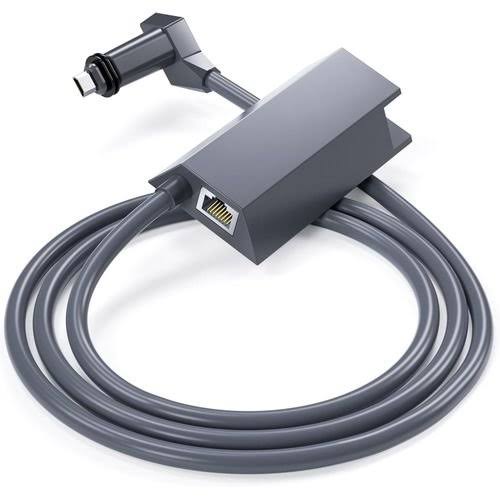
Starlink Ethernet Adapter
Buy Starlink Ethernet Adapter in Uganda for fast wired connections, third-party routers, switches and reliable networking. Order yours today.
Contact us for current pricing in Uganda
Contact us for current pricing in Uganda
Product Details
Starlink Ethernet Adapter: 7 Powerful Wired Benefits
Starlink Ethernet Adapter in Uganda
WiFi is convenient, but not every device or network should depend entirely on wireless connectivity.
Businesses may have network switches.
CCTV systems may require Ethernet.
Desktop computers may benefit from wired networking.
A customer may also want to use MikroTik, Ubiquiti, TP-Link or another third-party router behind Starlink.
For compatible older Starlink hardware, this is where the Starlink Ethernet Adapter becomes important.
The adapter adds a wired network connection to the Starlink Gen 2 Router system, which does not have a built-in Ethernet LAN port.
What Is the Starlink Ethernet Adapter?
The Starlink Ethernet Adapter is a dedicated networking accessory designed to provide an Ethernet connection between compatible Starlink equipment and wired network devices.
Starlink describes the accessory as designed to connect a device directly to the Starlink Router for a wired connection and specifies support for speeds up to 1 Gbps.
This enables compatible Starlink installations to connect to devices such as:
- Computers
- Network switches
- Third-party routers
- Access points
- CCTV networking equipment
- Smart TVs
- Other Ethernet devices
It is especially associated with Standard Actuated Starlink and the Gen 2 Router.
Starlink Ethernet Adapter Specifications
Table 1: Starlink Ethernet Adapter Specifications
| Specification | Details |
|---|---|
| Product | Starlink Ethernet Adapter |
| Primary Function | Adds wired Ethernet connectivity |
| Maximum Supported Speed | Up to 1 Gbps |
| Adapter Cable Length | Approx. 0.92 m / 3 ft |
| Package Dimensions | 16.5 × 11.4 × 3.6 cm |
| Package Dimensions in Inches | 6.5 × 4.5 × 1.5 in |
| Package Weight | 0.15 kg / 0.33 lb |
| Main Hardware Use | Compatible Standard/Gen 2 system |
| Third-Party Router Support | Yes |
| Network Switch Support | Yes |
Starlink publishes these specifications in its official accessories documentation.
Why Does Gen 2 Starlink Need an Ethernet Adapter?
The Starlink Gen 2 Router does not have a built-in Ethernet LAN port.
This differs from Router 3, which has two built-in LAN Ethernet ports.
Starlink confirms that customers using the Gen 2 Router need the Ethernet Adapter when they want to create a wired network connection.
This means a typical Gen 2 wireless setup may work without the adapter.
But once you need to connect Ethernet equipment, the adapter becomes necessary.
Starlink Router Ethernet Differences
Not every Starlink router needs this accessory.
Table 2: Starlink Routers and Ethernet Connectivity
| Router | Built-In Ethernet | Separate Ethernet Adapter Needed? |
|---|---|---|
| Gen 1 Router | Yes – AUX port | No |
| Gen 2 Router | No | Yes for wired connection |
| Router 3 | Yes – 2 LAN ports | No |
| Router Mini | Yes – LAN port | No for normal LAN connection |
| Third-Party Router | Depends on model | Depends on Starlink hardware |
Starlink confirms that Router 3 has two Ethernet LAN ports, Router Mini has a LAN port, Gen 1 has an AUX Ethernet port, while Gen 2 requires the Ethernet Adapter.
This is why identifying the Starlink router before purchasing the adapter is important.
Starlink Ethernet Adapter for Standard Actuated
The Standard Actuated Starlink system is one of the main installations where this adapter is required.
Standard Actuated commonly uses the Gen 2 Router.
If the customer wants to connect a third-party router, Starlink instructs them to use the Ethernet Adapter between the Starlink system and their external router.
A typical setup becomes:
Starlink Dish → Gen 2 Router/Ethernet Adapter → Ethernet Cable → Third-Party Router
The exact configuration depends on whether the Starlink router continues managing the network or is placed into Bypass Mode.
Starlink Ethernet Adapter for Third-Party Routers
One of the most useful applications is connecting Starlink to another router.
For Standard Actuated systems, Starlink specifically states that the Ethernet Adapter is required when using a third-party router.
This can be useful when a customer wants advanced networking features from equipment such as:
- MikroTik routers
- Ubiquiti gateways
- TP-Link routers
- Business firewalls
- Load-balancing routers
- Other compatible networking equipment
The Ethernet cable runs from the Starlink Ethernet Adapter to the WAN port of the third-party router.
Starlink recommends configuring the third-party router's WAN interface to obtain its address using DHCP.
Using Bypass Mode
Bypass Mode is important when a third-party router is intended to take over network management.
Starlink states that Bypass Mode disables the built-in Starlink WiFi so the third-party router can manage the network.
For Standard Actuated systems using a third-party router, Starlink says Bypass Mode is required.
The arrangement becomes:
Starlink → Gen 2 Router + Ethernet Adapter → Third-Party Router → Network
This allows the external router to manage functions such as:
- WiFi
- DHCP
- Firewall rules
- Network segmentation
- Access control
- Advanced routing
depending on the capabilities of the selected equipment.
Starlink Ethernet Adapter for MikroTik
MikroTik routers are frequently used for business and managed networks.
A Standard Actuated Starlink connection can feed a MikroTik router through the Ethernet Adapter.
The basic arrangement is:
Starlink → Ethernet Adapter → MikroTik WAN → LAN/Switch/APs
The MikroTik router can then manage the internal network.
Possible applications include:
- Office networks
- Hotspot systems
- Guest WiFi
- Bandwidth management
- Multiple access points
- VLANs
- Failover systems
- Load balancing
The exact MikroTik configuration depends on the network design.
Starlink Ethernet Adapter for Ubiquiti Networks
Ubiquiti equipment can also be connected behind compatible Starlink hardware.
For example:
Starlink → Ethernet Adapter → Ubiquiti Gateway → Switch → Access Points
This may be useful for:
- Large homes
- Offices
- Hotels
- Lodges
- Schools
- Restaurants
- Commercial properties
The Ethernet Adapter does not configure the Ubiquiti equipment.
It simply provides the required wired connection from the compatible Starlink system.
Connecting a Network Switch
A network switch allows multiple wired devices to share the network.
Starlink specifically confirms that a network switch can be connected to the Ethernet Adapter on Standard Actuated systems.
For example:
Starlink → Ethernet Adapter → Network Switch → Multiple Devices
Those devices could include:
- Desktop computers
- TVs
- Printers
- Network video recorders
- Access points
- Other Ethernet devices
If you need more than one wired connection from a Gen 2 system, adding an appropriate network switch is usually more practical than trying to create multiple adapter connections.
Ethernet Adapter for CCTV Systems
CCTV networks are another common application.
A typical network might use:
Starlink → Ethernet Adapter → Router/Switch → NVR/CCTV Network
The Ethernet Adapter provides the Starlink network connection.
It does not replace the PoE switch or NVR used by the camera system.
For larger CCTV deployments, proper network planning is important because camera traffic, remote viewing and internet traffic may all share network resources.
Ethernet Adapter for Desktop Computers
Some users simply want a wired connection for one computer.
In compatible installations, the Ethernet Adapter provides the required Ethernet interface.
A wired connection can reduce dependence on local WiFi conditions.
This can be useful for:
- Desktop workstations
- Office computers
- Video conferencing computers
- Network administration
- Large file transfers
However, the adapter does not increase Starlink's satellite internet capacity.
It changes how the local device connects to the network.
Ethernet Adapter for Smart TVs
A television with an Ethernet port can also use a wired network connection.
Instead of connecting the TV through WiFi, the customer may connect it through an Ethernet switch or other appropriate network configuration.
This can be useful where WiFi signal strength at the television is inconsistent.
The actual streaming performance will still depend on:
- Starlink service performance
- Network congestion
- Streaming platform
- Ethernet equipment
- Device capabilities
The adapter itself does not guarantee a particular streaming speed.
Ethernet Adapter for Gaming
A wired local network can be attractive for gaming because it removes the WiFi hop between the gaming device and router.
However, it is important to distinguish local network latency from satellite network latency.
The Ethernet Adapter can help provide a wired local connection.
It cannot eliminate latency caused by:
- Satellite routing
- Internet routing
- Game servers
- Network congestion
It also cannot guarantee lower overall ping.
Its primary function is to provide Ethernet connectivity.
Ethernet Adapter and Network Switch
Table 3: Adapter Alone vs Adapter with Switch
| Setup | Wired Devices | Best Application |
|---|---|---|
| Ethernet Adapter → PC | 1 | Single computer |
| Ethernet Adapter → TV | 1 | Single entertainment device |
| Ethernet Adapter → Router | Depends on router | Advanced network |
| Ethernet Adapter → Switch | Multiple | Multiple wired devices |
| Ethernet Adapter → MikroTik | Multiple/managed | Business network |
| Ethernet Adapter → Ubiquiti Gateway | Multiple/managed | Structured network |
Starlink specifically states that customers needing more than one wired port can connect a network switch to the Ethernet Adapter.
Starlink Ethernet Adapter vs Router 3 Ethernet Ports
Router 3 changed the situation significantly.
Unlike Gen 2, Router 3 already includes two Ethernet LAN ports.
Table 4: Ethernet Adapter vs Router 3
| Feature | Gen 2 + Ethernet Adapter | Router 3 |
|---|---|---|
| Native LAN Port | No | Yes |
| Adapter Required for Ethernet | Yes | No |
| Ethernet Ports | Adapter provides wired interface | 2 LAN ports |
| WiFi Standard | WiFi 5 | WiFi 6 |
| Third-Party Hardware | Supported through adapter | Connect directly |
| Network Switch | Connect through adapter | Connect to LAN port |
| Main Use of Adapter | Add Ethernet | Usually unnecessary |
Starlink confirms Router 3's two Ethernet ports can connect wired mesh nodes and devices such as TVs and computers.
Therefore, customers with Router 3 generally should not buy the Gen 2 Ethernet Adapter simply to obtain an Ethernet port.
Ethernet Adapter vs Router Mini
Router Mini also has native Ethernet connectivity.
Starlink lists:
- One latching Ethernet LAN port
- One latching Ethernet WAN port
on Router Mini.
Table 5: Ethernet Connectivity by Router
| Feature | Gen 2 Router | Router 3 | Router Mini |
|---|---|---|---|
| Ethernet LAN Built In | No | Yes | Yes |
| Separate Adapter | Required | Not normally required | Not normally required |
| WiFi Generation | WiFi 5 | WiFi 6 | WiFi 6 |
| Network Switch Connection | Via adapter | Direct LAN | Direct LAN |
| Wired Mesh Capability | Via adapter | Yes | Yes |
The Starlink Ethernet Adapter therefore remains particularly relevant to Gen 2 Router installations.
Ethernet Adapter and Wired Mesh
The Ethernet Adapter can also participate in wired Starlink mesh configurations.
Starlink explains that where the Gen 2 Router is the main router and Router 3 is used as a mesh node, users can create a wired mesh by connecting the Ethernet Adapter on the Gen 2 Router to the WAN side of Router 3 using Ethernet.
This can be useful where wireless mesh performance is limited by:
- Thick walls
- Concrete construction
- Long distances
- Multiple floors
- Building layout
A wired backbone can provide a more direct connection between networking devices.
Does the Ethernet Adapter Increase Starlink Speed?
No.
The Ethernet Adapter does not increase the speed delivered by the Starlink satellite connection.
Its purpose is to provide a wired network interface.
Actual internet performance still depends on factors such as:
- Starlink service conditions
- Network congestion
- Obstructions
- Service plan
- Device capabilities
- Network equipment
The adapter itself supports wired connectivity up to 1 Gbps, but this specification should not be interpreted as a guarantee that the Starlink internet service will deliver 1 Gbps.
Starlink Ethernet Adapter Dimensions
The adapter is compact.
Table 6: Ethernet Adapter Physical Details
| Measurement | Specification |
|---|---|
| Adapter Cable Length | 0.92 m |
| Cable Length in Feet | 3 ft |
| Package Length | 16.5 cm |
| Package Width | 11.4 cm |
| Package Height | 3.6 cm |
| Package Weight | 0.15 kg |
| Package Weight in Pounds | 0.33 lb |
| Supported Wired Speed | Up to 1 Gbps |
These specifications come directly from Starlink's accessories documentation.
Ethernet Adapter for Office Networks
Business networks frequently need more than basic WiFi.
An office may require:
- Multiple computers
- Printers
- CCTV
- VoIP equipment
- Access points
- Servers
- Network storage
- Guest WiFi
The Ethernet Adapter can provide the starting wired connection for a compatible Gen 2 Starlink system.
A typical business installation may be:
Starlink → Ethernet Adapter → Business Router → Managed Switch → Network Devices
This provides greater flexibility than relying entirely on the Gen 2 Router's WiFi.
Ethernet Adapter for Hotels and Lodges
Hotels and lodges normally require wider network coverage than a single Starlink router can provide.
The Ethernet Adapter can feed an appropriately designed network using:
- Switches
- Access points
- Third-party routers
- Managed WiFi systems
For example:
Starlink → Ethernet Adapter → Router → PoE Switch → Multiple Access Points
The Starlink adapter is only one component of this network.
Coverage throughout rooms, outdoor areas and multiple buildings requires appropriate network design.
Ethernet Adapter for Schools
Schools can use the wired connection to distribute Starlink connectivity across classrooms, computer laboratories and administrative areas.
The network may include:
- Main router
- Network switch
- Access points
- Computers
- Printers
- CCTV
The Ethernet Adapter can provide the wired handoff from compatible Gen 2 Starlink hardware into this larger network.
Installation Considerations
Installation is relatively straightforward, but connections should be handled carefully.
Before completing the setup:
- Check the adapter for damage
- Ensure connectors are properly seated
- Use suitable Ethernet cable
- Keep cables away from crushing
- Avoid tight bends
- Protect equipment from unnecessary moisture
- Confirm the connected device receives network connectivity
Starlink recommends using official Starlink cables to reduce compatibility issues.
Troubleshooting the Ethernet Adapter
If WiFi works but Ethernet does not, Starlink recommends testing multiple Ethernet cables and multiple devices.
This helps isolate the problem.
For example:
Cable A fails + Cable B works → likely cable issue
Multiple cables work on other devices but not one computer → likely computer Ethernet issue
Multiple cables and multiple devices all fail → adapter or Starlink router may require further troubleshooting
Starlink advises contacting support if the testing indicates a possible Starlink hardware problem.
Do You Need the Adapter with New Standard Starlink?
Not necessarily.
This is an important distinction.
Starlink's current support documentation states that Standard Actuated requires the Ethernet Adapter, while newer Starlink Standard hardware has native Ethernet available through its current architecture.
Similarly, Router 3 already includes two LAN Ethernet ports.
Therefore, always identify the hardware before purchasing.
The Ethernet Adapter is not a universal requirement for every Starlink installation.
Who Should Buy a Starlink Ethernet Adapter?
The adapter is particularly useful for customers who have a compatible Gen 2 Router/Standard Actuated system and want to:
- Connect a computer by Ethernet
- Connect a network switch
- Install a third-party router
- Use MikroTik networking
- Use Ubiquiti networking
- Connect CCTV infrastructure
- Build an office LAN
- Create a wired mesh connection
- Connect other Ethernet equipment
Customers with Router 3 should first use its built-in Ethernet ports instead of buying an unnecessary Gen 2 adapter.
Why Buy from Starlink Uganda Installers?
Starlink Uganda Installers can help customers determine whether their hardware actually requires the Ethernet Adapter.
This is important because Gen 1, Gen 2, Router 3, Router Mini, Standard, Mini, Enterprise and Performance systems do not all use Ethernet in the same way.
Installation assistance can also include third-party router configuration, MikroTik setup, Ubiquiti networking, network switches, CCTV integration, Ethernet cabling and WiFi expansion.
This provides a complete network solution rather than simply supplying an adapter.
Frequently Asked Questions About Starlink Ethernet Adapter
1. What does the Starlink Ethernet Adapter do?
The Starlink Ethernet Adapter adds a wired Ethernet connection to compatible Starlink hardware. Starlink describes it as allowing a device to connect directly to the Starlink Router through a wired connection, with support for speeds up to 1 Gbps.
2. Does the Gen 2 Starlink Router need an Ethernet Adapter?
Yes, if you need a wired Ethernet connection. The Gen 2 Router does not include a built-in Ethernet LAN port, so Starlink provides the Ethernet Adapter for wired networking.
3. Does Router 3 need a Starlink Ethernet Adapter?
No for normal Ethernet connectivity. Router 3 already has two built-in LAN Ethernet ports, which can connect wired devices, mesh equipment or a network switch.
4. Can I connect a network switch to the Starlink Ethernet Adapter?
Yes. Starlink confirms that Standard Actuated customers can connect a network switch through the Ethernet Adapter when multiple wired connections are required.
5. Can I connect a MikroTik router to the Starlink Ethernet Adapter?
Yes. A third-party router can be connected to a Standard Actuated Starlink system through the Ethernet Adapter. Starlink recommends connecting Ethernet from the adapter to the third-party router's WAN port and configuring the WAN interface for DHCP.
6. Do I need Bypass Mode when using my own router?
For a Standard Actuated system where the third-party router will manage the network, Starlink says Bypass Mode is required. Bypass Mode turns off the Starlink router's WiFi functionality so the external router can manage the network.
7. How fast is the Starlink Ethernet Adapter?
Starlink specifies that the Ethernet Adapter supports wired connections of up to 1 Gbps. This describes the adapter's wired capability and does not guarantee that the satellite internet connection itself will deliver 1 Gbps.
8. How long is the Starlink Ethernet Adapter cable?
Starlink lists the adapter cable length at approximately 0.92 metres (3 feet). The packaged accessory weighs approximately 0.15 kg.
9. Why is my Starlink Ethernet Adapter not working?
If WiFi works but Ethernet does not, Starlink recommends trying another Ethernet cable and testing different devices. If all cables and devices fail, the adapter or router may require further troubleshooting.
10. Where can I buy a Starlink Ethernet Adapter in Uganda?
Customers can contact Starlink Uganda Installers for a Starlink Ethernet Adapter and assistance connecting Gen 2 Starlink to computers, network switches, MikroTik routers, Ubiquiti equipment, CCTV networks and other wired systems.
Conclusion
The Starlink Ethernet Adapter is an important accessory for compatible Starlink installations that use the Gen 2 Router because that router does not include a native Ethernet LAN port. The adapter creates a wired connection for computers, network switches, third-party routers and other Ethernet equipment and supports wired connectivity up to 1 Gbps. Starlink lists an approximately 0.92 m cable, 16.5 × 11.4 × 3.6 cm package dimensions and a package weight of about 0.15 kg.
The adapter is particularly valuable for Standard Actuated users building office networks, CCTV systems, MikroTik installations, Ubiquiti networks or wired mesh configurations. It is not required for every Starlink router: Router 3 already has two LAN Ethernet ports, Router Mini has native Ethernet, and other current Starlink hardware may use different Ethernet arrangements. Checking the exact Starlink hardware before purchasing prevents unnecessary or incompatible accessories.
For a Starlink Ethernet Adapter in Uganda, Starlink Uganda Installers can assist with adapter selection, installation, third-party router integration, MikroTik and Ubiquiti networking, network switches, CCTV connectivity and complete Starlink network setup.