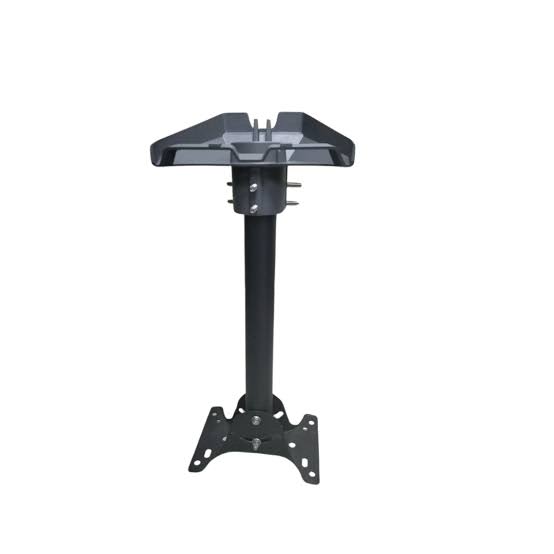
Starlink Gen 3 Mounting Stand
Shop Starlink Gen 3 Mounting Stand in Uganda for secure ground-level setup, quick installation, weather-resistant support and easy Starlink positioning.
Contact us for current pricing in Uganda
Contact us for current pricing in Uganda
Product Details
Starlink Gen 3 Mounting Stand: 7 Powerful Benefits
Starlink Gen 3 Mounting Stand in Uganda
Starlink installations do not always require drilling into a roof or wall.
Sometimes the best location for the Starlink terminal is an open section of the compound, balcony, terrace, temporary work area or another suitable ground-level surface.
For these applications, a mounting stand can provide a simpler solution.
The Starlink Gen 3 Mounting Stand provides a stable platform for the rectangular Standard terminal while keeping installation straightforward.
Starlink officially refers to this accessory as the Standard X-Frame Base. It is specifically designed to support either ground-level installation or quick setup.
This makes it different from permanent mounting accessories such as the Wall Mount, Pivot Mount and Pipe Adapter.
What Is the Starlink Gen 3 Mounting Stand?
The Starlink Gen 3 Mounting Stand is an X-shaped base that supports a mast onto which the compatible Starlink terminal is installed.
Its main purpose is to create a stable freestanding installation without requiring an existing pole or permanent attachment to a building.
Starlink describes the X-Frame Base as suitable for:
- Ground-level installations
- Quick Starlink setups
- Situations requiring a freestanding base
The mount is made from durable, weather-resistant materials intended to provide a sturdy foundation in different environmental conditions.
Table 1: Starlink Gen 3 Mounting Stand Specifications
| Specification | Details |
|---|---|
| Official Product Name | Standard X-Frame Base |
| Common Description | Starlink Gen 3 Mounting Stand |
| Compatible Hardware | Starlink Standard and Enterprise |
| Main Application | Ground-level installation |
| Setup Type | Quick/freestanding setup |
| Overall Dimension | Approx. 562.3 mm / 22.1 in |
| Base Width | Approx. 327.9 mm / 12.9 in |
| Height Measurement | Approx. 121.7 mm / 4.8 in |
| Package Dimensions | 380 × 640 × 145 mm |
| Package Weight | 2.9 kg / 6.4 lb |
Starlink publishes these specifications in its current Standard Accessories Guide.
Is Starlink Gen 3 Now Called Standard 4?
Yes.
The terminology can be confusing because many customers still search for Starlink Gen 3, Starlink V4 or Starlink Version 4.
Starlink's current naming explains that the hardware many customers previously called Gen 3 Starlink is now referred to as Standard 4, while the Standard Kit with Router 3 is now called Standard 4 X.
The terminal is the familiar rectangular Standard Starlink without a built-in motor for automatic orientation.
For this reason, customers searching for a “Gen 3 Mounting Stand” should verify compatibility using their actual Starlink terminal rather than relying only on the informal Gen 3 name.
What Comes with the Starlink Gen 3 Mounting Stand?
The X-Frame system contains the components required to create the freestanding support structure.
Table 2: Standard X-Frame Base Kit Contents
| Component | Purpose |
|---|---|
| X-Frame Base | Creates the ground-level foundation |
| Mast Adapter | Connects compatible Starlink hardware |
| Mast | Raises and supports the terminal |
| Installation Instructions | Guides assembly and setup |
Starlink officially lists the X-Frame Base, Mast Adapter and Mast as the kit contents.
The Starlink terminal itself is separate from the accessory.
Designed for Ground-Level Installation
Ground installation is the primary purpose of this mounting stand.
A ground-level Starlink installation can be useful where there is an open area with an unobstructed sky view.
Examples can include:
- Compounds
- Gardens
- Open terraces
- Temporary project sites
- Field offices
- Camps
- Construction locations
- Farm compounds
However, simply having enough ground space does not automatically make the location suitable.
Starlink still needs a sufficiently clear view of the sky.
Trees, buildings, walls and other objects around the stand can obstruct communication with satellites.
Therefore, the location should be evaluated before deciding where to place the X-Frame Base.
Quick Starlink Setup
Another major purpose of the X-Frame Base is quick setup.
Starlink specifically describes it as supporting ground-level installation or a quick setup.
This makes the stand useful when a customer does not want to immediately commit to a permanent roof or wall installation.
For example, a customer can establish the Starlink system at a temporary project location without first constructing a pole.
Once the project ends, the system can be relocated.
The X-Frame design therefore provides more flexibility than many permanent mounting methods.
Durable Weather-Resistant Construction
The mounting stand is intended for outdoor use.
Starlink states that the Standard X-Frame Base is made from durable, weather-resistant materials and is designed to provide a sturdy and enduring foundation across different environmental conditions.
This is important because Starlink terminals normally need to be positioned outdoors with a clear sky view.
However, weather-resistant construction does not mean the stand can be placed anywhere without considering the surface.
A stable installation still requires an appropriate location.
Choosing a Suitable Surface
The X-Frame Base should sit on a surface where it can remain stable.
Potential locations include suitable:
- Concrete areas
- Firm ground
- Terraces
- Flat outdoor areas
- Other structurally stable surfaces
Avoid locations where the base can easily shift, sink or become unstable.
The Starlink terminal should remain correctly positioned after installation.
If the ground changes substantially during heavy rain or other weather conditions, the installation should be inspected.
Starlink Gen 3 Stand vs Standard Kickstand
The Standard 4 X kit already includes a detachable Kickstand. Starlink states that the Standard kit comes with the equipment required to get online and that the kickstand can be used for quick setup or permanent installation where appropriate.
So why would someone purchase an X-Frame Base?
The two options use different physical designs.
Table 3: Gen 3 Mounting Stand vs Kickstand
| Feature | X-Frame Base | Standard Kickstand |
|---|---|---|
| Ground-Level Setup | Yes | Yes |
| Included with Standard 4 X Kit | No | Yes |
| Freestanding Mast | Yes | No |
| X-Shaped Foundation | Yes | No |
| Mast Adapter | Included | Not required in same way |
| Quick Setup | Yes | Yes |
| Starlink Standard Compatible | Yes | Yes |
| Enterprise Compatibility | Yes | Not equivalent |
| Best Use | Dedicated freestanding base | Simple Standard setup |
The included kickstand may already be sufficient for many Standard users.
The X-Frame Base becomes another option where a dedicated mast-and-base configuration is preferred.
X-Frame Base vs Wall Mount
A Wall Mount attaches Starlink to a building.
The X-Frame Base does not.
Table 4: X-Frame Base vs Wall Mount
| Feature | X-Frame Base | Wall Mount |
|---|---|---|
| Ground Installation | Excellent | No |
| Exterior Wall Required | No | Yes |
| Building Drilling | No | Usually required |
| Freestanding | Yes | No |
| Elevated Position | Limited by stand | Can be higher |
| Quick Relocation | Easier | More difficult |
| Permanent Installation | Possible where suitable | Excellent |
| Main Advantage | Ground-level flexibility | Elevated wall placement |
A Wall Mount may be preferable when buildings or vegetation obstruct Starlink at ground level.
The X-Frame Base is more attractive when an open ground-level area already provides a suitable sky view.
X-Frame Base vs Pivot Mount
The Pivot Mount is designed for a different type of installation.
It is useful where the Starlink terminal needs to be secured to an appropriate roof surface and aligned accordingly.
The X-Frame Base is freestanding.
Table 5: X-Frame Base vs Pivot Mount
| Feature | X-Frame Base | Pivot Mount |
|---|---|---|
| Ground-Level Installation | Yes | No |
| Roof Installation | No | Yes |
| Freestanding | Yes | No |
| Roof Drilling | No | Installation dependent |
| Quick Setup | Excellent | More permanent |
| Easy Relocation | Better | Limited |
| Standard Compatibility | Yes | Yes |
| Best Application | Open ground | Suitable roof |
The correct mount depends primarily on where the clearest sky view is available.
X-Frame Base vs Pipe Adapter
A Pipe Adapter allows the Starlink Standard terminal to use an appropriate existing pole.
The X-Frame Base provides its own supporting mast and ground base.
Table 6: X-Frame Base vs Pipe Adapter
| Requirement | X-Frame Base | Pipe Adapter |
|---|---|---|
| Existing Pole Required | No | Yes |
| Ground Setup | Excellent | Requires pole |
| Freestanding | Yes | Depends on pole |
| Mast Included | Yes | Pole generally separate |
| Easy Relocation | Good | Depends on installation |
| Elevated Installation | Limited | Can provide greater elevation |
| Standard Compatible | Yes | Yes |
| Best Use | Open ground | Existing/suitable pole |
If trees, fences or nearby buildings obstruct the ground location, a pole installation may provide better elevation.
Starlink Gen 3 Mounting Stand for Homes
The mounting stand can be useful at homes with sufficiently open compounds.
Instead of immediately drilling the roof, the Starlink can be positioned at ground level and tested.
This can help determine:
- Whether the location has adequate satellite visibility
- Whether cable length is sufficient
- Whether the router location works
- Whether a permanent elevated mount is eventually necessary
For some homes, the ground setup may remain suitable.
For others, testing may reveal that a Wall Mount, Pivot Mount or pole installation provides a better long-term solution.
Mounting Stand for Rental Properties
Rental properties can create challenges for permanent Starlink installation.
Tenants may not have permission to drill through:
- Roofing
- Exterior walls
- Fascia boards
- Other building structures
A freestanding Starlink mounting stand can reduce the need for building modifications where an appropriate open installation location exists.
It can also make future relocation easier.
The property owner or manager's requirements should still be respected when routing cables or placing outdoor equipment.
Mounting Stand for Temporary Offices
Temporary offices are another strong application.
Construction projects, field operations and temporary commercial locations may only occupy a site for several months.
Installing a permanent roof or wall mounting system may not always be worthwhile.
A setup can instead use:
Starlink Standard → X-Frame Base → Cable → Router/Network
When the project moves, the equipment can be dismantled and relocated.
This is consistent with Starlink's description of the X-Frame Base as suitable for quick setups.
Starlink Gen 3 Mounting Stand for Construction Sites
Construction sites often change rapidly.
Buildings may still be under construction, and a permanent Starlink location may not yet exist.
The X-Frame Base can provide a temporary ground installation for:
- Site offices
- Engineering teams
- Project managers
- Security systems
- Administrative teams
- Contractor connectivity
As construction progresses, Starlink can later be moved to another suitable location.
Care should be taken to keep the stand away from vehicle routes, heavy equipment and active construction areas where it could be struck.
Starlink Mounting Stand for Farms
Farms can provide large open spaces suitable for satellite connectivity.
The X-Frame Base may be useful near:
- Farmhouses
- Offices
- Workshops
- Stores
- Field operations
- Temporary agricultural projects
The main requirement is still sky visibility.
Trees and tall farm structures should be considered before selecting the installation location.
Where vegetation blocks the ground-level view, a pole or roof mount may be more appropriate.
Starlink Mounting Stand for Events
Temporary connectivity can also be useful for events.
A freestanding Starlink setup can potentially support internet requirements where suitable service, power and network equipment are available.
Examples include:
- Outdoor events
- Temporary registration areas
- Field exhibitions
- Temporary production offices
- Remote event sites
The stand should be positioned somewhere protected from crowds and vehicle movement.
A freestanding Starlink terminal should not be placed where attendees can easily trip over the stand or cables.
Cable Planning with the Mounting Stand
The mounting stand is only one part of the installation.
The Starlink cable still needs to travel from the outdoor terminal toward the required network and power equipment.
Starlink's current Standard 4 X kit includes a 15 m (49.2 ft) Router 3 Starlink Cable, together with the Router 3, power supply and AC cable.
Before positioning the stand, consider:
- Terminal location
- Cable distance
- Building entry point
- Router position
- Power location
- Cable protection
Do not choose a perfect satellite location only to discover that the cable cannot reach the required equipment.
Avoid Areas with Heavy Foot Traffic
A ground-level installation naturally sits closer to people, animals and vehicles than a roof installation.
Therefore, avoid positioning the stand:
- Across walkways
- Beside vehicle entrances
- In parking areas
- Where children regularly play
- Where livestock can disturb it
- In active work zones
Cable routes should also avoid creating trip hazards.
The stand should be accessible for maintenance without being exposed to unnecessary disturbance.
Ground Stand and Starlink Alignment
The Standard terminal commonly called Gen 3 does not have a built-in motor for self-orientation. Starlink identifies Standard 4 and Standard 4 X as rectangular terminals without built-in motors.
This means positioning and alignment matter.
After selecting the installation location, use the Starlink app's guidance to correctly orient the terminal.
If the stand is accidentally moved, the terminal's alignment may need to be checked again.
This is particularly relevant at temporary sites where equipment is frequently moved.
Ground Mounting vs Elevated Mounting
A ground installation is convenient, but it is not always the best installation.
The deciding factor should be satellite visibility.
Choose ground mounting when:
- The area is open
- There are few surrounding obstructions
- The stand can remain secure
- Cable routing is practical
Consider elevation when:
- Buildings block the sky
- Tall vegetation surrounds the property
- Fences obstruct the location
- The terminal could easily be disturbed
- The ground location is unsafe
Starlink offers several alternative mounts for Standard installations, and its current support material specifically lists Wall Mount, Pivot Mount, Pipe Adapter and X-Frame Base options.
Weather Considerations
Starlink describes the X-Frame Base materials as durable and weather resistant.
However, environmental conditions should still be considered.
Inspect the installation after:
- Severe weather
- Ground movement
- Accidental impact
- Relocation
- Construction activity around the stand
Confirm that the base remains stable and that Starlink has not been moved out of its intended position.
Is the X-Frame Base Compatible with Enterprise?
Yes.
Starlink officially lists the Standard X-Frame Base as compatible with both:
Starlink Standard
and
Starlink Enterprise.
This makes the stand more versatile than an accessory limited to only one terminal.
However, compatibility should still be checked using the exact Starlink hardware before purchasing because Starlink mounts are hardware-specific. Starlink explicitly notes that Standard and Enterprise mounts are not compatible with unrelated Starlink kits.
Is It Compatible with Starlink Mini?
No compatibility with Starlink Mini is listed for the Standard X-Frame Base.
Starlink Mini has its own mounting system.
Its accessories include Mini-specific solutions such as the Mini Wall Mount, Pivot Mount, Mobility Mount and Roof Rack Mount.
Customers should therefore avoid buying a Standard X-Frame Base for a Mini simply because both terminals have rectangular shapes.
Starlink states that its mounts are specific to their respective hardware families.
Is It Compatible with Standard Actuated?
The older Standard Actuated terminal uses a different mounting architecture.
It contains a built-in motor for self-orientation, unlike Standard 4 and Standard 4 X.
Therefore, customers replacing older Starlink hardware should not assume their previous stand or mount is directly interchangeable with the newer Standard terminal.
Starlink offers specific mounting solutions and adapters for different hardware generations.
Professional Starlink Stand Installation
The X-Frame Base is designed for straightforward installation, and Starlink describes it as engineered for easy setup with the necessary mounting components and instructions.
However, a professional Starlink installation can involve more than assembling the stand.
An installer can help with:
- Obstruction assessment
- Stand location
- Terminal orientation
- Cable routing
- Building entry
- Router positioning
- WiFi coverage
- Ethernet networking
- Connectivity testing
This can be particularly useful for offices and commercial installations.
Choosing the Right Gen 3 Mount
A simple starting guide is:
Open ground → X-Frame Base
Exterior wall → Standard Wall Mount
Suitable slanted roof → Pivot Mount
Existing compatible pole → Pipe Adapter
The correct solution depends on the property.
Starlink's current Standard 4 X support resources list all of these mounting options among the compatible installation accessories.
Why Choose the Starlink Gen 3 Mounting Stand?
The Starlink Gen 3 Mounting Stand is especially useful for customers who need:
- Ground-level Starlink installation
- Quick setup
- A freestanding mounting solution
- No existing pole
- Reduced need for wall or roof mounting
- Temporary project connectivity
- Easy relocation
- Weather-resistant construction
- Standard Starlink compatibility
- Enterprise compatibility
- A dedicated mast and base
- Installation flexibility
Its main advantage is simplicity.
Instead of attaching Starlink to a building, the X-Frame Base creates its own foundation.
Why Buy from Starlink Uganda Installers?
Starlink Uganda Installers can help customers determine whether a mounting stand is actually the best solution for the property.
An X-Frame Base may work perfectly in an open compound, while another site surrounded by trees or buildings may require an elevated wall, roof or pole installation.
The installation can also include cable routing, router positioning, obstruction assessment, Starlink alignment and connectivity testing.
This provides a more complete solution than purchasing a stand without first considering the installation environment.
Frequently Asked Questions About Starlink Gen 3 Mounting Stand
1. What is the Starlink Gen 3 Mounting Stand?
The Starlink Gen 3 Mounting Stand commonly refers to Starlink's Standard X-Frame Base, a freestanding mounting accessory designed for ground-level installation and quick Starlink setup.
2. Is Starlink Gen 3 still the official product name?
Starlink has updated its naming. The hardware widely referred to as Gen 3 Starlink is now called Standard 4, while the Standard Kit supplied with Router 3 is called Standard 4 X.
3. What comes with the Starlink Gen 3 Mounting Stand?
Starlink lists the kit contents as the X-Frame Base, Mast Adapter and Mast. These components create the freestanding support structure for the compatible Starlink terminal.
4. How much does the Starlink Gen 3 Mounting Stand weigh?
The packaged Standard X-Frame Base weighs approximately 2.9 kg (6.4 lb). Starlink lists package dimensions of approximately 380 × 640 × 145 mm.
5. Is the Gen 3 Mounting Stand suitable for outdoor use?
Yes. Starlink describes the X-Frame Base as being made from durable, weather-resistant materials intended to provide a sturdy foundation in different environmental conditions.
6. Is the X-Frame Base compatible with Starlink Enterprise?
Yes. Starlink officially lists compatibility with both Starlink Standard and Starlink Enterprise.
7. Can I use the Gen 3 Mounting Stand with Starlink Mini?
Starlink does not list Mini compatibility for the Standard X-Frame Base. Mini has a separate range of Mini-specific mounting accessories, so customers should use a mount designed for their exact hardware.
8. Do I need an X-Frame Base if my Standard Starlink has a kickstand?
Not necessarily. Starlink Standard kits include a detachable kickstand that can already be used for quick setup and suitable permanent installations. The X-Frame Base provides a different freestanding mast-and-base arrangement for customers who prefer that installation style.
9. Is the Starlink Gen 3 Mounting Stand better than a Wall Mount?
They serve different installation requirements. The X-Frame Base is designed for ground-level or quick setups, while a Wall Mount can position Starlink higher on a building where ground-level obstructions make elevation necessary.
10. Where can I buy a Starlink Gen 3 Mounting Stand in Uganda?
Customers can contact Starlink Uganda Installers for the Starlink Gen 3 Mounting Stand and assistance choosing between the X-Frame Base, Wall Mount, Pivot Mount and Pipe Adapter according to the installation location.
Conclusion
The Starlink Gen 3 Mounting Stand, officially known as the Standard X-Frame Base, is a practical solution for customers who want a sturdy ground-level or quick Starlink installation. It consists of an X-Frame Base, Mast Adapter and Mast and is manufactured from durable, weather-resistant materials. The packaged accessory measures approximately 380 × 640 × 145 mm and weighs around 2.9 kg (6.4 lb).
The X-Frame Base is particularly useful for temporary offices, open residential compounds, farms, construction sites and other locations where a freestanding Starlink installation is more convenient than drilling into a roof or wall. Starlink officially lists the accessory as compatible with Starlink Standard and Enterprise, while the newer Standard hardware commonly called Gen 3 is now identified by Starlink as Standard 4 or Standard 4 X depending on the kit configuration.
For a Starlink Gen 3 Mounting Stand in Uganda, Starlink Uganda Installers can assist with stand selection, installation, obstruction assessment, cable routing, terminal alignment and complete Starlink setup for homes, businesses, farms and temporary project sites.