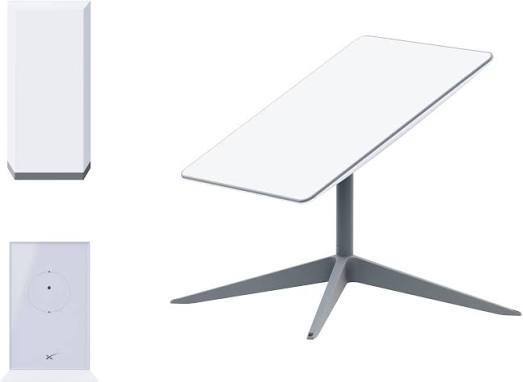
Starlink High Performance Kit
Shop Starlink High Performance Kit in Uganda for reliable business and enterprise internet. Get professional installation, networking and support today.
Contact us for current pricing in Uganda
Contact us for current pricing in Uganda
Product Details
Starlink High Performance Kit: 7 Powerful Business Benefits
Starlink High Performance Kit in Uganda
The Starlink High Performance Kit is designed for users who need more robust Starlink hardware than a conventional residential installation.
Starlink specifically identifies Performance Gen 1 as suitable for power users, businesses and enterprise applications. According to Starlink, the system is designed to maintain better performance at high temperatures, connect to more satellites and withstand more demanding environments than ordinary residential hardware.
This makes the High Performance Kit suitable for locations where connectivity is operationally important.
Businesses, remote facilities, farms, lodges, construction projects and organisations operating away from dependable terrestrial broadband infrastructure can use Starlink as their primary connection or as part of a broader connectivity strategy.
The terminal still requires suitable sky visibility. Trees, buildings, poles and roof sections that obstruct its view of the sky can cause interruptions. Starlink recommends using the obstruction-checking feature in the Starlink app when selecting an installation location.
What Comes with the Starlink High Performance Kit?
Starlink's current documentation for Performance Gen 1 lists the terminal, base, power supply and router together with the required connection cables.
Table 1: Starlink High Performance Kit Contents
| Component | Purpose |
|---|---|
| High Performance Starlink | Connects to Starlink satellites |
| Base | Supports terminal installation |
| Starlink Router | Provides local WiFi connectivity |
| Power Supply | Powers the High Performance terminal |
| 25 m Starlink Cable | Connects terminal to power equipment |
| 5 m Ethernet Cable | Provides Ethernet connectivity |
| 2 m Router Cable | Connects networking equipment |
| 1.8 m Power Supply AC Cable | Connects power supply to electricity |
| 1.8 m Router AC Cable | Powers the router |
The 25 m Starlink cable included with this kit provides considerably more installation flexibility than shorter cable configurations supplied with some other Starlink systems.
Starlink High Performance Terminal
The terminal is the defining component of the High Performance Kit.
It uses an electronic phased-array antenna, but unlike the Flat High Performance/Performance Gen 2 terminal, the original High Performance unit has motorized self-orientation.
During setup, the terminal can physically orient itself to establish an appropriate operating position.
The phased-array antenna then electronically communicates with satellites moving overhead.
This distinction is important because customers sometimes use the terms High Performance and Flat High Performance interchangeably.
They are different hardware generations.
Starlink currently calls the original High Performance terminal Performance Gen 1, while Flat High Performance is Performance Gen 2.
Starlink High Performance Specifications
The High Performance Kit was designed with demanding environments in mind.
Table 2: Starlink High Performance Specifications
| Specification | High Performance / Performance Gen 1 |
|---|---|
| Antenna | Electronic phased array |
| Orientation | Motorized self-orienting |
| Field of View | 140° |
| Environmental Rating | IP56 |
| Operating Temperature | -30°C to 50°C |
| Snow Melt Capability | Up to 75 mm/hour |
| Average Power Usage | 110–150W |
| Included Starlink Cable | 25 m |
| Router Generation | WiFi 5 |
| Router Coverage | Up to approximately 185 m² |
These specifications come from Starlink's current Performance Gen 1 documentation.
The combination of a wide field of view and more rugged design helps distinguish High Performance hardware from Starlink systems primarily intended for conventional residential installations.
140° Field of View
One of the important specifications of the Starlink High Performance Kit is its 140° field of view.
The field of view describes the area of sky available to the terminal for satellite communication.
High Performance hardware was designed to connect to more satellites and operate effectively in demanding applications.
This does not mean obstructions can be ignored.
A large tree, building or other obstruction within the terminal's required view can still interrupt connectivity.
A proper site survey therefore remains important even when using higher-performance Starlink hardware.
Motorized Self-Orienting Starlink
The original High Performance terminal contains a motorised orientation system.
This means the terminal can physically adjust itself during setup rather than requiring the installer to manually align the terminal as with newer Standard hardware.
Starlink describes Performance Gen 1's orientation as motorized self-orienting.
However, this does not eliminate the need to select the correct installation position.
The terminal still needs a sufficiently unobstructed sky view.
For best results, Starlink recommends installing High Performance as close to vertical as possible and using the app's obstruction tool before completing the installation.
Starlink High Performance for Businesses
Businesses are one of the primary applications for High Performance Starlink.
A company operating at a location without reliable fibre can use Starlink to provide internet connectivity for everyday operations.
Potential uses include:
- Cloud applications
- Video conferencing
- Remote collaboration
- Business communication
- Online systems
- CCTV remote access
- Cloud backups
- Web-based applications
- Point-of-sale connectivity
Starlink itself describes Performance Gen 1 as best suited to power users, business and enterprise applications.
The local network should then be designed according to the organisation's requirements.
Starlink High Performance for Enterprise Networks
Larger organisations usually require more than a satellite terminal and a single WiFi router.
Starlink can serve as the internet connection while a separate professional network distributes connectivity around the organisation.
For example:
Starlink → Router/Firewall → Managed Switch → Access Points → Users
This type of design can support larger numbers of users and wider physical coverage.
It can also allow businesses to introduce VLANs, separate guest networks, dedicated CCTV networks and other network-management features when suitable third-party equipment is installed.
Table 3: High Performance Business Applications
| Application | Potential Use |
|---|---|
| Business Office | Primary or supplementary connectivity |
| Remote Branch | Internet where terrestrial options are limited |
| Construction Site | Temporary project connectivity |
| Farm | Remote operational connectivity |
| Lodge | Operational and guest internet |
| School | Administrative and learning connectivity |
| Remote Facility | Satellite broadband |
| Field Office | Rapid connectivity deployment |
| Industrial Site | Connectivity for remote operations |
The appropriate Starlink service plan and network configuration should be selected according to the intended application.
Starlink High Performance Router
Performance Gen 1 documentation lists a Starlink WiFi router using WiFi 5, dual-band 3×3 MIMO technology and WPA2 security.
Starlink specifies wireless coverage of up to approximately 185 m² or 2,000 ft² under suitable conditions.
Actual coverage can be considerably different depending on:
- Building materials
- Concrete walls
- Multiple floors
- Router placement
- Wireless interference
- Distance
- Number and location of users
A large business should therefore not assume that one router will cover the entire property.
Additional networking equipment may be necessary.
Router 3 with High Performance Starlink
Customers can also encounter High Performance installations upgraded with Starlink's newer Router 3.
Starlink provides a dedicated Gen 3 Router Setup Guide for the High Performance Kit. The setup connects Router 3 to the High Performance power supply using the appropriate cable.
Router 3 also provides additional RJ45 Ethernet connections that can be used for third-party hardware.
This provides an upgrade path for customers who already own High Performance hardware but want newer Starlink networking equipment.
Compatibility and required cables should still be checked for the exact hardware configuration.
Ethernet Networking with High Performance Starlink
Ethernet is particularly important for business installations.
Wireless connectivity is convenient for mobile devices, but wired Ethernet can provide a stable local network connection for fixed equipment.
Examples include:
- Desktop computers
- Network switches
- CCTV systems
- Servers
- Smart televisions
- Access points
- Business routers
- Firewalls
The High Performance Kit includes Ethernet connectivity equipment, allowing the Starlink internet connection to be incorporated into more comprehensive network designs.
High Performance Starlink Cable
The original High Performance Kit includes a 25 m (82 ft) Starlink cable.
This provides useful flexibility when positioning the terminal.
The best location for the satellite terminal may be on a roof or pole, while the power supply and networking equipment need to remain inside the building.
Longer cable distance makes it easier to separate these locations.
However, cable routing should still be carefully planned.
Cables should be protected from physical damage, excessive bending and locations where people or equipment can interfere with them.
Table 4: High Performance Kit Cabling
| Cable | Documented Length | Purpose |
|---|---|---|
| Starlink Cable | 25 m | Terminal connection |
| Ethernet Cable | 5 m | Ethernet networking |
| Router Cable | 2 m | Router connection |
| Power Supply AC Cable | 1.8 m | Powers High Performance supply |
| Router AC Cable | 1.8 m | Powers router |
These cable lengths are listed in Starlink's current Performance Gen 1 specifications.
Starlink High Performance Power Supply
High Performance uses a dedicated external power supply.
Starlink lists the power supply with an IP66 environmental rating, an operating temperature range from approximately -30°C to 50°C, a dedicated earth terminal and an included wall mount.
The dedicated earth terminal is particularly relevant to professionally planned installations.
The power supply should be installed according to Starlink's installation requirements rather than left unsecured.
Starlink's installation documentation shows the power supply mounted before the Starlink, AC and Ethernet cables are connected.
High Performance Power Consumption
Power consumption is an important consideration when comparing High Performance with other Starlink kits.
Starlink lists average Performance Gen 1 consumption at approximately 110–150W.
This is significantly more than lower-power hardware such as Starlink Mini.
The difference matters when planning:
- UPS backup
- Portable batteries
- Solar power
- Inverter systems
- Generator capacity
- Off-grid installations
Customers should avoid sizing a backup system based only on Starlink's average power figure.
The router, switches, access points, laptops and other equipment may also need backup electricity.
Backup Power for Starlink High Performance
A business that depends on Starlink should consider what happens during a blackout.
Without backup electricity, the Starlink terminal and networking equipment will shut down even if the satellite service itself remains available.
A UPS can help cover short outages.
For longer interruptions, larger battery-and-inverter systems may be required.
Solar can also be considered for remote installations.
Table 5: High Performance Backup Options
| Backup Solution | Typical Application | Main Advantage |
|---|---|---|
| UPS | Short outages | Automatic switching |
| Portable Power Station | Temporary backup | Easy deployment |
| Inverter + Battery | Business backup | Larger capacity |
| Solar + Battery | Remote sites | Off-grid operation |
| Generator | Long outages | Extended operation |
| Hybrid System | Critical sites | Multiple power sources |
Because High Performance can consume 110–150W on average, battery sizing should be performed carefully.
Solar Power for High Performance Starlink
High Performance can form part of an off-grid solar installation when the electrical system is properly sized.
For example, if the terminal consumed an average of 130W continuously for 24 hours, its theoretical daily energy requirement would be:
130W × 24 hours = 3,120Wh or 3.12kWh
That figure does not include the router, network switches, access points or conversion losses.
It also does not mean every High Performance installation consumes exactly 130W.
It simply demonstrates why a 24-hour High Performance installation requires substantially more battery and solar capacity than a low-power Mini installation.
High Performance Starlink for Remote Sites
Remote facilities are a strong use case for this hardware.
The terminal's environmental specifications and business-focused design can be useful where conventional broadband infrastructure is difficult to obtain.
Possible locations include:
- Remote offices
- Farms
- Lodges
- Research sites
- Construction projects
- Field camps
- Remote institutions
- Industrial operations
Power and local networking should be planned alongside Starlink.
A satellite connection alone does not solve WiFi coverage across a large site.
Additional access points, switches or point-to-point wireless equipment may be necessary.
High Performance Starlink for Hotels and Lodges
Hotels and lodges can use Starlink as the upstream internet connection while a dedicated WiFi system distributes connectivity throughout the property.
For example, the network may contain:
High Performance Starlink → Firewall → Managed Switch → Multiple Access Points
Guest WiFi can then be separated from administrative systems using appropriate networking equipment.
This is generally more suitable for a large hospitality property than expecting one Starlink router to provide WiFi throughout guest rooms, restaurants and outdoor areas.
High Performance Starlink for Construction Sites
Construction sites often need internet before permanent telecommunications infrastructure reaches the project.
The High Performance Kit can provide connectivity for project teams working in such locations.
Internet can support:
- Cloud project-management systems
- Drawing and document sharing
- Video meetings
- Site communication
- CCTV monitoring
- Remote reporting
- Procurement systems
- Administrative work
Because construction environments can be physically demanding, the terminal, power supply and cables should be installed where they are protected from accidental damage.
High Performance Starlink Mounting
Starlink offers mounting accessories for installing Performance Gen 1 on roofs, poles and walls.
The correct mount depends on the property.
The installation location should first be selected according to sky visibility.
Starlink recommends checking for obstructions and, where ground-level visibility is insufficient, considering an elevated roof, wall or pole installation.
Mounting should then secure the terminal while maintaining its required orientation and protecting the cable route.
High Performance vs Flat High Performance
These two products are frequently confused, but there is an important difference.
The High Performance Kit is Performance Gen 1, while the Flat High Performance Kit is Performance Gen 2.
Table 6: High Performance vs Flat High Performance
| Feature | High Performance | Flat High Performance |
|---|---|---|
| Current Name | Performance Gen 1 | Performance Gen 2 |
| Antenna | Electronic phased array | Electronic phased array |
| Field of View | 140° | 140° |
| Orientation | Motorized self-orienting | Fixed/non-actuated |
| Main Application | Business/enterprise | Business/mobility |
| Environmental Rating | IP56 | IP56 with cables installed |
| Average Power | 110–150W | Around 110W in current comparison |
| Mounting Style | Mast/base and compatible mounts | Wedge-style mounting |
| Mobility Focus | Primarily demanding fixed use | Greater mobility focus |
Starlink currently describes High Performance Gen 1 as a business and enterprise product, while Flat High Performance/Gen 2 uses a fixed terminal design suited to different demanding and mobility applications.
High Performance vs Performance Gen 3
The High Performance Kit is also different from Starlink's newest Performance Gen 3 hardware.
Performance Gen 3 introduces newer cabling and an Advanced Power Supply capable of accepting AC or DC input. Its setup also supports direct connection to a third-party router using the supplied Ethernet cable.
Customers should therefore identify their exact Performance generation before purchasing replacement equipment.
A cable or power supply designed for one Performance generation should not automatically be assumed compatible with another.
High Performance vs Standard Starlink
Standard hardware is generally more appropriate for ordinary residential installations.
High Performance is designed around more demanding business and enterprise requirements.
The main differences include the wider field of view, motorised self-orientation, environmental design and higher power consumption.
Standard hardware can still be suitable for many businesses, particularly smaller offices.
High Performance becomes more relevant where the hardware's particular capabilities and environmental resilience justify the additional system requirements.
Installation of Starlink High Performance Kit
Installation starts by identifying a location with an unobstructed sky view.
The Starlink app's Check for Obstructions feature can help evaluate the proposed location.
If ground-level installation does not provide sufficient visibility, Starlink recommends considering a roof, pole or wall installation.
The terminal is then secured using an appropriate mount, connected through its Starlink cable and powered through the dedicated power supply.
Networking equipment is then connected and configured.
Finally, the connection and local WiFi or Ethernet network should be tested.
Professional Installation in Uganda
Professional installation can be especially valuable with High Performance hardware because these systems are frequently deployed at business and remote sites.
An installation may involve:
- Roof access
- Pole mounting
- Long cable routes
- Wall penetration
- Power-supply mounting
- Earthing considerations
- Ethernet networking
- WiFi access points
- Managed switches
- Backup power
A site survey can identify these requirements before equipment is permanently installed.
Choosing the Starlink High Performance Kit
The Starlink High Performance Kit is worth considering when the installation requires more robust business-focused Starlink hardware.
Before purchasing, consider:
- Intended application
- Required Starlink service plan
- Site location
- Sky visibility
- Mounting requirements
- Local network size
- Number of users
- Ethernet requirements
- Backup power
- Future network expansion
For portable low-power applications, Mini may be more practical.
For ordinary residential use, Standard may be sufficient.
For demanding business and enterprise environments, High Performance provides hardware specifically designed for that class of deployment.
Why Buy the Starlink High Performance Kit from Starlink Uganda Installers?
Starlink Uganda Installers can help customers plan the High Performance installation as a complete connectivity solution rather than treating the terminal as a standalone device.
Installation can include terminal positioning, roof or pole mounting, cable routing, power-supply installation and router configuration.
Business customers can also plan Ethernet distribution, switches, access points and third-party networking according to the building and number of users.
Where electricity reliability is a concern, UPS, inverter, battery or solar backup can also be incorporated into the overall design.
FAQs
1. What is the Starlink High Performance Kit?
The Starlink High Performance Kit is Starlink hardware designed for power users, businesses and enterprise applications. Starlink now refers to the original High Performance hardware as Performance Gen 1.
2. Is High Performance the same as Flat High Performance?
No. High Performance is currently identified as Performance Gen 1, while Flat High Performance is Performance Gen 2.
3. Does the Starlink High Performance dish move?
Yes. Starlink identifies the original High Performance/Performance Gen 1 terminal as motorized and self-orienting.
4. What is the field of view of Starlink High Performance?
The terminal has a 140° field of view, according to Starlink's specifications.
5. How much power does the Starlink High Performance Kit use?
Starlink lists average power consumption at approximately 110–150W. Actual consumption can vary according to operating conditions.
6. How long is the High Performance Starlink cable?
The kit includes a 25 m (82 ft) Starlink cable connecting the High Performance terminal to its equipment.
7. Is Starlink High Performance suitable for businesses?
Yes. Starlink specifically describes Performance Gen 1 as suitable for power users, business and enterprise applications.
8. Can Starlink High Performance use Router 3?
Yes. Starlink provides a dedicated Router 3 setup guide for High Performance hardware using the appropriate Router 3 kit and connections.
9. Can I use backup power with Starlink High Performance?
Yes. A correctly sized UPS, inverter-and-battery system, portable power station, solar system or generator can provide backup. The system should account for the terminal's 110–150W average power requirement plus networking equipment.
10. Where can I buy the Starlink High Performance Kit in Uganda?
Customers can contact Starlink Uganda Installers for High Performance equipment together with assistance for installation, mounting, networking and backup-power planning.
Conclusion
The Starlink High Performance Kit, now identified by Starlink as Performance Gen 1, provides robust satellite connectivity hardware for power users, businesses and enterprise environments. Its electronic phased-array antenna, motorised self-orientation, wide 140° field of view and IP56 environmental rating distinguish it from Starlink hardware designed primarily around conventional residential installations.
The kit can form the foundation of a complete business network rather than serving only as a WiFi connection. Ethernet networking, routers, managed switches, access points and backup-power systems can be incorporated according to the requirements of offices, lodges, farms, construction projects and remote facilities. Correct site selection and obstruction-free installation remain essential for dependable Starlink operation.
For the Starlink High Performance Kit, professional installation and business network integration in Uganda, contact Starlink Uganda Installers. Customers can get assistance with mounting, cable routing, router configuration, Ethernet networking and backup-power planning for demanding Starlink deployments. Visit starlinkugandainstallers.co.ke for more information.