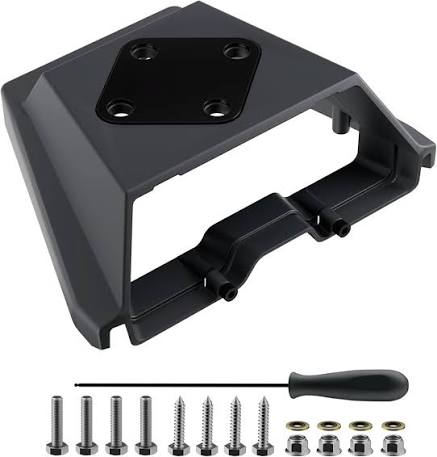
Starlink Mini Mobility Mount
Shop Starlink Mini Mobility Mount in Uganda for secure vehicle installation, weather protection and reliable mobile Starlink use. Order yours today.
Contact us for current pricing in Uganda
Contact us for current pricing in Uganda
Product Details
Starlink Mini Mobility Mount: 7 Powerful Travel Benefits
Starlink Mini Mobility Mount in Uganda
Starlink Mini was created around portability.
Its compact satellite terminal includes integrated WiFi, allowing customers to take their internet connection between different locations without carrying a separate primary router.
But portability and permanent mobile mounting are different requirements.
A customer who places Mini on its kickstand at a campsite can pack it away after use. A customer who wants Mini securely installed on a vehicle needs a mounting system designed for permanent attachment.
The Starlink Mini Mobility Mount addresses this requirement.
It provides a low-profile installation that securely holds Mini while also addressing water ingress, corrosion and cable routing.
What Is the Starlink Mini Mobility Mount?
The Starlink Mini Mobility Mount is an official Starlink mounting accessory compatible specifically with Starlink Mini.
It is designed for permanent installation on suitable:
- Metal
- Fiberglass
- Wood
- Plastic surfaces
Starlink states that the mount is designed to create a waterproof seal and protect against water ingress when correctly installed.
This makes it particularly relevant to outdoor and vehicle applications where the mounting surface may regularly encounter rain, dust and changing weather.
Unlike the standard Mini kickstand, the Mobility Mount is mechanically attached to the installation surface.
Starlink Mini Mobility Mount Specifications
Starlink publishes dimensions, weight and compatibility information for the Mini Mobility Mount.
Table 1: Starlink Mini Mobility Mount Specifications
| Specification | Details |
|---|---|
| Product | Starlink Mini Mobility Mount |
| Compatibility | Starlink Mini |
| Mounting Angle | 9° |
| Suitable Surfaces | Wood, fiberglass, metal and plastic |
| Fastener Material | Stainless steel |
| Package Dimensions | 185.5 × 249.9 × 86 mm |
| Package Dimensions in Inches | 7.3 × 9.8 × 3.4 in |
| Package Weight | 0.6 kg |
| Package Weight in Pounds | 1.32 lb |
| Primary Application | Permanent mobile/outdoor mounting |
The accessory guide also shows the mounted assembly at approximately 296.5 mm long and 260 mm wide, with a low-profile design intended to keep Mini relatively close to the mounting surface.
Designed Specifically for Starlink Mini
Compatibility matters when selecting a mobility mount.
The Starlink Mini Mobility Mount is specifically listed as compatible with Starlink Mini.
Customers should not assume that Standard V4, Standard Actuated or Performance mounting equipment will fit Mini.
Starlink Mini has its own mounting ecosystem, which includes options such as the:
- Mobility Mount
- Pivot Mount
- Wall Mount
- Roof Rack Mount
- Pipe Adapter and Flat Mount
Starlink provides separate installation guides for these Mini mounting solutions.
The correct choice depends on whether Mini will be used on a building, pole, vehicle or temporary surface.
Designed for Permanent Mounting
One of the most important differences between the Mobility Mount and the standard Mini kickstand is permanence.
The Mobility Mount attaches directly to the selected surface using mounting hardware.
This makes it useful where the customer wants Mini to remain installed rather than being unpacked and positioned every time internet connectivity is required.
A permanent installation can be particularly useful for:
- Overlanding vehicles
- Field-service vehicles
- Project vehicles
- Mobile work units
- Appropriate boats or similar installations
- Other compatible mobile surfaces
The installation surface still needs to be structurally suitable for the mount and Starlink Mini.
9-Degree Mounting Angle
One of the defining characteristics of the Mini Mobility Mount is its 9-degree mounting angle.
Starlink states that this angle helps maintain signal during extreme and wet weather conditions.
The terminal therefore sits at a slight angle rather than completely flat against the installation surface.
This is different from simply placing Mini on a vehicle roof using an improvised bracket.
The mount has been designed specifically around the Mini terminal and its intended mobile installation.
Waterproof Seal
Outdoor vehicle installations need to account for rain and water ingress.
Starlink states that the Mini Mobility Mount is designed to create a waterproof seal and protect against water ingress when permanently attached to supported surfaces.
The mounting system incorporates sealing hardware as part of the installation.
Correct installation remains essential.
A waterproofing feature only works as intended when the mount and sealing components are installed correctly.
Corrosion-Resistant Fasteners
Vehicles and outdoor equipment can be exposed to:
- Rain
- Humidity
- Mud
- Dust
- Changing temperatures
- Long periods outdoors
Starlink therefore uses stainless-steel fasteners in the Mobility Mount.
Starlink describes these fasteners as corrosion resistant and suitable for harsh environments.
This is important for equipment intended to remain outdoors rather than being packed away after every use.
What Comes with the Mobility Mount?
Starlink has updated the Mini Mobility Mount installation hardware over time, so customers should follow the installation guide supplied with their specific mount rather than assuming every package revision contains identical fasteners.
The current installation guide lists the Mobility Mount together with mounting screws/bolts, lag screws, Nyloc nuts and sealing washers.
Table 2: Mobility Mount Installation Components
| Component | Purpose |
|---|---|
| Mobility Mount | Holds Starlink Mini |
| Bolts/Screws | Secures mount |
| Lag Screws | Alternative mounting method where appropriate |
| Nyloc Nuts | Helps secure bolted installation |
| Sealing Washers | Helps seal mounting points |
| Cable Opening | Routes Mini power cable |
| Mounting Hardware | Supports permanent installation |
The exact hardware used depends on the installation method and surface.
Mobility Mount Installation Tools
Starlink's current installation guide identifies several tools for installing the Mini Mobility Mount.
These include:
- Drill or impact driver
- 5 mm / 3/16-inch drill bit
- 9 mm / 3/8-inch drill bit
- 14 mm wrench
- 13 mm wrench
- Pen or marker
Tool requirements may differ according to the selected installation method and hardware revision.
Customers should therefore follow the instructions supplied with the actual mount.
Cable Routing Through the Mount
The Mobility Mount incorporates power-cable routing into the installation.
Starlink's installation guide instructs users to route the power cable through the opening in the Mobility Mount and out through the front. The cable is then connected to Mini before the terminal is slid into the mount until it clicks securely into place.
This produces a cleaner installation than leaving the power cable loosely routed around the outside of the mount.
Proper cable routing is especially important on moving vehicles.
Mobility Mount vs Mini Kickstand
The standard Mini Kit already includes a kickstand.
However, these two accessories serve very different applications.
Table 3: Mobility Mount vs Mini Kickstand
| Feature | Mobility Mount | Mini Kickstand |
|---|---|---|
| Permanent Installation | Excellent | Not its primary purpose |
| Vehicle Installation | Designed for suitable permanent mounting | Temporary deployment |
| Fasteners | Yes | Not comparable |
| Waterproof Mounting Seal | Designed into mount | No permanent mounting seal |
| Stainless-Steel Fasteners | Yes | Not applicable |
| Quick Removal/Setup | Less convenient | Excellent |
| Camping Deployment | Good when vehicle-mounted | Excellent |
| Fixed Vehicle Setup | Excellent | Limited |
| Mounting Angle | 9° | Different positioning system |
The kickstand is ideal when customers want to unpack Mini, use it temporarily and pack it away.
The Mobility Mount is more appropriate when Mini needs to remain attached to a compatible surface.
Mobility Mount vs Mini Roof Rack Mount
The Mini Roof Rack Mount provides another vehicle-oriented installation approach.
The difference is mainly how the Starlink is attached.
A Mobility Mount is designed for permanent attachment to suitable wood, fiberglass, metal or plastic surfaces.
A Roof Rack Mount is intended for an appropriate vehicle roof-rack configuration.
Table 4: Mobility Mount vs Roof Rack Mount
| Feature | Mobility Mount | Roof Rack Mount |
|---|---|---|
| Starlink Mini Compatible | Yes | Yes |
| Vehicle Application | Yes | Yes |
| Direct Surface Mounting | Yes | Not the primary approach |
| Roof Rack Required | No | Yes |
| Permanent Attachment | Yes | Rack-based |
| Surface Drilling | Depending on installation | Depends on rack system |
| Best For | Suitable direct mounting surfaces | Vehicles with compatible racks |
Customers with an existing roof rack may therefore prefer the Roof Rack Mount, while other installations may suit the Mobility Mount.
Mobility Mount vs Mini Pivot Mount
The Pivot Mount is designed primarily around permanent building installations such as suitable slanted roofs.
The Mobility Mount is designed around low-profile permanent mounting on surfaces including metal, fiberglass, wood and plastic.
Table 5: Mobility Mount vs Pivot Mount
| Feature | Mobility Mount | Pivot Mount |
|---|---|---|
| Vehicle Installation | Excellent | Not primary use |
| Slanted Building Roof | Not primary use | Excellent |
| Low Profile | Yes | Taller design |
| 9° Angle | Yes | Adjustable pivot |
| Permanent Installation | Yes | Yes |
| Mini Compatible | Yes | Yes |
| Main Purpose | Mobile/outdoor surface mounting | Fixed roof mounting |
The right mount should therefore be selected according to the actual application rather than simply choosing the most compact option.
Mobility Mount for Overlanding
Overlanding is one of the clearest applications for a permanently mounted Starlink Mini.
An overlanding vehicle may travel through areas where mobile-network coverage is limited or inconsistent.
A Mini mounted on the vehicle can reduce the amount of equipment that needs to be unpacked at each stop.
Instead of:
Park → Unpack Mini → Position → Connect → Use → Pack
the setup can become:
Park → Power Mini → Connect
Actual service availability and mobility use still depend on the customer's Starlink service plan and permitted use.
The mount itself does not determine the service plan.
Mobility Mount for Camping
Camping users can choose between permanent and temporary Starlink setups.
Someone who camps occasionally may prefer the standard kickstand and Travel Kit.
Someone who travels frequently in the same vehicle may prefer a permanently mounted Mini.
The Mobility Mount can therefore form part of a travel system that includes:
Mini + Mobility Mount + Vehicle/Portable Power + Appropriate Service Plan
This reduces repeated handling of the terminal.
Mobility Mount for Field Vehicles
Businesses operating field vehicles can also benefit from a permanent Mini mounting solution.
Potential applications include:
- Engineering teams
- Survey teams
- Construction operations
- Agricultural field teams
- Research teams
- Remote technical support
- Project-management vehicles
- Emergency field operations
A permanently installed Mini can simplify connectivity at temporary work locations.
Instead of deploying satellite hardware separately every time, teams can focus on powering the system and establishing the required network connection.
Mobility Mount for Work Vehicles
Some businesses operate vehicles as mobile offices.
These may contain:
- Laptops
- CCTV equipment
- Monitoring systems
- WiFi equipment
- Communication devices
- Power stations
- Battery systems
Starlink Mini can become the internet source for this type of mobile workspace.
Because Mini already includes integrated WiFi, a separate router is not required for basic connectivity.
Where more advanced networking is required, Mini also provides Ethernet connectivity for compatible networking equipment.
Powering a Vehicle-Mounted Starlink Mini
Mounting is only one half of a mobile installation.
Mini also needs power.
Starlink states that Mini operates across a 12–48V input range. It also recommends its dedicated USB-C Cable with a compatible 100W USB-C supply or Mini Car Adapter for appropriate portable power configurations.
A mobile setup may therefore use an appropriate:
- Mini Car Adapter
- Battery system
- Portable power station
- USB-C power system
- Other compatible DC arrangement
The correct option depends on the vehicle and power system.
Mini Car Adapter and Mobility Mount
The Mobility Mount and Mini Car Adapter can complement each other.
The Mobility Mount solves the physical installation problem.
The vehicle power solution addresses electrical power.
A practical configuration can therefore be:
Vehicle Power → Compatible Mini Power Accessory → Starlink Mini → Mobility Mount
Cable routing should be planned so connectors and cables are protected from unnecessary movement or physical damage.
Cable Routing on Vehicles
Vehicle installations require more attention to cable routing than stationary installations.
Avoid routes where cables may be:
- Crushed by doors
- Exposed to sharp metal
- Pinched beneath panels
- Damaged by moving components
- Exposed to excessive heat
- Left loose in high-airflow areas
The Mobility Mount itself incorporates an opening through which the Mini power cable is routed before connecting to the terminal.
The remainder of the cable route should be planned around the vehicle.
Choosing the Mounting Position
A permanent mount should not be installed before the location has been evaluated.
Starlink Mini requires a clear view of the sky.
Starlink warns that objects such as trees, poles and roofs can obstruct communication between the terminal and satellites. It recommends using the obstruction tool in the Starlink app to evaluate potential installation locations.
For a vehicle, consider:
- Roof equipment
- Roof racks
- Cargo
- Roof boxes
- Tents
- Solar panels
- Other antennas
These objects should not unnecessarily obstruct Mini's view.
Installation on Metal
Metal is one of the surfaces specifically listed by Starlink for the Mobility Mount.
However, the surface must still be suitable for drilling and fastening.
Before drilling into a vehicle roof or panel, determine what is located underneath.
Electrical cables, airbags, roof structures and interior components can make some locations unsuitable.
Professional installation can help reduce the risk of damaging the vehicle.
Installation on Fiberglass
Starlink also lists fiberglass as a supported mounting surface.
This can be relevant to campers, recreational vehicles and other specialised bodies.
Fiberglass requires appropriate drilling and fastening techniques to avoid cracking or damaging the material.
The mount should be installed according to Starlink's instructions and the structural characteristics of the vehicle.
Installation on Wood
Wood is another surface identified by Starlink.
The latest installation guide includes both screw/bolt and lag-screw mounting approaches depending on the application.
The wood must be structurally suitable.
A thin decorative panel should not automatically be treated as equivalent to a solid structural mounting surface.
The installation should be capable of supporting the terminal and mount during real-world outdoor use.
Installation on Plastic
Starlink also identifies plastic among the compatible surface types for the Mobility Mount.
Again, this does not mean every plastic panel is automatically suitable.
Thickness, strength, shape and accessibility behind the panel can affect installation.
The mounting location should be assessed before drilling.
Permanent Mounting and Waterproofing
Drilling through a vehicle or outdoor structure creates potential water-entry points.
The Mobility Mount addresses this with sealing hardware and a design intended to form a waterproof seal.
Correct installation is critical.
The mounting surface should be prepared appropriately, and the supplied sealing system should be installed according to Starlink's guide.
Improvised fasteners may compromise the intended seal.
Low-Profile Installation
The Mobility Mount holds Mini relatively close to the mounting surface.
This provides a cleaner appearance than a tall pole-style installation.
A low-profile arrangement can also be beneficial on vehicles where unnecessary height is undesirable.
However, users should still account for the total installed height when entering:
- Garages
- Parking structures
- Car washes
- Covered areas
- Low-clearance structures
Any roof-mounted accessory changes the effective vehicle height.
Mobile Internet vs Mobility Mount
The word Mobility in the product name refers to the mounting solution.
It should not be interpreted as automatically granting a particular Starlink service plan.
The mount physically secures Mini.
The customer's Starlink subscription determines the permitted service usage and geographic/mobility conditions.
Therefore, customers planning to use Starlink while travelling should confirm that their selected service plan supports their intended use.
Starlink Mini Mobility Setup
A complete mobile Mini installation usually involves more than the mount itself.
Table 6: Starlink Mini Mobility Setup Checklist
| Component | Purpose |
|---|---|
| Starlink Mini | Satellite terminal and integrated WiFi |
| Mobility Mount | Secures Mini |
| Mounting Hardware | Attaches mount to surface |
| Sealing Hardware | Helps prevent water ingress |
| Power Cable | Supplies Mini |
| Compatible Power Source | Powers system |
| Starlink App | Setup and obstruction checking |
| Suitable Service Plan | Determines permitted service usage |
| Cable Protection | Protects wiring |
| Optional Ethernet Equipment | Expands local network |
Planning all these components together creates a more reliable mobile installation.
Professional Mini Mobility Mount Installation
The Mini Mobility Mount can be installed by users who have appropriate tools and experience.
However, vehicle installation requires more than simply drilling several holes.
A professional installer can evaluate:
- Mounting surface
- Structural suitability
- Equipment beneath the panel
- Cable routing
- Waterproofing
- Power connection
- Sky visibility
- Final Starlink operation
This becomes particularly valuable when installing Mini on an expensive vehicle or specialised mobile unit.
Why Choose the Starlink Mini Mobility Mount?
The Starlink Mini Mobility Mount is especially useful for customers looking for:
- Permanent Mini installation
- Vehicle-mounted Starlink
- Low-profile mounting
- Waterproof sealing
- Corrosion-resistant fasteners
- 9-degree mounting angle
- Metal-surface installation
- Fiberglass installation
- Wood or plastic installation
- Cleaner cable routing
- Overlanding connectivity
- Field-work connectivity
It provides a purpose-designed alternative to improvised brackets and temporary mounting arrangements.
Why Buy from Starlink Uganda Installers?
Starlink Uganda Installers can help customers determine whether the Mobility Mount, Roof Rack Mount or another Mini mounting solution is appropriate for their setup.
A vehicle with a compatible roof rack may benefit from the dedicated Roof Rack Mount.
Another vehicle may be better suited to direct installation using the Mobility Mount.
Customers also need to consider Mini power, cable routing and their intended Starlink service usage.
Planning these components together can create a cleaner and more practical mobile Starlink installation.
Frequently Asked Questions About Starlink Mini Mobility Mount
1. What is the Starlink Mini Mobility Mount?
The Starlink Mini Mobility Mount is a low-profile permanent mounting accessory designed specifically for Starlink Mini. It can be installed on suitable wood, fiberglass, metal and plastic surfaces and incorporates sealing features to protect against water ingress.
2. Is the Mobility Mount compatible with Starlink Mini?
Yes. Starlink specifically lists Starlink Mini as the compatible hardware for the Mini Mobility Mount.
3. Can the Mini Mobility Mount be installed on a vehicle?
Yes. The mount is intended for permanent mobile-style installations and supports suitable metal, fiberglass, wood and plastic surfaces. The actual mounting surface should still be checked for structural suitability before installation.
4. Is the Starlink Mini Mobility Mount waterproof?
Starlink states that the mount is designed to create a waterproof seal and protect against water ingress when permanently and correctly mounted to a supported surface.
5. What angle does the Mini Mobility Mount use?
The mount supports a 9-degree mounting angle, which Starlink says helps maintain signal during extreme and wet weather conditions.
6. Does the Mini Mobility Mount use corrosion-resistant hardware?
Yes. Starlink states that the mount uses stainless-steel fasteners designed to resist corrosion in harsh environments.
7. How much does the Starlink Mini Mobility Mount weigh?
Starlink lists the package weight at approximately 0.6 kg (1.32 lb) and package dimensions of approximately 185.5 × 249.9 × 86 mm.
8. How is the Starlink Mini power cable routed through the mount?
Starlink's installation guide directs the installer to route the power cable through the opening in the Mobility Mount and out the front. The cable is connected to Mini before the terminal is slid into the mount until it clicks into place.
9. What is the difference between the Mobility Mount and Roof Rack Mount?
The Mobility Mount attaches directly to a suitable mounting surface, while the Mini Roof Rack Mount is intended for an appropriate roof-rack installation. The better option depends on the vehicle and whether direct permanent mounting is desirable.
10. Where can I buy a Starlink Mini Mobility Mount in Uganda?
Customers can contact Starlink Uganda Installers to enquire about Mini Mobility Mount availability and get assistance with vehicle mounting, waterproof installation, cable routing and compatible Mini power solutions.
Conclusion

The Starlink Mini Mobility Mount provides a purpose-designed solution for permanently mounting Starlink Mini on suitable wood, fiberglass, metal and plastic surfaces. Its low-profile design, corrosion-resistant stainless-steel fasteners, waterproof sealing approach and 9-degree mounting angle make it particularly relevant for vehicles, overlanding setups, field operations and other demanding outdoor applications.
A successful mobility installation requires more than securing Mini to a surface. The mounting location should provide suitable sky visibility, while the power cable needs safe routing and an appropriate power source. Starlink's current installation guide routes the power cable through the mount before Mini is slid securely into position, helping create a cleaner permanent setup.
For a Starlink Mini Mobility Mount in Uganda, Starlink Uganda Installers can assist with mount selection, vehicle installation, cable routing, waterproofing and Mini power planning. Visit Starlink Uganda Installers for more information.