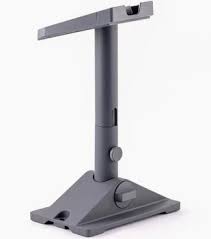
Starlink Mini Pivot Mount
Shop Starlink Mini Pivot Mount in Uganda for secure slanted-roof installation, flexible alignment and durable mounting. Order and install yours today.
Contact us for current pricing in Uganda
Contact us for current pricing in Uganda
Product Details
Starlink Mini Pivot Mount: 7 Powerful Installation Benefits
Starlink Mini Pivot Mount in Uganda
The Starlink Mini Pivot Mount provides a more permanent installation option for customers who do not want to operate their Starlink Mini using only the supplied kickstand or temporary flat-surface setup.
Starlink Mini is designed for portability, but many customers eventually use it as a fixed internet connection at a home, office, lodge, farm or remote site. In these situations, a dedicated mounting system can provide a cleaner and more practical installation.
The Pivot Mount is especially useful where the best unobstructed location is on a sloped roof.
Starlink specifically describes the Mini Pivot Mount as suitable for installation on slanted, shingled roofs. Its swivelling design enables the installer to compensate for the roof angle and adjust the terminal into the correct position.
What Is the Starlink Mini Pivot Mount?
The Starlink Mini Pivot Mount is an official mounting accessory designed specifically for the Starlink Mini terminal.
It combines a roof-mounted base, vertical mast and adjustable pivoting mechanism.
Rather than forcing the Mini to follow the angle of the roof, the pivoting mechanism allows the installer to adjust the mount and then orient the terminal correctly.
This is particularly useful because Starlink Mini requires proper initial alignment.
Starlink's installation guidance instructs users to use the Starlink app's alignment tool to position Mini correctly. If the terminal is within approximately 5° of the required alignment, the app does not display an alignment warning.
Once the Mini is aligned, the Pivot Mount's thumb screw is tightened to prevent unwanted rotation.
Starlink Mini Pivot Mount Specifications
Starlink publishes detailed specifications for the Mini Pivot Mount in its official accessories guide.
Table 1: Starlink Mini Pivot Mount Specifications
| Specification | Details |
|---|---|
| Product | Starlink Mini Pivot Mount |
| Compatibility | Starlink Mini |
| Primary Application | Slanted/shingled roofs |
| Overall Height | Approx. 425 mm / 16.7 in |
| Mount Height | Approx. 311 mm / 12.2 in |
| Base Width | Approx. 140 mm / 5.5 in |
| Base Length | Approx. 223 mm / 8.78 in |
| Pivot Movement | Up to 90° |
| Package Dimensions | 270 × 360 × 95 mm |
| Package Weight | Approx. 1.8 kg / 4.0 lb |
| Cable Clips | 20 included |
Starlink describes the mount as constructed from durable, weather-resistant materials for outdoor installation.
Designed for Starlink Mini
Compatibility is important when purchasing Starlink mounting accessories.
The Mini Pivot Mount is specifically listed for Starlink Mini.
Customers should not assume that a mount designed for Standard V4, Standard Actuated, Enterprise or Performance hardware will directly fit Mini.
Starlink Mini has its own mounting architecture and accessory range.
Starlink's current Mini support resources include separate installation guides for:
- Mini Pivot Mount
- Mini Wall Mount
- Mini Mobility Mount
- Mini Roof Rack Mount
- Mini Pipe Adapter and Flat Mount
- Mini Travel Kit
Choosing the correct Mini-specific mount helps avoid improvised installations and compatibility problems.
Why Use a Pivot Mount?
A sloping roof creates an obvious challenge.
If a satellite terminal simply follows the roof angle, it may not face the correct direction.
The Pivot Mount solves this by allowing the mounting mast to be adjusted independently from the angle of the roof.
The installer can secure the base to the roof, adjust the pivot mechanism, insert the Mini and then rotate the terminal according to the Starlink app's alignment instructions.
This creates a flexible installation even where the underlying roof is significantly angled.
Starlink Mini Pivot Mount for Slanted Roofs
Slanted roofs are the main application identified by Starlink for this mount.
The design is particularly suited to slanted, shingled roofs.
The elongated mounting design provides additional positioning flexibility, while the swivelling mechanism allows fine adjustment.
A proper roof installation should consider both Starlink performance and the roof itself.
The installer needs to determine:
Sky visibility → roof condition → mounting location → alignment → waterproofing → cable route
Mounting should therefore begin with site assessment rather than immediately drilling into the roof.
Finding a Clear View of the Sky
The mount cannot compensate for a badly obstructed location.
Starlink requires a clear view of the sky because the terminal communicates with satellites moving overhead.
Starlink specifically warns that objects such as tree branches, poles and roofs can obstruct communication and cause service interruptions.
The Starlink app includes an obstruction tool that can be used before installation.
This allows the installer to evaluate a potential roof location before permanently attaching the mount.
If ground-level installation cannot provide sufficient visibility, Starlink recommends considering elevated locations such as a roof, wall or pole.
Mini Pivot Mount Kit Contents
The Mini Pivot Mount comes with more than the mounting structure itself.
Table 2: Mini Pivot Mount Kit Contents
| Component | Quantity | Purpose |
|---|---|---|
| Mini Pivot Mount | 1 | Supports Starlink Mini |
| Sealant Tape Squares | 2 | Helps seal mounting points |
| Sealant Tape Strips | 2 | Installation/weather sealing |
| Lag Screws | 2 | Secures mount |
| Cable Routing Clips | 20 | Organises Mini power cable |
These components are documented in Starlink's current Mini accessories guide.
The inclusion of sealant material is particularly important because roof penetrations should be treated carefully to prevent water ingress.
Recommended Installation Tools
Starlink also specifies the basic tools required for Mini Pivot Mount installation.
These include:
- Drill
- 6 mm / 1/4-inch drill bit
- 9/16-inch hex socket
- Marker
- Level
Additional safety or installation equipment may be required depending on the building.
For example, working on a high or steep roof may require suitable height-access and fall-protection equipment.
The mount may be straightforward to install mechanically, but roof access should still be approached safely.
Pivot Mount vs Mini Kickstand
The Starlink Mini Kit already includes a kickstand.
However, the kickstand and Pivot Mount serve different purposes.
Table 3: Mini Pivot Mount vs Kickstand
| Feature | Mini Pivot Mount | Mini Kickstand |
|---|---|---|
| Slanted Roof Installation | Excellent | Not primary purpose |
| Temporary Setup | Less convenient | Excellent |
| Permanent Installation | Excellent | Limited |
| Adjustable Roof Angle | Yes | Basic |
| Mounting Hardware | Included | Not comparable |
| Cable Routing Clips | Included | No |
| Travel Use | Less practical | Excellent |
| Fixed Home Installation | Excellent | Good for simple deployment |
The kickstand remains useful for camping, travel and temporary setups.
The Pivot Mount becomes more attractive when Mini will remain installed on a building.
Pivot Mount vs Mini Wall Mount
The Mini Pivot Mount and Mini Wall Mount also serve different installation locations.
The Pivot Mount is primarily intended for sloping roof surfaces.
The Wall Mount is intended where attaching Mini to a suitable vertical building surface provides the required sky visibility.
A wall installation may be preferable where drilling into the roof is undesirable.
A roof installation may be preferable where the wall position leaves the terminal obstructed by the building itself.
Table 4: Pivot Mount vs Wall Mount
| Feature | Pivot Mount | Wall Mount |
|---|---|---|
| Slanted Roof | Excellent | Not primary application |
| Exterior Wall | Not primary application | Excellent |
| Adjustable Position | Yes | Mount dependent |
| Permanent Installation | Yes | Yes |
| Starlink Mini Compatible | Yes | Yes |
| Best Choice Depends On | Roof and sky visibility | Wall and sky visibility |
The correct mount should therefore be selected after evaluating the property rather than choosing solely according to appearance.
Pivot Mount vs Mini Pipe Adapter
Starlink Mini also includes a Pipe Adapter and Flat Mount with the standard kit.
The Pipe Adapter is useful where a suitable pole or pipe is already available.
The Pivot Mount is better suited to direct roof installation.
Table 5: Pivot Mount vs Pipe Adapter
| Requirement | Pivot Mount | Pipe Adapter |
|---|---|---|
| Slanted Roof | Excellent | Requires separate pole |
| Existing Pole | Not required | Ideal |
| Direct Roof Attachment | Yes | No |
| Adjustable Base | Yes | Depends on pole |
| Starlink Mini Compatible | Yes | Yes |
| Permanent Setup | Yes | Yes |
| Main Advantage | Roof flexibility | Uses existing pole |
For some properties, a pole installation can place Mini higher above surrounding obstructions.
For others, a Pivot Mount directly on the roof provides a simpler and cleaner solution.
Pivot Mount vs Mini Mobility Mount
The Mini Mobility Mount is designed for a different purpose.
A Pivot Mount is primarily a fixed installation accessory.
Mobility-oriented mounting equipment is designed for appropriate vehicle and mobile applications.
Customers should therefore not purchase a Pivot Mount simply because they want to use Mini while travelling.
For a fixed home, lodge or office roof, Pivot Mount may be appropriate.
For vehicle applications, a Mini Mobility Mount or Roof Rack Mount should be considered instead.
Installing the Starlink Mini Pivot Mount
The official installation process involves selecting a suitable location, securing the base, routing the cable through the mast and inserting the Mini.
Starlink's installation guide specifically instructs users to route the DC power cable through the side opening of the mast and through the adapter slot before connecting it to Mini.
The terminal is then installed onto the mast.
The installer rotates Mini so it faces the required section of sky.
The Starlink app's alignment tool is then used for final adjustment.
Once correctly aligned, the mount is locked to prevent unintended movement.
Cable Routing Through the Pivot Mount
Cable management is built into the installation process.
Instead of leaving the DC cable loosely hanging from the Mini, Starlink's installation guide routes the cable through the mount structure.
This produces a cleaner installation and helps organise the cable close to the terminal.
The Pivot Mount package also includes 20 cable-routing clips for securing the cable along the installation route.
Good cable routing should avoid:
- Sharp bends
- Pinching
- Crushing
- Loose cable sections
- Sharp roofing edges
- Areas where people frequently walk
The cable should also be routed toward the power supply without unnecessary mechanical stress.
Roof Sealing
Any installation involving roof penetrations requires careful sealing.
The Mini Pivot Mount package includes both sealant tape squares and sealant tape strips.
These components are part of Starlink's documented installation system.
The exact roof structure still matters.
Shingles, tiles, metal roofing and other materials can require different installation techniques.
Customers should therefore avoid assuming that the same drilling and sealing procedure is appropriate for every roof.
Where the roof construction is complicated, professional installation is preferable.
Aligning Starlink Mini
Correct alignment is one of the most important stages.
Starlink Mini does not need to physically track each satellite by rotating continuously.
Its phased-array antenna handles satellite communication electronically.
However, the terminal still needs to face the correct general direction.
The Starlink app provides alignment guidance.
Starlink states that when Mini is aligned within approximately 5°, the app will not display an alignment alert.
The Pivot Mount makes it easier to achieve this alignment on an angled roof.
Locking the Mini in Position
After alignment, the Mini should not remain free to rotate.
Starlink's Pivot Mount installation guide instructs the installer to tighten the thumb screw on the mast once the terminal has been correctly aligned.
This locks the rotational position.
The installer should then verify that the terminal and mount are secure before completing the installation.
This step is particularly important for outdoor equipment that will remain exposed to changing weather conditions.
Weather-Resistant Construction
Starlink describes the Mini Pivot Mount as being manufactured from durable, weather-resistant materials.
This is appropriate because the mount is intended for permanent outdoor use.
However, weather resistance of the mount does not eliminate the need for proper installation.
Long-term reliability also depends on:
- Correct fastening
- Roof condition
- Proper sealing
- Correct cable routing
- Appropriate alignment
- Secure locking
A quality mount installed incorrectly can still cause problems.
Starlink Mini Pivot Mount for Homes
Residential customers may use the Pivot Mount where the roof provides better satellite visibility than the garden or ground level.
This can be particularly helpful where surrounding walls, vegetation or nearby structures limit ground-level sky visibility.
A roof installation also keeps the terminal away from normal foot traffic.
Once Mini is installed, the integrated WiFi can provide connectivity directly, or additional networking equipment can be added if the building requires broader WiFi coverage. Starlink confirms that Mini includes an integrated WiFi router, so a separate primary router is not required for basic connectivity.
Starlink Mini Pivot Mount for Offices
Small offices using Starlink Mini may prefer a permanent roof installation instead of deploying the terminal every morning.
The Pivot Mount can keep Mini in a fixed position while power and network cabling are routed indoors.
For larger office networks, Mini can also be connected to compatible Starlink or third-party networking equipment through Ethernet.
Starlink's Mini setup documentation supports hardwiring a compatible router through the Mini Ethernet connection.
The mount therefore handles the outdoor satellite-terminal installation while the indoor network can be designed separately.
Starlink Mini Pivot Mount for Farms
Farms can benefit from elevated Starlink installations because buildings, trees and terrain may create obstructions at ground level.
Installing Mini on a farmhouse, office or suitable farm building can provide a clearer sky view.
The Pivot Mount is particularly useful when the available roof is slanted.
Once the Starlink connection reaches the building, networking equipment can distribute internet connectivity to nearby areas through WiFi, Ethernet, fibre or wireless links.
The Pivot Mount's role is to keep the Starlink terminal securely positioned and aligned.
Starlink Mini Pivot Mount for Lodges
Remote lodges and accommodation facilities may also use Starlink Mini as an internet source.
A permanent roof installation reduces the need to move the terminal repeatedly.
This can be particularly useful where the property is in a remote location and conventional fixed internet infrastructure is limited.
The Mini can be mounted on a suitable roof, aligned correctly and connected to the property's internal network.
For larger accommodation properties, professional WiFi access points may still be required to distribute connectivity across multiple rooms or buildings.
Starlink Mini Pivot Mount for Remote Sites
Remote project sites can also use permanent Mini installations.
Possible applications include:
- Construction offices
- Agricultural sites
- Research facilities
- Remote workshops
- Temporary offices
- Project camps
- Field stations
Where a project remains at the same location for several months, a permanent Pivot Mount can provide a cleaner setup than repeatedly deploying Mini on its kickstand.
When the project moves, the terminal can be removed and the equipment redeployed elsewhere with an appropriate mount.
Choosing the Best Mounting Location
Before drilling, evaluate several possible locations.
Table 6: Mini Pivot Mount Site Checklist
| Check | Why It Matters |
|---|---|
| Clear Sky View | Reduces satellite obstructions |
| Roof Condition | Supports secure installation |
| Roof Angle | Determines mount positioning |
| Cable Route | Ensures practical power connection |
| Indoor Power Location | Determines cable planning |
| Trees | Can obstruct Starlink |
| Nearby Buildings | May block sky visibility |
| Safe Roof Access | Important for installation |
| Future Maintenance | Terminal should remain serviceable |
| Drainage/Weather | Helps avoid installation problems |
Starlink recommends using the app's obstruction tool before committing to the installation location.
Pivot Mount Dimensions and Clearance
The Mini Pivot Mount reaches approximately 425 mm (16.7 inches) in overall height, with a base approximately 140 mm wide and 223 mm long.
These dimensions should be considered before installation.
The terminal needs enough physical clearance to be adjusted without colliding with nearby roof structures.
Avoid placing the mount directly against chimneys, parapets or other objects that interfere with adjustment or sky visibility.
The installer should also consider whether nearby structures could create satellite obstructions after the terminal has been positioned.
Professional Installation vs DIY
The Mini Pivot Mount is designed to make installation relatively straightforward, and Starlink provides an official installation guide.
However, the difficulty depends heavily on the building.
A low, easily accessible roof may be straightforward.
A steep or high roof may require professional equipment and experience.
Professional installation is particularly useful where the project involves:
- Significant roof height
- Difficult access
- Fragile roofing
- Complex cable routing
- Waterproofing requirements
- Obstruction assessment
- Network integration
The cost of correcting roof damage or a poorly positioned mount can exceed the cost of installing it properly the first time.
Why Choose the Starlink Mini Pivot Mount?
The Starlink Mini Pivot Mount is particularly suitable when customers need:
- Permanent Starlink Mini installation
- Slanted-roof mounting
- Adjustable terminal positioning
- Accurate Mini alignment
- Weather-resistant mounting hardware
- Integrated cable routing
- A cleaner fixed installation
- Better placement above ground-level obstructions
- Home or office installation
- Professional roof installation
It is not the only Starlink Mini mounting option.
Its main strength is adjustable fixed installation on an appropriate sloping roof.
Why Buy from Starlink Uganda Installers?
Starlink Uganda Installers can help customers determine whether the Pivot Mount is appropriate for the property before installation.
Some buildings may be better suited to a Mini Wall Mount.
Others may already have a suitable pole and therefore require the Mini Pipe Adapter.
Vehicle users may need a Mobility or Roof Rack Mount instead.
Where Pivot Mount is appropriate, installation can include obstruction assessment, mounting, weather sealing, cable routing, Starlink alignment and final connectivity testing.
This provides a complete installation rather than simply attaching the terminal to a roof.
Frequently Asked Questions About Starlink Mini Pivot Mount
1. What is the Starlink Mini Pivot Mount?
The Starlink Mini Pivot Mount is a dedicated adjustable mounting accessory designed for permanent Starlink Mini installation, particularly on slanted and shingled roofs.
2. Is the Pivot Mount compatible with Starlink Mini?
Yes. Starlink specifically lists Starlink Mini as the compatible terminal for the Mini Pivot Mount.
3. Can I install Starlink Mini Pivot Mount on a slanted roof?
Yes. Slanted, shingled roofs are the primary installation application Starlink identifies for the Mini Pivot Mount. Its swivelling mechanism allows adjustment for different roof angles.
4. How adjustable is the Starlink Mini Pivot Mount?
Starlink's technical drawing shows approximately 90° of pivot movement, allowing the mast position to be adjusted according to the installation surface and required terminal orientation.
5. What comes with the Mini Pivot Mount?
The package includes the Pivot Mount, two sealant tape squares, two sealant tape strips, two lag screws and 20 cable-routing clips.
6. How heavy is the Starlink Mini Pivot Mount?
Starlink lists the packaged weight at approximately 1.8 kg or 4.0 lb.
7. How do I align Mini after installing the Pivot Mount?
Rotate Mini toward the required sky direction and use the alignment tool in the Starlink app. Once correctly aligned, tighten the mount's thumb screw to prevent further rotation.
8. Does the Mini Pivot Mount include cable clips?
Yes. Starlink lists 20 cable-routing clips in the Pivot Mount kit, allowing the Mini power cable to be organised along the installation route.
9. Is the Starlink Mini Pivot Mount weather resistant?
Starlink describes the mount as constructed from durable, weather-resistant materials intended to provide a sturdy foundation for Mini in outdoor installations.
10. Where can I buy Starlink Mini Pivot Mount in Uganda?
Customers can contact Starlink Uganda Installers to enquire about Mini Pivot Mount availability and get assistance with roof mounting, alignment, cable routing and complete Starlink Mini installation.
Conclusion
The Starlink Mini Pivot Mount provides a practical permanent mounting solution for customers installing Mini on slanted and shingled roofs. Its adjustable swivelling design helps compensate for roof angle, while its approximately 90° pivot movement gives installers flexibility when positioning the terminal. Starlink supplies the mount with sealant materials, lag screws and 20 cable-routing clips for a more organised installation.
Correct installation still begins with choosing the right location. Starlink Mini requires a clear view of the sky, and nearby trees, buildings, poles or sections of roof can cause service interruptions. After mounting, the Starlink app's alignment tool helps position the terminal correctly, and the Pivot Mount's thumb screw locks the final orientation.
For a Starlink Mini Pivot Mount in Uganda, contact Starlink Uganda Installers for help with mount selection, roof installation, cable routing, alignment and complete Starlink Mini setup. Visit Starlink Uganda Installers for more information.