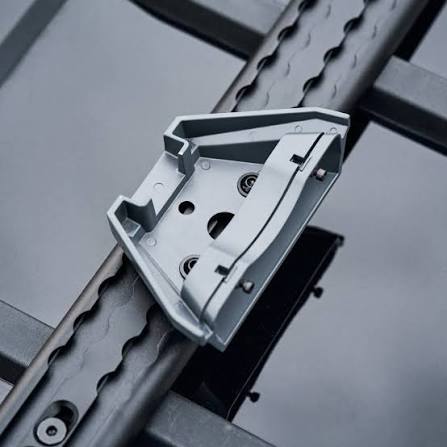
Starlink Mini Roof Rack Mount
Shop Starlink Mini Roof Rack Mount in Uganda for secure vehicle installation, easy removal and reliable Mini positioning. Order yours today.
Contact us for current pricing in Uganda
Contact us for current pricing in Uganda
Product Details
Starlink Mini Roof Rack Mount: 7 Powerful Travel Benefits
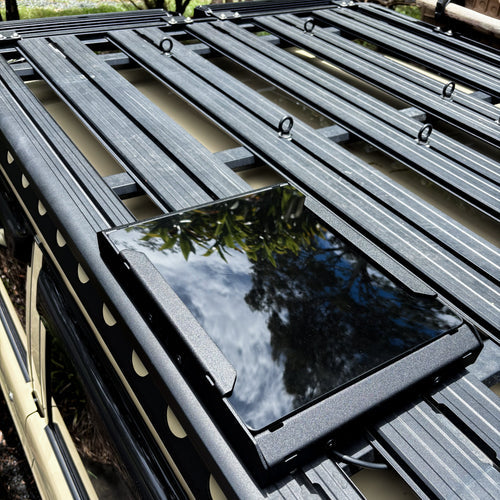
Starlink Mini Roof Rack Mount in Uganda
Starlink Mini is particularly suited to customers who want satellite connectivity in a compact package.
The Mini terminal has integrated WiFi, so a separate primary router is not necessary for a basic setup. The standard kit also includes a kickstand, Pipe Adapter and Flat Mount, 15 m DC Power Cable, power supply and Starlink Plug.
However, the standard kickstand is mainly useful when Mini is being deployed on an appropriate temporary surface.
Customers travelling regularly in a vehicle may want a more organised mounting solution.
The Starlink Mini Roof Rack Mount is designed specifically for that application.
Instead of drilling directly into the vehicle, it uses a compatible existing roof-rack crossbar as the mounting point.
What Is the Starlink Mini Roof Rack Mount?
The Mini Roof Rack Mount is an official Starlink accessory that attaches Starlink Mini to compatible vehicle roof racks.
Starlink designed it to accommodate different crossbar sizes rather than one single rack dimension.
The mount supports bars between approximately:
12 mm and 48 mm thick
with a maximum width of:
88 mm.
It should not be installed on round-profile roof-rack bars.
This compatibility requirement is important because not every roof rack is suitable simply because it has crossbars.
Table 1: Starlink Mini Roof Rack Mount Specifications
| Specification | Details |
|---|---|
| Product | Starlink Mini Roof Rack Mount |
| Compatibility | Starlink Mini |
| Minimum Rack Thickness | 12 mm / 0.47 in |
| Maximum Rack Thickness | 48 mm / 1.89 in |
| Maximum Rack Width | 88 mm / 3.5 in |
| Round-Profile Bars | Not intended |
| Package Dimensions | 185.5 × 249.9 × 86 mm |
| Package Dimensions in Inches | 7.3 × 9.8 × 3.4 in |
| Package Weight | 0.6 kg |
| Package Weight in Pounds | 1.32 lb |
These compatibility and package specifications are documented in Starlink's official Mini Accessories Guide.
Designed Specifically for Starlink Mini
The Roof Rack Mount is specifically listed as compatible with Starlink Mini.
It should not be assumed to fit Standard V4, Standard Actuated, Enterprise or Performance terminals.
Starlink provides Mini with its own range of mounting accessories, including the Roof Rack Mount, Mobility Mount, Wall Mount, Pivot Mount and included Pipe Adapter/Flat Mount.
Choosing a hardware-specific mount helps ensure the terminal is held correctly rather than relying on improvised brackets.
Roof Rack Compatibility
Checking the roof rack should be one of the first steps before buying this mount.
Starlink divides compatible rack thicknesses into two installation ranges:
- 12–32 mm (0.47–1.26 in)
- 28–48 mm (1.10–1.89 in)
The mount uses a reversible grip-pad arrangement to accommodate these different bar thicknesses. The short side is used for bars between 12 and 32 mm, while the long side accommodates other compatible bars up to 48 mm thick.
The crossbar must also be no more than 88 mm wide.
Do Not Use It on Round Roof-Rack Bars
This is one of the most important compatibility restrictions.
Starlink's installation guide explicitly states:
The Mini Roof Rack Mount is not intended to be mounted to round-profile bars.
Customers should therefore inspect the crossbar profile before purchasing.
A round bar may fall within the stated width and thickness measurements but still be unsuitable because of its shape.
The correct fit involves both dimensions and profile.
Reversible Grip Pad
Different roof racks use different crossbar thicknesses.
Instead of requiring separate mount versions, Starlink uses a grip pad that can be positioned according to the crossbar thickness.
Table 2: Roof Rack Bar Compatibility
| Crossbar Measurement | Mount Configuration |
|---|---|
| 12–32 mm thick | Short side of grip pad |
| 28–48 mm thick | Long side of grip pad |
| Up to 88 mm wide | Supported |
| Over 48 mm thick | Outside listed compatibility |
| Over 88 mm wide | Outside listed compatibility |
| Round-profile bar | Not intended |
| Compatible rectangular/aero-style profile | Check dimensions before installation |
The overlap between the two thickness ranges allows the installer to select the grip-pad orientation that provides the appropriate fit for the rack.
Clamp-On Roof Rack Installation
A major advantage of this mount is that it attaches to the existing crossbar.
Starlink's installation procedure instructs the user to loosen the two thumb screws until the mount can wrap around the roof-rack bar.
The mount arm is then flipped down and positioned around the crossbar.
Once correctly positioned, the mount arm is returned to its latched position.
The two hand screws are then tightened until the assembly is firmly secured to the rack.
This approach can avoid the need for direct drilling through the vehicle roof.
Correct Vehicle Orientation
Orientation is important.
Starlink includes an arrow on the Roof Rack Mount indicating the required vehicle direction.
According to the installation guide, the arrow should point toward the front of the vehicle.
This means the mount should not simply be attached in whichever direction seems convenient.
Before tightening the hand screws, verify:
- Rack compatibility
- Grip-pad orientation
- Mount centring
- Vehicle direction
- Starlink sky visibility
Following these steps reduces the chance of needing to reinstall the mount later.
Centre the Mount on the Crossbar
Starlink instructs installers to position the Roof Rack Mount so the grip pad contacts the roof rack and the mount is equally centred on the bar.
This helps create a secure installation.
Avoid positioning the mount partly off the crossbar or tightening it around an incompatible section of the rack.
The rack itself should also be properly secured to the vehicle before Mini is installed.
The Starlink mount cannot compensate for a loose or incorrectly installed roof rack.
Finding the Best Roof Rack Position
A roof rack provides height, but height alone does not guarantee a good Starlink installation.
Mini still needs a clear view of the sky.
Starlink warns that objects obstructing communication between the terminal and satellites can cause service interruptions. Its installation guide recommends using the obstruction tool in the Starlink app before selecting the mounting location.
Potential vehicle obstructions include:
- Roof boxes
- Rooftop tents
- Spare tyres
- Cargo
- Solar panels
- Other antennas
- Raised roof equipment
The Roof Rack Mount should be positioned where these objects do not unnecessarily block Mini.
Starlink Mini Roof Rack Mount Dimensions
The Roof Rack Mount itself is relatively compact.
Table 3: Mini Roof Rack Mount Dimensions
| Measurement | Approximate Size |
|---|---|
| Mount Width | 260 mm / 10.2 in |
| Mount Length | 296.5 mm / 11.7 in |
| Mount Profile Measurement | 103.2 mm / 4.1 in |
| Package Length | 249.9 mm / 9.8 in |
| Package Width | 185.5 mm / 7.3 in |
| Package Height | 86 mm / 3.4 in |
| Package Weight | 0.6 kg / 1.32 lb |
Starlink publishes these measurements in its Mini Accessories Guide.
The compact design helps keep the Mini close to the roof-rack crossbar instead of using a tall pole-style mounting arrangement.
Easy Starlink Mini Removal
One advantage of the Roof Rack Mount is that Mini does not necessarily have to remain on the vehicle permanently.
Starlink specifically describes the accessory as allowing users to easily remove Mini from the Roof Rack Mount when it is not in use.
This can be useful when:
- Parking the vehicle for long periods
- Storing Mini securely
- Moving Mini to another setup
- Travelling without needing Starlink
- Protecting the terminal from theft when unattended
The roof-rack mounting system can remain attached while the Mini is removed as appropriate.
Removing the Mini Kickstand
Before Mini is fitted to the Roof Rack Mount, its standard kickstand is removed.
Starlink's installation guide instructs users to squeeze the kickstand's release tab and pull it away from its fixed position.
The Mini can then be fitted to the dedicated roof-rack mounting assembly.
Keep the kickstand rather than discarding it.
It remains useful when Mini is removed from the vehicle and needs to be deployed temporarily on another suitable surface.
Installing Mini into the Roof Rack Mount
After the mount has been secured to the roof-rack crossbar, the Starlink Mini is installed into the mounting assembly.
The official guide instructs the user to connect the required cable and then slide Mini into the mount until it clicks into place, confirming that the terminal is firmly attached.
This click-in design helps simplify removing and reinstalling the terminal.
After installation, physically check that Mini is correctly seated before relying on the setup.
Roof Rack Mount vs Mini Mobility Mount
The Roof Rack Mount and Mobility Mount are both useful for vehicle installations, but they attach differently.
Table 4: Roof Rack Mount vs Mobility Mount
| Feature | Roof Rack Mount | Mobility Mount |
|---|---|---|
| Starlink Mini Compatible | Yes | Yes |
| Vehicle Use | Yes | Yes |
| Existing Roof Rack Required | Yes | No |
| Direct Vehicle Surface Mounting | No | Yes |
| Drilling Vehicle Surface | Generally avoided by mount | May be required |
| Easy Mini Removal | Yes | More permanent arrangement |
| Crossbar Size Restrictions | Yes | Not applicable |
| Round Rack Bar Restriction | Yes | Not applicable |
| Best For | Vehicles with compatible racks | Direct permanent surface installation |
For vehicles already equipped with a compatible roof rack, the Roof Rack Mount can provide a straightforward installation without creating direct mounting holes in the roof.
Roof Rack Mount vs Mini Kickstand
The Mini's included kickstand remains useful for temporary setups.
However, it is not the same as a dedicated vehicle roof-rack installation.
Table 5: Roof Rack Mount vs Mini Kickstand
| Feature | Roof Rack Mount | Mini Kickstand |
|---|---|---|
| Roof Rack Installation | Yes | No |
| Vehicle-Oriented Setup | Yes | Temporary deployment |
| Secure Crossbar Attachment | Yes | No |
| Portable Ground/Table Use | No | Yes |
| Mini Removal | Yes | Yes |
| Permanent Rack Position | Can remain installed | Not comparable |
| Included with Mini Kit | No | Yes |
| Best Application | Vehicle travel | Portable temporary setup |
The kickstand is better for customers who want to stop, unpack Mini and place it on an appropriate surface.
The Roof Rack Mount is better suited to customers who want Mini positioned on a compatible vehicle rack.
Roof Rack Mount vs Improvised Vehicle Mount
Some customers may consider using generic clamps or fabricated brackets.
However, a purpose-designed mount provides known Starlink Mini compatibility and documented rack dimensions.
Table 6: Official Roof Rack Mount vs Improvised Mount
| Consideration | Starlink Mini Roof Rack Mount | Improvised Mount |
|---|---|---|
| Designed for Mini | Yes | Depends |
| Published Rack Compatibility | Yes | Depends |
| Reversible Grip Pad | Yes | Depends |
| Direction Indicator | Yes | Depends |
| Click-In Mini Installation | Yes | Depends |
| Removal System | Designed for Mini | Varies |
| Installation Documentation | Yes | Varies |
| Fit Verification | Published limits | Installer dependent |
For customers regularly travelling over uneven roads, correct mounting becomes particularly important.
Starlink Mini Roof Rack Mount for Overlanding
Overlanding is one of the strongest use cases for the Roof Rack Mount.
Vehicles used for long-distance travel often already have roof racks for:
- Tents
- Recovery equipment
- Storage boxes
- Fuel containers
- Water
- Solar equipment
- Camping equipment
The Mini Roof Rack Mount can integrate the satellite terminal into the same general vehicle platform, provided the crossbar dimensions and profile are compatible.
Care should be taken to keep surrounding cargo from obstructing Mini's sky view.
Roof Rack Mount for Camping
Camping users can choose between temporary and vehicle-mounted Starlink setups.
A temporary setup might use:
Mini + Kickstand + Portable Power
A vehicle-oriented setup might use:
Mini + Roof Rack Mount + Compatible Power
The second option reduces the need to find a separate ground location for the Mini every time camp is established.
However, the customer still needs an appropriate Starlink service plan for the intended type and location of use.
The physical mount does not determine service-plan permissions.
Roof Rack Mount for Safari and Field Vehicles
The mount can also be useful for vehicles supporting field operations.
Potential applications include:
- Surveying
- Engineering
- Construction
- Agricultural fieldwork
- Research
- Remote project management
- Photography
- Environmental work
- Mobile offices
A roof-mounted Mini can help reduce the amount of equipment that needs to be separately deployed at each stop.
The terminal still requires power and appropriate satellite visibility.
Powering Roof-Mounted Starlink Mini
The mount itself does not supply power.
Starlink Mini requires a separate compatible power arrangement.
The standard Mini Kit includes a 15 m DC Power Cable and power supply, while Starlink also identifies portable options such as its Mini USB-C Cable with a suitable 100W USB-C source or the Mini Car Adapter.
A vehicle installation therefore needs to consider:
Mounting + Power + Cable Routing + Service Plan
not simply the mount.
Cable Routing on a Vehicle
Cable routing should be planned before the vehicle begins regular travel.
Avoid locations where cables can be:
- Trapped in doors
- Rubbed against sharp metal
- Crushed by roof-rack equipment
- Exposed to moving components
- Left loose in airflow
- Damaged during loading and unloading
The power solution should also be located where it remains secure and properly ventilated.
Do not allow a well-installed roof mount to be undermined by poor cable routing.
Using Mini's Integrated WiFi
One advantage of Starlink Mini for vehicles is its integrated WiFi router.
Starlink confirms that a separate router is not required to get online with a basic Mini setup.
This means a compact vehicle configuration can consist of:
Starlink Mini → Roof Rack Mount → Power Source → WiFi Devices
For more advanced networking, Mini also supports wired Ethernet and compatible additional routers.
This can be useful for mobile offices with several networked devices.
Check Vehicle Height
Adding equipment to a roof rack increases the overall height of the vehicle.
This should be considered when entering:
- Garages
- Parking structures
- Car washes
- Ferries
- Covered loading areas
- Low-clearance entrances
Roof-rack users should already be aware of clearance limitations, but adding Mini creates another component above the roofline.
Know the vehicle's final installed height.
Keep Roof Cargo Away from Mini
A roof rack is often used for multiple accessories simultaneously.
When installing Mini, avoid placing tall cargo directly around it.
A rooftop tent, storage box or other large item may obstruct the terminal's sky view.
Starlink specifically states that obstructions can interrupt service and recommends using the app's obstruction tool to identify a suitable mounting location.
Recheck the setup whenever the roof-rack cargo arrangement changes significantly.
Secure the Roof Rack Itself
The Starlink mount attaches to the roof rack, so the overall installation is only as secure as the rack beneath it.
Before fitting Mini:
- Inspect the rack
- Confirm crossbars are tight
- Check manufacturer load requirements
- Inspect attachment points
- Look for damage or corrosion
- Confirm the crossbar is structurally suitable
The Mini Roof Rack Mount should not be attached to a loose or damaged crossbar.
Why Choose the Starlink Mini Roof Rack Mount?
The Starlink Mini Roof Rack Mount is particularly useful for customers who need:
- Vehicle-mounted Starlink Mini
- Existing roof-rack installation
- No direct roof drilling for the mount
- Easy Mini removal
- Compact mounting
- Overlanding connectivity
- Camping connectivity
- Field-work connectivity
- Mobile-office internet
- Documented Mini compatibility
Its adjustable grip system supports several crossbar thicknesses, making it adaptable to many compatible roof-rack designs.
Why Buy from Starlink Uganda Installers?
Starlink Uganda Installers can help customers determine whether their roof rack is suitable before installation.
The important measurements are not simply whether a vehicle has a rack. The bar needs to meet the supported thickness and width limits and must not use an incompatible round profile.
Customers can also get assistance with Mini power solutions, cable routing, obstruction checking and installation positioning to create a more complete vehicle Starlink setup.
Frequently Asked Questions About Starlink Mini Roof Rack Mount
1. What is the Starlink Mini Roof Rack Mount?
The Starlink Mini Roof Rack Mount is a dedicated accessory that securely attaches Starlink Mini to a compatible vehicle roof-rack crossbar. It allows Mini to be removed when not in use.
2. What roof-rack sizes does the Mini Roof Rack Mount support?
It supports crossbars approximately 12–48 mm (0.47–1.89 in) thick and up to 88 mm (3.5 in) wide.
3. Can I install the Starlink Mini Roof Rack Mount on round bars?
No. Starlink explicitly states that the Mini Roof Rack Mount is not intended for round-profile bars.
4. Does the Roof Rack Mount require drilling into my vehicle?
The mount is designed to clamp around a compatible roof-rack crossbar using its mount arm and hand screws. The official procedure does not require drilling through the vehicle roof to attach the Roof Rack Mount itself.
5. Which direction should the Roof Rack Mount face?
Starlink includes a directional arrow on the mount. During installation, that arrow should point toward the front of the vehicle.
6. How much does the Mini Roof Rack Mount weigh?
Starlink lists a package weight of approximately 0.6 kg (1.32 lb) and package dimensions of 185.5 × 249.9 × 86 mm.
7. Can Starlink Mini be removed from the Roof Rack Mount?
Yes. Starlink specifically designed the mount so Mini can be easily removed when it is not in use.
8. Do I need to remove the Mini kickstand before installation?
Yes. Starlink's Roof Rack Mount installation instructions tell users to squeeze the release tab and remove the Mini's standard kickstand before mounting the terminal.
9. Is the Roof Rack Mount the same as the Mini Mobility Mount?
No. The Roof Rack Mount clamps to a compatible existing vehicle crossbar. The Mobility Mount is intended for a different permanent mounting approach on suitable surfaces. The correct option depends on the vehicle and mounting structure.
10. Where can I buy a Starlink Mini Roof Rack Mount in Uganda?
Customers can contact Starlink Uganda Installers to enquire about the Roof Rack Mount and receive assistance checking rack compatibility, positioning Mini, routing power cables and selecting appropriate vehicle power accessories.
Conclusion
The Starlink Mini Roof Rack Mount provides a practical way to attach Starlink Mini to compatible vehicle roof-rack crossbars without using a direct permanent mounting point through the vehicle roof. It supports rack bars from approximately 12 to 48 mm thick and up to 88 mm wide, while Starlink specifically warns that it is not intended for round-profile bars. Its reversible grip-pad system allows the mount to accommodate different supported crossbar thicknesses.
For overlanding, camping, safari vehicles, field operations and mobile work, the mount offers another important advantage: Mini can be removed when it is not needed. Correct installation still requires the mount to be centred securely on the crossbar, with the directional arrow pointing toward the front of the vehicle. The installation location should also provide a clear view of the sky, which can be checked using the Starlink app before final positioning.
For a Starlink Mini Roof Rack Mount in Uganda, Starlink Uganda Installers can assist with roof-rack compatibility, Mini mounting, cable routing, vehicle power solutions and complete mobile Starlink installation.