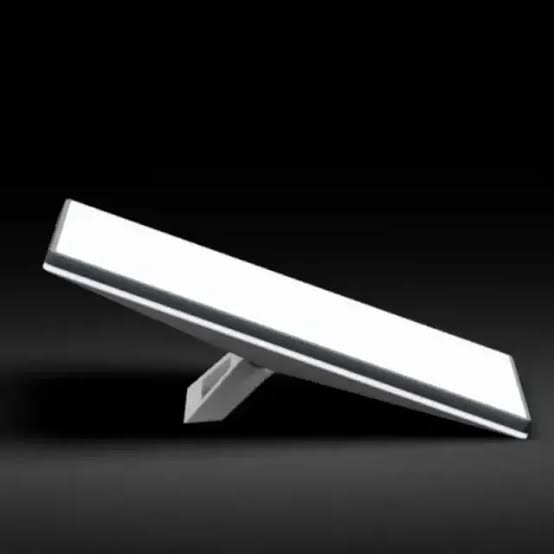
Starlink Mini X
Shop Starlink Mini X for compact, portable satellite internet with Router Mini, extended WiFi and flexible connectivity for homes and travel. Order today.
Contact us for current pricing in Uganda
Contact us for current pricing in Uganda
Product Details
Starlink Mini X: 7 Powerful Benefits for Portable Internet
Starlink Mini X in Uganda
The Starlink Mini X builds on one of the most useful characteristics of Starlink Mini: portability.
Starlink Mini combines the satellite terminal and primary WiFi functionality into one compact device. Mini X takes that concept further by packaging Mini together with Router Mini, providing an additional wireless networking device that can be positioned elsewhere to expand network coverage.
This makes Mini X particularly attractive where a customer wants compact satellite internet but expects the built-in WiFi signal from the Mini terminal alone to be insufficient for the intended space.
The kit can be useful for:
- Small homes
- Cabins and cottages
- Remote work
- Temporary offices
- Field teams
- Mobile setups
- Farms
- Camps
- Small businesses
- Portable connectivity
Starlink currently describes Mini X as a compact, portable and power-efficient internet solution intended for basic connectivity requirements.
What Comes with the Starlink Mini X?
The biggest distinction between Starlink Mini X and the regular Mini package is the additional Router Mini equipment.
Starlink's official Mini X specification sheet and installation guide list the following components.
Table 1: Starlink Mini X Kit Contents
| Component | Purpose |
|---|---|
| Starlink Mini with Integrated WiFi | Satellite connectivity and primary WiFi |
| Kickstand | Supports quick placement |
| Mini Pipe Adapter and Flat Mount | Provides additional mounting options |
| 15 m DC Power Cable | Powers the Starlink Mini |
| Mini Power Supply | Provides operating power |
| Starlink Plug | Protects the connection |
| Router Mini | Extends WiFi coverage |
| Router Mini Power Supply | Powers Router Mini |
| Router Mini Stand | Supports router placement |
The complete Mini X package weighs approximately 6.73 kg, according to Starlink's specification sheet.
Starlink Mini X Explained
Mini X is not simply a completely different satellite terminal from Mini.
The package combines Starlink Mini + Router Mini.
That distinction is important when comparing products.
The Starlink Mini terminal remains the equipment responsible for communicating with Starlink satellites. It also contains integrated WiFi, meaning devices can connect directly to the Mini.
Router Mini provides additional network coverage.
Starlink specifically says Mini X includes a Mini dish and Router Mini for extended coverage.
This makes Mini X a convenient package for customers who might otherwise purchase a normal Mini and later add another router.
Starlink Mini X Integrated WiFi
The Starlink Mini terminal already contains WiFi functionality.
Once Mini is powered and connected, users can connect their phones, laptops and other devices to the STARLINK wireless network.
This means Router Mini is not required simply for the satellite terminal to work.
Instead, Router Mini becomes an additional network node.
It can be positioned elsewhere in the property to help improve WiFi coverage beyond the area effectively served by the Mini terminal.
This is particularly useful when the Starlink itself must be installed where satellite visibility is best rather than where indoor WiFi coverage is best.
Starlink Mini X Router Mini
Router Mini is one of the defining features of the Starlink Mini X Kit.
Starlink describes Router Mini as a small and lightweight WiFi router optimised for Starlink Mini. It is designed for straightforward plug-and-play configuration through the Starlink app and is particularly suited to smaller homes, cabins and mobile installations.
Its compact design also matches the portable nature of Mini.
Rather than carrying a large networking system, users can transport the Starlink Mini and Router Mini together.
Table 2: Starlink Mini X Main Components
| Feature | Starlink Mini | Router Mini |
|---|---|---|
| Satellite Connection | Yes | No |
| Integrated WiFi | Yes | Yes |
| Main Purpose | Internet + WiFi | Extend network |
| Portable Design | Yes | Yes |
| Separate Power | Yes | Yes |
| Ethernet Networking | Supported | Supported |
| Mesh Networking | Main network | Mesh expansion |
| Starlink App Setup | Yes | Yes |
This combination allows the satellite terminal and indoor WiFi equipment to serve different purposes.
Starlink Mini X WiFi Coverage
Starlink states that the Mini itself can provide coverage of up to approximately 112 m² or 1,200 ft² under suitable conditions.
Actual coverage can vary considerably.
Concrete walls, multiple floors, metal structures, furniture and electrical interference can all affect WiFi performance.
Mini X addresses this limitation by adding Router Mini.
The Router Mini can be positioned where additional coverage is required rather than forcing all wireless devices to communicate directly with the Starlink terminal.
This is particularly useful where Mini is positioned near an exterior wall, window, balcony or outdoor mounting location.
Setting Up Starlink Mini X
Starlink provides an important instruction for Mini X installation:
Set up Starlink Mini first and Router Mini second.
Starlink warns that powering and configuring the router first can create setup problems such as a device appearing connected without internet access.
The correct sequence is therefore important.
Table 3: Starlink Mini X Setup Process
| Step | Action |
|---|---|
| 1 | Download the Starlink app |
| 2 | Find a location with clear sky visibility |
| 3 | Check for obstructions |
| 4 | Connect power to Starlink Mini |
| 5 | Connect to the STARLINK WiFi network |
| 6 | Complete Mini setup and alignment |
| 7 | Power Router Mini |
| 8 | Wait for the new mesh-node notification |
| 9 | Pair Router Mini |
| 10 | Move Router Mini to its desired position and test coverage |
Starlink states that pairing the Router Mini can take approximately 1–5 minutes once the mesh node is detected.
Starlink Mini X Alignment
The Mini terminal requires a clear view of the sky.
Trees, roof sections, poles and other objects between Starlink and the satellites can cause service interruptions.
Starlink therefore recommends using the obstruction-checking tool in its app before deciding on the final installation position.
After Mini is connected, the app also provides alignment guidance.
If the terminal needs to be rotated, an alert appears in the app and the alignment tool guides the user toward the appropriate orientation.
Correct terminal positioning should take priority over WiFi convenience because Router Mini can subsequently help extend the wireless network.
Starlink Mini X for Homes
Mini X can be useful for smaller residential properties where Starlink Mini provides the internet connection but additional indoor WiFi coverage is desired.
For example, the Mini terminal may need to be installed on one side of the property to achieve clear satellite visibility.
Router Mini can then be positioned further inside the house.
This arrangement can improve connectivity in rooms that receive a weaker signal from the primary Mini terminal.
Starlink describes Router Mini as particularly suitable for smaller homes and similar environments.
Starlink Mini X for Remote Work
Remote workers need both internet connectivity and useful WiFi coverage.
A Mini X installation can provide both without requiring a large networking setup.
Potential applications include:
- Remote offices
- Field engineering
- Construction supervision
- Research work
- Agricultural operations
- Temporary project offices
- Mobile workspaces
- Remote accommodation
The Starlink Mini provides the satellite connection while Router Mini can help distribute that connection within the workspace.
Starlink Mini X for Travel
Portability is central to the Mini X concept.
Starlink describes the kit as designed to provide high-speed, low-latency internet whether the customer is at home or on the go.
Because both the Mini terminal and Router Mini use compact designs, the complete networking system remains relatively easy to transport.
Users should still select a Starlink service plan that supports their intended type and location of use.
Portable hardware does not automatically mean every service plan supports unrestricted mobility.
Starlink Mini X for Cabins and Holiday Homes
Mini X can also work well for smaller secondary residences, cabins and holiday properties.
These locations may not have reliable fibre or other fixed broadband.
Starlink Mini can establish the satellite connection while Router Mini improves indoor wireless coverage.
Starlink itself specifically identifies smaller homes, cabins and mobile setups as suitable Router Mini applications.
This makes Mini X a convenient package for customers who want both satellite connectivity and network expansion without building a complicated local network.
Router Mini Placement
Router placement has a major effect on mesh performance.
Starlink recommends keeping Router Mini away from:
- Thick walls
- Bulky furniture
- Large televisions
- Metal appliances
- Multiple physical obstructions
Starlink also recommends elevating the router where practical rather than placing it directly on the floor.
For wireless mesh installations, Starlink recommends keeping additional routers no more than approximately two rooms apart.
Closer placement generally improves performance, while placing nodes farther apart can increase physical reach but reduce connection quality.
Wireless Mesh with Starlink Mini X
The simplest Mini X arrangement uses Router Mini as a wireless mesh node.
After the Starlink Mini is completely configured and online, Router Mini is powered nearby.
The Starlink app should then display a notification indicating that a new mesh node has been detected.
The user selects Pair or Pair All, and Router Mini joins the network.
Once pairing is complete, Router Mini can be moved to its desired position.
This allows customers to expand coverage without installing an Ethernet cable between the Mini and Router Mini.
Wired Mesh with Starlink Mini X
Mini X also supports wired mesh networking.
Instead of Router Mini communicating wirelessly with the main Starlink network, an Ethernet cable can connect the devices.
Starlink states that wired connections can provide better performance than wireless meshing in appropriate installations.
For a waterproof wired connection to the Starlink Mini, Starlink recommends its 15 m Mini Starlink Ethernet Cable.
Table 4: Wireless vs Wired Router Mini
| Feature | Wireless Mesh | Wired Mesh |
|---|---|---|
| Ethernet Cable Required | No | Yes |
| Installation Simplicity | Excellent | More planning required |
| Router Placement | Depends on wireless signal | More flexible within cable limits |
| Backhaul | Wireless | Ethernet |
| Wall Interference | Can affect performance | Less relevant to backhaul |
| Suitable for Portable Use | Excellent | Good |
| Suitable for Fixed Installation | Good | Excellent |
The best option depends on whether portability or maximum network consistency is the priority.
Ethernet Port on Starlink Mini X
The Mini terminal provides Ethernet networking capability.
Starlink's Mini X instructions explain that users can remove the Starlink Plug and connect a suitable Ethernet cable to wired mesh or compatible third-party hardware.
There is an important environmental consideration.
Starlink warns that the product is no longer rated IP67 when a standard RJ45 Ethernet cable is inserted.
For outdoor installations, customers should therefore use appropriate Starlink-compatible cabling and weather-resistant installation practices.
Starlink Mini X for Third-Party Networking
Mini X does not restrict customers to wireless mesh networking.
Its Ethernet capability can allow the Starlink connection to feed compatible third-party networking hardware.
For example, a fixed installation may use:
Starlink Mini → Ethernet → Third-Party Router or Network Equipment
This can be useful where the property already has an existing Ethernet or WiFi infrastructure.
For larger installations, a professional network may still be preferable to relying exclusively on Router Mini.
Starlink Mini X Power Requirements
Mini X includes two separately powered networking components:
- Starlink Mini
- Router Mini
The Starlink Mini kit includes its own power supply and 15 m DC power cable, while Router Mini comes with a separate Router Mini power supply.
This should be considered when planning portable battery or backup-power systems.
A power station intended to operate the complete Mini X setup must support both the Mini terminal and Router Mini rather than being sized only for the satellite terminal.
Mini X with Portable Power Stations
One of Mini's advantages is relatively low power consumption compared with larger Starlink hardware.
This makes Mini-based configurations attractive for battery-powered installations.
Mini X adds Router Mini, so the complete system requires more energy than operating the Mini terminal alone.
Customers planning portable operation should consider:
- Battery usable capacity
- Mini power consumption
- Router Mini consumption
- Conversion losses
- Required operating hours
- Other loads such as laptops
- Phone charging
- Lighting
- Fans or other equipment
A properly sized portable power station can therefore become an important part of a mobile Mini X setup.
Mini X with Solar Power
Solar power can also be used for Mini X when the system is properly designed.
A typical off-grid setup may include:
- Solar panels
- Charge controller
- Battery storage
- Appropriate Mini power equipment
- Router Mini power
- Electrical protection
The energy calculation should cover the entire installation.
For example, running Mini, Router Mini, a laptop and several small devices can require substantially more battery capacity than powering Mini alone.
Solar generation should also be sized for local sunlight conditions and the required daily runtime.
Starlink Mini X for Vehicles
Starlink specifically addresses vehicle use in its Mini X setup documentation.
For vehicle applications, Starlink recommends using the official Starlink car adapter to help prevent power-related drop-outs and overheating associated with unsuitable third-party power sources.
The appropriate service plan must also support the intended use.
A secure mounting solution and safe cable routing are particularly important in vehicle installations.
The Starlink equipment should not be placed where it can interfere with driving visibility, occupants or vehicle safety systems.
Starlink Mini X Mounting
Mini X includes several mounting components for the Mini terminal.
The official kit contains:
- Kickstand
- Mini Pipe Adapter
- Flat Mount
This provides customers with flexibility for both temporary and more permanent installations.
The kickstand is useful for quick deployment.
The Pipe Adapter can support appropriate pole installations.
The Flat Mount provides another option where a low-profile mounting arrangement is suitable.
Additional mounting accessories may also be available depending on the installation.
Starlink Mini X vs Starlink Mini Kit
The most important difference is straightforward:
Mini X includes Router Mini.
The standard Mini Kit already includes the satellite terminal with integrated WiFi.
Mini X adds Router Mini and its associated power and mounting equipment to provide additional WiFi coverage.
Table 5: Starlink Mini X vs Starlink Mini
| Feature | Mini X | Mini Kit |
|---|---|---|
| Starlink Mini Terminal | Yes | Yes |
| Integrated WiFi | Yes | Yes |
| Router Mini | Included | Not normally included |
| Router Mini Power Supply | Included | No |
| Router Mini Stand | Included | No |
| Mesh Expansion | Included in package | Additional router required |
| 15 m DC Power Cable | Included | Included |
| Kickstand | Included | Included |
| Pipe Adapter/Flat Mount | Included | Included |
| Portability | Excellent | Excellent |
Customers who only need the Mini terminal may therefore prefer the regular Mini Kit.
Customers expecting to need additional WiFi coverage can benefit from the Mini X package.
Starlink Mini X vs Standard Kit
Mini X and Standard are designed around different priorities.
Mini X emphasises compact size, portability and convenient mesh expansion.
Standard hardware is generally more appropriate for permanent residential and business installations requiring a larger fixed system.
Table 6: Mini X vs Standard Kit
| Feature | Starlink Mini X | Standard Kit |
|---|---|---|
| Primary Focus | Portable/basic connectivity | Fixed home/business connectivity |
| Terminal | Starlink Mini | Standard Starlink |
| Primary WiFi | Integrated into Mini | Separate router |
| Extra Router | Router Mini included | Depends on configuration |
| Portability | Excellent | Moderate |
| Mesh Expansion | Included Router Mini | Additional nodes available |
| Power Requirements | Lower-power Mini platform | Higher than Mini |
| Quick Deployment | Excellent | Good |
| Small Homes/Cabins | Excellent | Suitable |
| Larger Fixed Networks | Additional equipment may be needed | Better starting point |
The best kit depends on the actual application rather than simply selecting the newer or larger hardware.
Is Starlink Mini X Available in Uganda?
This is an important consideration before purchasing.
As of Starlink's current support information, Mini X is officially available in Argentina and Germany, with additional markets expected later. Starlink does not currently list Uganda among the confirmed Mini X markets in that support notice.
Customers in Uganda should therefore confirm hardware availability and service compatibility before purchasing or importing a Mini X Kit.
This does not mean Mini X hardware cannot exist in the local resale market; it means official market availability should not be assumed without checking.
Choosing Starlink Mini X
The Starlink Mini X is particularly attractive when a customer wants:
- Portable satellite internet
- Compact equipment
- Integrated Mini WiFi
- Additional Router Mini coverage
- Mesh networking
- Wired Ethernet options
- Small-home connectivity
- Remote-work connectivity
- Mobile installation flexibility
- Lower-power Starlink hardware
For a customer who needs only a compact Starlink terminal, the regular Mini may be sufficient.
For customers who already know they need additional WiFi coverage, Mini X provides a more complete package.
For large permanent business networks, Standard, Enterprise or Performance hardware may be more appropriate depending on the application.
Why Buy Starlink Mini X from Starlink Uganda Installers?
Starlink Uganda Installers can help customers determine whether Mini X is appropriate for the intended installation and confirm the equipment required for the complete setup.
Customers can receive assistance with Starlink positioning, mounting, Router Mini pairing, mesh configuration and Ethernet networking.
Portable and remote installations can also be planned around suitable backup batteries, portable power stations or solar systems.
For fixed installations, additional network equipment can be incorporated where Mini X alone does not provide sufficient coverage.
This allows customers to build a complete connectivity system rather than purchasing hardware without considering mounting, power and WiFi distribution.
FAQs
1. What is the Starlink Mini X?
The Starlink Mini X is a package combining Starlink Mini with integrated WiFi and a separate Router Mini for extended network coverage. Starlink describes it as a compact, portable and power-efficient connectivity solution.
2. What comes with the Starlink Mini X Kit?
Mini X includes Starlink Mini, kickstand, Mini Pipe Adapter and Flat Mount, 15 m DC power cable, power supply, Starlink Plug, Router Mini, Router Mini power supply and Router Mini stand.
3. What is the difference between Starlink Mini and Mini X?
Both use the Starlink Mini terminal. The major difference is that Mini X includes Router Mini and its supporting equipment, giving the customer an additional WiFi node for extended coverage.
4. Does Starlink Mini X have built-in WiFi?
Yes. The Mini terminal itself has integrated WiFi. Mini X additionally includes Router Mini for expanded wireless coverage.
5. How do I set up Router Mini with Mini X?
Starlink says to completely set up and connect the Mini first. Router Mini should then be powered, detected as a new mesh node in the Starlink app and paired to the existing network.
6. Can Router Mini connect wirelessly?
Yes. Router Mini supports wireless mesh connectivity with the Starlink Mini. Starlink also supports wired mesh configurations using Ethernet.
7. Does Starlink Mini X support Ethernet?
Yes. The Mini terminal provides an Ethernet connection that can be used for wired mesh or compatible third-party equipment. Starlink notes that using a standard RJ45 cable changes the terminal's IP67 environmental protection status.
8. Can Starlink Mini X be used in a vehicle?
Starlink provides guidance for vehicle use and recommends its official car adapter to help maintain suitable power delivery. Customers must also ensure their Starlink service plan supports the intended use.
9. Is Starlink Mini X officially available in Uganda?
Starlink's current support information lists Mini X as available in Argentina and Germany, with additional markets expected. Uganda is not currently listed in that notice, so customers should confirm availability before purchasing.
10. Where can I buy Starlink Mini X in Uganda?
Customers can contact Starlink Uganda Installers to enquire about Starlink Mini X availability and get assistance with equipment selection, installation, Router Mini configuration, mounting, Ethernet networking and portable-power solutions.
Conclusion
The Starlink Mini X combines the compact Starlink Mini terminal with Router Mini to create a more complete portable internet and WiFi package. The Mini provides the satellite connection and integrated WiFi, while Router Mini can extend network coverage into additional areas of a small home, cabin, temporary office or mobile setup.
Its support for wireless mesh, wired mesh and Ethernet networking gives customers several ways to configure the local network. The included kickstand, Pipe Adapter and Flat Mount also provide flexibility for different installation environments, while the Mini platform remains particularly attractive for customers prioritising portability and power efficiency.
For Starlink Mini X equipment, installation, Router Mini configuration, mounting, Ethernet networking and portable-power solutions, contact Starlink Uganda Installers. Because Starlink's current official notice has not yet listed Uganda among Mini X launch markets, availability should be confirmed before purchase. Visit starlinkugandainstallers.co.ke for more information.