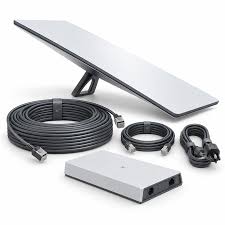
Starlink Performance Kit Gen 3
Shop Starlink Performance Kit Gen 3 in Uganda for rugged business, remote and mobile internet with AC/DC power. Get professional installation today.
Contact us for current pricing in Uganda
Contact us for current pricing in Uganda
Product Details
Starlink Performance Kit Gen 3: 7 Powerful Business Benefits
Starlink Performance Kit Gen 3 in Uganda
The Starlink Performance Kit Gen 3 is designed for customers who need more than a conventional residential Starlink installation.
It is intended for demanding applications where connectivity may be required in remote locations, harsh weather, industrial environments, moving platforms or business-critical installations.
Starlink describes Performance Gen 3 as designed for resilient connectivity in remote areas and harsh environments, extreme weather, high-vibration settings and in-motion usage.
That positioning makes Performance Gen 3 relevant for applications such as remote business operations, construction projects, industrial sites, field offices, transport operations, maritime environments and other locations where more rugged hardware is appropriate.
The system can also integrate directly with professional third-party networking equipment rather than requiring customers to build their network around a residential WiFi router.
What Comes with the Starlink Performance Kit Gen 3?
Starlink Performance Gen 3 is packaged differently from ordinary residential Starlink hardware.
Its standard kit centres on the Performance terminal and Advanced Power Supply.
Table 1: Starlink Performance Gen 3 Kit Contents
| Component | Purpose |
|---|---|
| Performance Gen 3 Starlink | Connects to Starlink satellites |
| Advanced Power Supply | Provides AC/DC power and networking |
| 25 m Performance Cable | Connects terminal to power supply |
| 1.5 m AC Power Cable | Provides AC input |
| 1.5 m DC Power Cable | Provides DC input |
| 5 m Ethernet Cable | Connects compatible networking equipment |
| Compatible Mount | Secures Starlink to the installation surface |
Starlink currently states that customers purchasing the kit can choose a compatible mount such as a Wall Mount, Flat Mount, Wedge Mount or Pipe Adapter.
A WiFi router is not automatically included as a standard component of the Performance Gen 3 kit, although Starlink says an eligible router can be added at checkout in supported markets or purchased separately.
Starlink Performance Gen 3 Specifications
Performance Gen 3 introduces substantial changes compared with previous Performance generations.
Table 2: Starlink Performance Gen 3 Specifications
| Specification | Performance Gen 3 |
|---|---|
| Antenna | Electronic phased array |
| Field of View | 140° |
| Built-In Motor | No |
| Terminal Rating Connected | IP69K |
| Terminal Rating Unplugged | IP68 |
| Operating Temperature | -40°C to 60°C |
| Snow Melt Capability | Up to 85 mm/hour |
| Survivable Wind | 280 kph+ |
| Power Input | 100–240V AC / 12–56V DC |
| Average Power Draw | Approx. 70W |
| Peak Hardware Throughput | 475 Mbps download / 75 Mbps upload |
| Included Performance Cable | 25 m |
| Router Compatibility | Third-party compatible |
These specifications are from Starlink's current comparison of Performance Gen 3 with earlier hardware.
Peak hardware throughput should not be interpreted as guaranteed customer internet speed. Actual service performance depends on the selected service plan, network conditions, location and other operational factors.
400+ Mbps Capability
Starlink currently describes the Performance Kit as capable of download speeds up to 400+ Mbps.
The company also states that it is working on network enhancements intended to enable gigabit speeds for Performance hardware, with service-plan upgrades rather than hardware replacement forming part of that roadmap.
For customers, the important distinction is between hardware capability and guaranteed service speed.
Buying Performance Gen 3 does not guarantee that every location or service plan will continuously deliver the terminal's maximum hardware capability.
Network congestion, service-plan priority, obstructions and other factors can influence real-world speeds.
140° Field of View
Performance Gen 3 provides a 140° field of view.
This wide field of view is particularly useful for Performance-class applications because the terminal has a large area of sky available for satellite communication.
It is especially relevant where the hardware is used in moving environments.
Performance Gen 3 still requires appropriate sky visibility.
Trees, buildings, poles and roof sections can obstruct communication between Starlink and satellites.
Starlink therefore instructs installers to use the obstruction tool within the Starlink app before permanently installing Performance Gen 3.
Rugged IP69K Protection
One of the standout features of Starlink Performance Kit Gen 3 is its environmental protection.
Starlink rates the Performance terminal at IP69K when connected and IP68 when unplugged.
Starlink says the terminal has been tested for water submersion to approximately one metre for up to 30 minutes and for pressure washing.
This does not eliminate the need for correct installation.
Connectors, cables, mounting points and network equipment still need to be installed according to the manufacturer's instructions.
However, the environmental specifications demonstrate why Performance Gen 3 is designed for more demanding applications than typical residential hardware.
Extreme Temperature Operation
Performance Gen 3 is rated to operate from approximately -40°C to 60°C.
That wider operating range makes the terminal suitable for environments where equipment may experience more extreme temperatures.
Starlink specifically positions the system for harsh environments and extreme weather.
This can be relevant for installations exposed to strong sunlight, remote industrial environments, cold climates and other challenging conditions.
Other equipment in the installation—including routers, switches, batteries and power equipment—must also be appropriate for the environmental conditions.
Performance Gen 3 Wind Resistance
Starlink currently lists Performance Gen 3 with a survivable wind rating of 280 kph+.
This is a terminal specification and should not be interpreted as a guarantee that every mounting structure will withstand the same wind conditions.
The strength of the installation also depends on:
- Mounting hardware
- Fasteners
- Roof or wall structure
- Pole strength
- Installation method
- Surface condition
Professional mounting is therefore especially important in exposed locations.
Snow Melt Capability
Performance Gen 3 also increases snow-melting capability.
Starlink currently specifies snow melt of up to approximately 85 mm per hour.
This is greater than the snow-melt capability listed for previous Performance Gen 2 and Standard hardware.
Although snow may not be a major consideration for most Ugandan installations, the specification helps demonstrate the environmental capabilities of Performance Gen 3.
Advanced Power Supply
One of the biggest differences between Performance Gen 3 and previous Starlink hardware is the Advanced Power Supply.
Starlink describes it as rack-mountable and capable of operating on both AC and DC power. It also supports DC input with a backup battery and includes diagnostics, a high-power Starlink output and a LAN connection.
This gives businesses considerably more flexibility when designing power systems.
Table 3: Advanced Power Supply Features
| Feature | Benefit |
|---|---|
| AC Input | Conventional mains operation |
| DC Input | Supports suitable DC power systems |
| Backup Battery Support | Helps maintain operation during outages |
| Rack Mounting | Suitable for professional installations |
| LAN Port | Supports network integration |
| Smart Diagnostics | Helps monitor system operation |
| Performance Output | Powers Performance Gen 3 |
| Router Support | Can power compatible Router 3 configuration |
The Advanced Power Supply is therefore more than a basic AC adapter.
It is designed around professional and industrial connectivity applications.
AC and DC Power
Performance Gen 3 supports 100–240V AC and approximately 12–56V DC power input through its Advanced Power Supply.
This is particularly valuable for installations where conventional mains electricity is not the only power source.
Possible applications include:
- Vehicles
- Boats
- Battery systems
- Solar systems
- Remote telecommunications sites
- Industrial DC systems
- Backup-power installations
Starlink includes both an AC and DC power cable with the kit.
Customers should still ensure the power source meets Starlink's required electrical specifications.
Performance Gen 3 Power Consumption
Despite being newer and more rugged Performance hardware, Gen 3 has lower listed average power consumption than Performance Gen 2.
Starlink's current hardware comparison lists an average draw of approximately 70W for Performance Gen 3.
For illustration:
70W × 10 hours = 700Wh
For 24-hour operation:
70W × 24 hours = 1,680Wh or 1.68kWh
These are simple energy calculations based on Starlink's listed average figure, not guaranteed daily consumption.
Actual energy use can vary according to operating conditions.
Backup Battery Support
The Advanced Power Supply is designed to work with DC input and backup-battery configurations.
This can be valuable for businesses that need internet connectivity during power interruptions.
Instead of waiting for equipment to reboot after every short outage, a properly designed backup system can keep Performance Gen 3 and essential networking equipment operating.
Table 4: Performance Gen 3 Backup Options
| Power Solution | Suitable Application |
|---|---|
| UPS | Short AC interruptions |
| DC Battery | Direct backup applications |
| Portable Power Station | Temporary and field deployment |
| Inverter + Battery | Fixed business backup |
| Solar + Battery | Remote/off-grid operation |
| Generator | Long-duration outages |
| Hybrid System | Critical connectivity |
The complete network load should be considered rather than Starlink alone.
Routers, switches, access points and other essential equipment also require power.
Performance Gen 3 with Solar Power
The combination of DC input and lower average power consumption makes Performance Gen 3 particularly interesting for remote solar installations.
A properly designed system can combine:
Solar Panels → Charge Controller → Battery → Advanced Power Supply → Performance Gen 3
Actual design depends on the battery voltage, solar equipment and electrical requirements.
A solar system should account for the complete daily energy demand, expected solar generation, battery reserve and conversion losses.
Where the network includes routers, switches or access points, their energy requirements must also be added.
Third-Party Router Compatibility
Performance Gen 3 supports direct connection to compatible third-party routers.
The kit includes a 5 m Ethernet cable that can connect the Advanced Power Supply to the WAN port of a third-party router.
A typical business network might therefore use:
Performance Gen 3 → Advanced Power Supply → Firewall/Router → Managed Switch → Access Points
This gives businesses flexibility to choose networking equipment appropriate for their operations.
For example, an organisation can use professional firewalls, VLANs, managed WiFi and multiple Ethernet networks without depending entirely on a residential Starlink router.
Third-Party Router Static Route
Starlink also documents an additional configuration that may be required when using some third-party routers.
If the Starlink app reports Starlink unreachable, the network administrator may need to create a static route to the Starlink management interface.
Starlink currently documents:
Network: 192.168.100.0
Subnet Mask: 255.255.255.0
Gateway: 192.168.100.1
Interface: WAN
Router menus vary between manufacturers, so configuration should follow the documentation for the particular router.
Router 3 with Performance Gen 3
Customers who prefer Starlink networking hardware can use Router 3 with Performance Gen 3.
However, Starlink states that the Performance Gen 3 Kit itself does not include Router 3 as a standard component.
A separate Performance Router 3 Kit includes Router 3 and a 5 m Starlink cable.
The Advanced Power Supply can power Router 3 through this cable, meaning the router does not require a separate power supply in that configuration.
A 15 m version of the router connection cable is also available from Starlink where a longer run is needed.
Starlink Performance Gen 3 for Businesses
Performance Gen 3 is particularly well suited to organisations that require rugged satellite connectivity.
Potential applications include:
- Remote offices
- Construction projects
- Industrial facilities
- Logistics operations
- Mining and field operations
- Farms
- Lodges
- Research sites
- Emergency deployments
- Temporary project sites
The Starlink terminal provides the internet connection while professional networking equipment distributes connectivity throughout the site.
Performance Gen 3 for Remote Sites
Remote sites often face two challenges simultaneously: limited terrestrial connectivity and unreliable electricity.
Performance Gen 3 addresses both areas more directly than many previous Starlink kits.
Satellite connectivity reduces dependence on local fibre infrastructure, while the Advanced Power Supply supports both AC and DC power.
A remote site can therefore combine Starlink with batteries, solar, generators or hybrid power infrastructure.
For larger compounds, Ethernet, fibre or point-to-point wireless equipment can then distribute connectivity to other buildings.
Performance Gen 3 for High-Vibration Environments
Starlink specifically identifies high-vibration settings among the intended Performance Gen 3 applications.
This makes it relevant for specialised installations where conventional fixed residential equipment may not be the ideal choice.
Mounting remains critical.
The appropriate Starlink mount should be selected according to the installation surface and operating environment.
Fasteners and mounting surfaces should also be structurally suitable.
Performance Gen 3 for In-Motion Connectivity
Performance Gen 3 is designed for in-motion usage.
This can make it relevant for appropriate land-mobility and maritime applications.
However, hardware capability should not be confused with service-plan permissions.
The Starlink plan attached to the terminal must support the customer's intended type and location of use.
A vehicle or vessel installation should therefore consider:
- Hardware mounting
- Power source
- Cable protection
- Service plan
- Router location
- Environmental exposure
The complete system should be planned together.
Performance Gen 3 Mounting Options
Performance Gen 3 provides significantly more mounting choice than simply using one default base.
Starlink currently lists mounting options including:
- Flat Mount
- Wall Mount
- Wedge Mount
- Pipe Adapter
The best mount depends on the application.
A Flat Mount can suit certain low-profile installations.
A Wall Mount can work where a building wall provides suitable sky visibility.
A Pipe Adapter can be used for appropriate pole installations.
A Wedge Mount provides another permanent installation option.
Mount selection should follow the site survey.
Installing Starlink Performance Gen 3
Installation starts with identifying a location that provides a clear view of the sky.
The Performance Cable is connected to the terminal using its dedicated connector and then connected to the Advanced Power Supply.
The installer then selects either the supplied AC or DC power cable depending on the available power source.
The Starlink app should be used to check obstructions and terminal alignment before permanent mounting.
Table 5: Performance Gen 3 Installation Process
| Stage | Main Task |
|---|---|
| Site Survey | Identify appropriate installation location |
| Obstruction Check | Confirm clear sky visibility |
| Mount Selection | Choose Flat, Wall, Wedge or Pipe mounting |
| Terminal Installation | Secure Performance Gen 3 |
| Performance Cable | Connect terminal to Advanced Power Supply |
| Power Connection | Select AC or DC input |
| Router Connection | Connect Starlink or third-party router |
| Network Configuration | Configure business network |
| Alignment | Follow Starlink app guidance |
| Testing | Verify internet and local network |
The system should be tested before final cable management and installation completion.
Performance Gen 3 Cable Options
The included Performance Cable is 25 m or approximately 82 ft.
Starlink's current comparison also lists Performance Gen 3 cable lengths of 5 m, 25 m and 50 m.
This gives installers flexibility when the ideal Starlink location is some distance from the network and power equipment.
Table 6: Performance Gen 3 Cabling
| Cable | Purpose |
|---|---|
| 25 m Performance Cable | Terminal to Advanced Power Supply |
| 5 m Performance Cable | Alternative shorter installation |
| 50 m Performance Cable | Longer installation |
| 5 m Ethernet Cable | Third-party router/network connection |
| 1.5 m AC Cable | AC power input |
| 1.5 m DC Cable | DC power input |
| Router 3 Cable | Connects compatible Router 3 configuration |
The correct cable should be used rather than modifying the supplied Performance cable.
Performance Gen 3 vs Performance Gen 2
Performance Gen 3 introduces several important improvements over Performance Gen 2.
Gen 2 uses the hardware formerly known as Flat High Performance, while Gen 3 is the newer Performance platform.
Gen 3 provides stronger environmental protection, a wider operating-temperature range, improved snow melting, AC/DC power through the Advanced Power Supply and lower listed average power consumption.
Performance Gen 2 remains capable hardware, but customers should identify their generation before purchasing cables, power supplies or mounting equipment.
The hardware architectures are different.
Performance Gen 3 vs Standard 4X
Standard 4X is designed primarily around conventional residential and fixed installations.
Performance Gen 3 is intended for considerably more demanding applications.
Both use electronic phased-array technology, but Performance Gen 3 has a 140° field of view compared with 110° for Standard 4X. It also offers stronger environmental protection and a broader operating-temperature range.
Starlink currently lists average power draw at approximately 70W for Performance Gen 3 and approximately 62W for Standard 4X.
The appropriate choice therefore depends on the environment and application rather than power consumption alone.
Performance Gen 3 Designed for Long-Term Deployment
Starlink states that Performance Gen 3 is designed around a 10-year mission life.
This does not mean every installation automatically carries a ten-year warranty.
Mission-life design and warranty terms are different concepts.
Instead, it indicates the intended durability class of the hardware.
For organisations planning permanent infrastructure, long-term hardware design can be an important consideration alongside service availability, power systems and network architecture.
Choosing Starlink Performance Kit Gen 3
The Starlink Performance Kit Gen 3 is particularly suitable where customers require:
- Business or enterprise Starlink
- Rugged hardware
- Harsh-environment operation
- Remote-site connectivity
- In-motion applications
- High-vibration installations
- AC and DC power
- Battery integration
- Third-party router compatibility
- Professional Ethernet networking
- Multiple mounting choices
- Long-term deployment
For a normal residential property, Standard hardware may be more straightforward.
For highly portable, low-power applications, Starlink Mini may be more convenient.
Performance Gen 3 is designed for situations where resilience, power flexibility and professional network integration are more important.
Why Buy Starlink Performance Kit Gen 3 from Starlink Uganda Installers?
Starlink Uganda Installers can assist customers with designing Performance Gen 3 installations around the actual site requirements rather than simply supplying the hardware.
Installation can include site assessment, obstruction checking, mount selection, terminal installation, cable routing, Advanced Power Supply setup and router configuration.
Business installations can also incorporate third-party routers, firewalls, managed switches, WiFi access points and point-to-point network extensions.
For remote locations, the AC/DC capabilities of the Advanced Power Supply also make it possible to plan battery, solar, inverter and generator solutions around the connectivity system.
This provides a more complete approach to business Starlink deployment.
FAQs
1. What is the Starlink Performance Kit Gen 3?
The Starlink Performance Kit Gen 3 is Starlink's rugged Performance-class terminal designed for resilient connectivity in remote locations, harsh environments, high-vibration settings and in-motion applications.
2. What comes with Performance Gen 3?
The kit includes the Performance Gen 3 terminal, Advanced Power Supply, 25 m Performance Cable, 5 m Ethernet cable, 1.5 m AC power cable and 1.5 m DC power cable. Compatible mounting options are available according to the installation.
3. How fast is Starlink Performance Gen 3?
Starlink currently describes the Performance Kit as capable of 400+ Mbps download speeds. Actual internet performance depends on service plan, location and network conditions.
4. How much power does Performance Gen 3 use?
Starlink's current hardware comparison lists an average power draw of approximately 70W. Actual consumption can vary according to operating conditions.
5. Can Performance Gen 3 run directly from DC power?
Yes. The Advanced Power Supply supports both 100–240V AC and 12–56V DC power input, making the system suitable for a wider range of fixed and remote power configurations.
6. Does Performance Gen 3 include a WiFi router?
A router is not part of the core Performance Gen 3 kit. Starlink states that eligible customers can add a router during purchase or obtain one separately. Performance Gen 3 also supports third-party routers.
7. Can I use my own router with Performance Gen 3?
Yes. The kit includes a 5 m Ethernet cable for connecting the Advanced Power Supply directly to the WAN port of a compatible third-party router.
8. Is Performance Gen 3 waterproof?
Starlink rates the Performance Gen 3 terminal IP69K with cables installed and IP68 without cables installed. Starlink also reports testing involving one metre of water submersion for up to 30 minutes and pressure washing.
9. Can Performance Gen 3 work with backup batteries?
Yes. Starlink's Advanced Power Supply supports DC input with a backup battery for uninterrupted operation when properly configured.
10. Where can I buy Starlink Performance Kit Gen 3 in Uganda?
Customers can contact Starlink Uganda Installers to enquire about Performance Gen 3 availability and get assistance with professional mounting, AC/DC power setup, third-party router integration, business networking and backup-power planning. Starlink currently says Performance Gen 3 is offered to Business and Enterprise customers in select regions, including parts of Africa, so local availability should be confirmed before purchase.
Conclusion
The Starlink Performance Kit Gen 3 is designed for demanding Business and Enterprise connectivity where rugged hardware, wide satellite visibility and flexible power options are important. Its 140° field of view, IP69K connected environmental rating, -40°C to 60°C operating range and approximately 70W average power draw represent significant advances in Starlink's Performance hardware platform.
The Advanced Power Supply further expands what can be done with Performance Gen 3 by supporting AC and DC input, backup-battery integration, professional Ethernet networking and compatible Router 3 configurations. Combined with Flat, Wall, Wedge and Pipe mounting options, this allows Performance Gen 3 to serve fixed businesses, remote sites, industrial environments and suitable in-motion applications.
For the Starlink Performance Kit Gen 3 and professional installation in Uganda, contact Starlink Uganda Installers for help with mounting, cable routing, Advanced Power Supply configuration, third-party networking and backup-power integration. Visit starlinkugandainstallers.co.ke for more information.