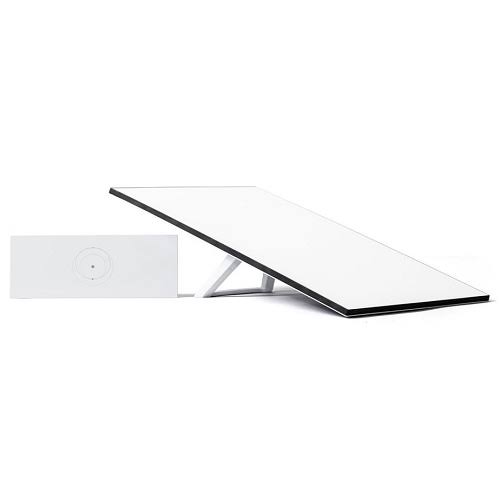
Starlink Standard 4X
Shop Starlink Standard 4X in Uganda for fast, reliable satellite internet with WiFi 6, Ethernet and flexible mounting. Order your kit today.
Contact us for current pricing in Uganda
Contact us for current pricing in Uganda
Product Details
Starlink Standard 4X: 7 Powerful Benefits for Fast Internet
Starlink Standard 4X in Uganda
The Starlink Standard 4X provides a practical satellite internet solution for homes, offices and other fixed locations where users want fast connectivity without depending entirely on fibre, copper or conventional fixed wireless infrastructure.
Starlink describes Standard 4X as best suited to residential customers and everyday internet activities such as streaming, video calling and gaming. It includes Router 3 rather than requiring the customer to purchase a primary WiFi router separately.
The system consists of two main technologies.
The outdoor Starlink terminal communicates with satellites using an electronic phased-array antenna.
Router 3 then distributes that connection through WiFi or Ethernet to devices inside the property.
This separation makes Standard 4X useful for customers who want a permanent Starlink installation while retaining flexibility over where the indoor router is positioned.
What Comes with the Starlink Standard 4X?
Starlink's current Standard 4X documentation lists the terminal, kickstand, Router 3 and associated power and connection equipment.
Table 1: Starlink Standard 4X Kit Contents
| Component | Purpose |
|---|---|
| Standard Starlink | Connects to Starlink satellites |
| Kickstand | Supports initial or temporary placement |
| Router 3 | Provides WiFi and Ethernet networking |
| 15 m Starlink Cable | Connects Starlink to Router 3 |
| 1.5 m AC Power Cable | Connects the system to mains electricity |
| Power Supply | Provides operating power |
Starlink lists the complete package at approximately 6.73 kg, with package dimensions of about 652.4 × 451.7 × 97.9 mm.
Starlink Standard 4X Terminal
Standard 4X uses a rectangular Starlink terminal without a built-in motor for self-orientation.
Starlink distinguishes it from older actuated hardware partly through this design. The terminal includes a kickstand that can be opened for quick deployment, folded for storage or used as part of an appropriate installation arrangement.
The antenna itself is an electronic phased array.
This allows the system to communicate with satellites moving overhead electronically.
The absence of a motor does not mean the terminal can simply face any direction. Correct initial orientation remains important.
The Starlink app provides an alignment tool that tells the installer when the terminal needs to be physically rotated. Starlink says that if the Standard 4X is aligned within approximately 5°, the app considers it properly aligned.
Starlink Standard 4X Specifications
Starlink's current hardware comparison provides detailed specifications for Standard 4X, including environmental protection, field of view, power consumption and cable options.
Table 2: Starlink Standard 4X Specifications
| Specification | Standard 4X |
|---|---|
| Antenna | Electronic phased array |
| Field of View | 110° |
| Initial Orientation | Software-assisted manual alignment |
| Built-In Motor | No |
| Environmental Rating | IP67 Type 4 with cables installed |
| Operating Temperature | -30°C to 50°C |
| Snow Melt Capability | Up to 40 mm/hour |
| Survivable Wind Rating | 177 kph+ |
| Average Power Draw | Approx. 62W in current comparison |
| Power Input | 100–240V AC |
| Included Starlink Cable | 15 m |
| Longer Cable Option | 50 m |
| Router | Router 3 |
Starlink's current comparison lists peak hardware throughput capability of up to 475 Mbps download and 70 Mbps upload for Standard 4X. This should not be interpreted as a guaranteed customer internet speed because actual service performance depends on the service plan, network conditions, location and other factors.
Router 3 with Starlink Standard 4X
One of the strongest features of Standard 4X is Router 3.
Starlink's current Router 3 specifications list support for IEEE 802.11a/b/g/n/ac/ax, making it a WiFi 6 router. It uses tri-band 2.4 GHz and 5 GHz networking with 4×4 MU-MIMO and OFDMA technologies.
Router 3 can therefore provide the foundation for a modern home or small-business network.
It can connect:
- Smartphones
- Laptops
- Tablets
- Smart televisions
- Gaming consoles
- Desktop computers
- CCTV networking equipment
- Smart-home devices
- Printers
- Other internet-connected equipment
Actual WiFi performance depends on building construction, router position, interference and the distance between Router 3 and connected devices.
Ethernet Ports on Router 3
Standard 4X is also useful for customers who require wired networking.
Router 3 provides two additional RJ45 Ethernet ports behind the removable Ethernet cover. Customers can connect their own Ethernet cables from these ports to compatible third-party equipment.
This makes it possible to connect equipment such as:
- Network switches
- Desktop computers
- Smart TVs
- Wireless access points
- CCTV equipment
- Third-party networking devices
Ethernet can be particularly useful for fixed devices where a wired local network connection is preferred.
Table 3: Standard 4X Networking Options
| Connection | Suitable Applications |
|---|---|
| Router 3 WiFi | Phones, tablets and laptops |
| Ethernet | Computers and fixed equipment |
| Network Switch | Additional wired devices |
| Mesh Router | Expanding wireless coverage |
| Access Points | Larger homes and offices |
| Third-Party Hardware | Advanced network configurations |
| Bypass Mode | Alternative routing configurations |
The best network can combine WiFi and Ethernet rather than depending exclusively on either technology.
Starlink Standard 4X for Homes
Standard 4X is primarily positioned for residential users.
It can support everyday activities such as:
- Web browsing
- Video streaming
- Remote work
- Video conferencing
- Online learning
- Cloud applications
- Gaming
- Social media
- Smart-home connectivity
The terminal should be installed where it has a sufficiently clear view of the sky.
Starlink warns that objects such as trees, poles and sections of a roof can obstruct communication between the terminal and satellites, causing service interruptions.
The Starlink app includes a Check for Obstructions tool that can help identify a better installation position.
Starlink Standard 4X for Offices
Although Standard 4X is primarily positioned for residential and everyday internet use, it can also serve suitable office environments.
A smaller office may use Router 3 directly.
A larger office can connect a network switch to one of Router 3's Ethernet ports and distribute the Starlink connection to additional equipment.
For example:
Starlink Standard 4X → Router 3 → Network Switch → Computers and Access Points
This can create a much more useful office network than relying exclusively on the wireless signal from one router.
The appropriate Starlink service plan should also be selected according to the intended business use.
Standard 4X for Remote Locations
One of the practical advantages of Starlink is that the property does not need a conventional terrestrial broadband cable running to it.
This makes Standard 4X useful for locations where fibre infrastructure is unavailable or difficult to obtain.
Possible applications include:
- Rural homes
- Farms
- Remote offices
- Construction sites
- Lodges
- Schools
- Temporary workspaces
- Remote facilities
However, Starlink still requires suitable power, correct installation and an unobstructed view of the sky.
The local WiFi network must also be designed according to the property.
Installing Starlink Standard 4X
Starlink's official setup process begins by identifying a suitable location with clear sky visibility.
The terminal can initially be positioned using its integrated kickstand.
One end of the supplied Starlink cable connects to the terminal and the other connects to the appropriate Router 3 port.
The power equipment is then connected and the system switched on.
After connecting to the default STARLINK WiFi network, the customer can use the Starlink app to configure the network and complete terminal alignment.
Table 4: Starlink Standard 4X Installation Process
| Step | Main Task |
|---|---|
| 1 | Select an installation location |
| 2 | Check the location for obstructions |
| 3 | Position or permanently mount Starlink |
| 4 | Route the 15 m Starlink cable |
| 5 | Connect Starlink to Router 3 |
| 6 | Connect the power equipment |
| 7 | Connect to the STARLINK WiFi network |
| 8 | Configure WiFi name and password |
| 9 | Align the terminal using the app |
| 10 | Test internet and WiFi coverage |
Permanent roof or pole installations should also consider cable protection and appropriate mounting.
Standard 4X Manual Alignment
Standard 4X does not use the motorised initial alignment system found on Standard Actuated.
Instead, the installer manually adjusts the terminal using guidance from the Starlink app.
This process should not be confused with manually tracking satellites.
Once properly aligned, Standard 4X uses its electronic phased-array antenna to track satellite signals electronically. It does not need to physically rotate each time a different satellite passes overhead.
This simpler physical design removes the motor and mast arrangement found on the older actuated terminal.
Starlink Standard 4X Mounting Options
The included kickstand provides a convenient starting point, but permanent installations often benefit from dedicated mounting hardware.
Starlink currently provides installation guides for Standard 4X accessories including:
- Wall Mount
- Pivot Mount
- Pipe Adapter
- Mobility Mount
- Standard X-Frame Base
- Standard Roof Rack
- Standard-to-Standard Actuated Mount Adapter
- Router 3 Mount
- Power Supply Mount
- Cable Routing Kit
- Masonry Routing Kit
The correct mounting solution depends on the building and sky visibility.
A roof installation can be useful where trees or neighbouring buildings obstruct a lower mounting position.
A wall mount may be appropriate where the building orientation provides a suitable view.
A pipe adapter can allow installation on an appropriate existing pole.
Standard 4X Cable
The Standard 4X includes a 15 m or 49.2 ft detachable Starlink cable between the terminal and Router 3.
Starlink's current hardware comparison also identifies a 50 m cable option for Standard 4X.
Cable length should be considered before mounting the terminal.
The location providing the clearest sky view may be significantly farther from the ideal indoor router position.
A properly planned cable route allows both pieces of equipment to be positioned more effectively.
Starlink advises against modifying the supplied cable or combining it with another cable simply to increase its length. The Starlink cable has a water-resistant locking seal and is specifically power-rated for the kit.
Starlink Standard 4X Power Consumption
Power requirements matter for customers planning UPS, battery or solar backup.
Starlink's current hardware comparison lists Standard 4X average power draw at approximately 62W.
Actual consumption can vary.
The system accepts 100–240V AC, making it compatible with standard mains power through its supplied power equipment.
Customers operating Starlink from batteries should calculate energy requirements rather than considering only instantaneous wattage.
For illustration:
62W × 10 hours = 620Wh
This is a theoretical calculation based on the listed average figure and does not account for variations in consumption or conversion losses.
Backup Power for Starlink Standard 4X
A backup-power system can keep Starlink operating when grid electricity fails.
Possible options include:
- UPS
- Portable power station
- Inverter and battery
- Solar and battery
- Generator
- Hybrid backup system
Battery sizing should include all essential networking equipment.
For example, a customer operating Starlink, an Ethernet switch and several access points will require more energy than a customer powering only Standard 4X.
Table 5: Standard 4X Backup Planning
| Equipment | Consider in Battery Sizing? |
|---|---|
| Standard 4X | Yes |
| Router 3 | Yes |
| Network Switch | If used |
| Mesh Router | If used |
| WiFi Access Points | If used |
| CCTV Equipment | If required |
| Laptop | If backup is required |
| Other Devices | According to requirements |
The desired runtime should be established before selecting battery capacity.
Starlink Standard 4X with Solar Power
Standard 4X can form part of a solar-powered internet installation when the solar and battery system is appropriately designed.
Using Starlink's current 62W average figure as a simple illustration:
62W × 24 hours = 1,488Wh or approximately 1.49kWh per day.
That does not represent a guaranteed daily energy requirement.
Actual consumption changes with operating conditions, and the complete solar design must also account for inverter losses, battery reserve, Router 3 and any additional networking equipment.
Solar generation also varies with panel size, shading, orientation and weather.
Mesh WiFi with Standard 4X
Large properties may need additional WiFi coverage.
Router 3 supports Starlink mesh networking, and Starlink currently identifies Router 3 as compatible with Standard 4X as well as Router Mini and several other Starlink hardware configurations.
Mesh nodes can help extend the wireless network into areas where the main Router 3 signal becomes weak.
This can be useful in:
- Multi-storey homes
- Large houses
- Offices
- Lodges
- Schools
- Buildings with thick walls
However, mesh should not automatically replace proper Ethernet networking.
Larger commercial properties may benefit from wired access points connected through Ethernet.
Router 3 Bypass Mode
Router 3 also supports Bypass Mode.
When Bypass Mode is enabled, the router's status light becomes violet, and the feature allows another networking configuration to take over routing functions. Starlink notes that a factory reset is required to exit Bypass Mode.
This can be useful for customers who want to use compatible third-party networking equipment.
Advanced network configuration should be planned carefully so that Starlink and the local network operate correctly together.
Standard 4X vs Standard Actuated
The differences between Standard 4X and Standard Actuated are important because both products can still appear in the Starlink market.
Table 6: Standard 4X vs Standard Actuated
| Feature | Standard 4X | Standard Actuated |
|---|---|---|
| Antenna | Electronic phased array | Electronic phased array |
| Initial Alignment | Manual with app | Motorised self-orientation |
| Built-In Motor | No | Yes |
| Main Router | Router 3 | Gen 2 WiFi Router |
| WiFi Generation | WiFi 6 | Earlier WiFi generation |
| Temporary Mount | Integrated kickstand | Mast with X-shaped base |
| Included Cable | Approx. 15 m | Approx. 15 m |
| Power Supply | Separate | Integrated into router |
| Ethernet | Router 3 built-in ports | Adapter typically required |
| Permanent Mounts | Multiple options | Hardware-specific options |
Starlink says both versions provide the same class of reliable high-speed Starlink internet and can support the same service plans and installation use cases, while their hardware design and setup process differ.
Standard 4X vs Starlink Mini
Mini is designed around compact size, portability and lower power requirements.
Standard 4X provides a larger terminal and separate Router 3, making it particularly attractive as a permanent home or office setup.
A traveller or mobile worker prioritising portability may prefer Mini.
A household expecting a more conventional fixed installation with Router 3 and built-in Ethernet connectivity may find Standard 4X more suitable.
The decision should therefore consider the installation rather than simply comparing physical size.
Standard 4X vs Enterprise
Standard 4X and Enterprise also serve different installation requirements.
Standard 4X comes with Router 3 and a 15 m cable, making it a straightforward complete package for homes and many smaller installations.
Enterprise instead emphasises long cable distance and professional third-party networking.
Customers should consider Enterprise where the terminal needs to be positioned much farther from the network room or where a professional router/firewall infrastructure is already in place.
Standard 4X remains a simpler starting point for most conventional installations.
Using Standard 4X with Network Switches
Router 3's additional Ethernet ports make network expansion straightforward.
A network switch can be connected to Router 3 and provide additional wired connections.
For example:
Starlink Standard 4X → Router 3 → Ethernet Switch → Computers, TVs and Access Points
This can be particularly useful for offices and larger homes.
A managed switch can also support more sophisticated networking where VLANs and other management functions are required.
Starlink Standard 4X for CCTV Networks
Standard 4X can also provide internet connectivity for a property with an IP CCTV system.
The cameras themselves would normally connect to the property's local network rather than directly to the Starlink terminal.
A typical configuration could involve:
Starlink → Router 3 → Network Switch → NVR/CCTV Network
Remote access requirements depend on the CCTV system and network configuration.
The number and quality of camera streams should also be considered when evaluating bandwidth requirements.
Choosing the Starlink Standard 4X
The Starlink Standard 4X is particularly worth considering when customers want:
- A modern fixed Starlink installation
- Router 3 included
- WiFi 6
- Built-in Ethernet connectivity
- Residential internet
- Remote-work connectivity
- Streaming and video calling
- Gaming
- Mesh expansion
- Permanent roof or pole mounting
- Backup-power compatibility
Starlink officially positions Standard 4X for residential users and everyday online activity, making it one of the more straightforward Starlink options for conventional home connectivity.
Why Buy Starlink Standard 4X from Starlink Uganda Installers?
Starlink Uganda Installers can help customers move beyond simply purchasing the hardware by planning the complete installation.
This can include selecting a location with suitable sky visibility, choosing the appropriate mounting method, routing the Starlink cable and positioning Router 3 for effective WiFi coverage.
For larger properties, additional mesh routers, Ethernet switches or wireless access points can be incorporated.
Customers who experience regular electricity interruptions can also plan an appropriately sized UPS, portable power station, inverter-and-battery system or solar backup.
The result is a Starlink installation designed around the actual property rather than simply placing the terminal wherever installation is easiest.
FAQs
1. What is the Starlink Standard 4X?
The Starlink Standard 4X is a rectangular Starlink terminal without a built-in self-orientation motor. The kit includes Router 3 and is primarily designed for residential users and everyday online activities such as streaming, gaming and video calls.
2. What comes with the Starlink Standard 4X Kit?
The kit includes the Standard Starlink terminal, kickstand, Router 3, 15 m Starlink cable, 1.5 m AC power cable and power supply.
3. Does Starlink Standard 4X have WiFi 6?
Yes. Standard 4X comes with Router 3, which supports IEEE 802.11ax or WiFi 6, together with 4×4 MU-MIMO and OFDMA.
4. Does Standard 4X have Ethernet ports?
Yes. Router 3 provides two additional RJ45 Ethernet ports that can connect compatible third-party equipment using Ethernet cables.
5. How long is the Starlink Standard 4X cable?
The included Starlink cable is 15 m or 49.2 ft. Starlink's current hardware comparison also lists a 50 m cable option for Standard 4X.
6. Does the Standard 4X dish move automatically?
No. Initial alignment is performed manually with guidance from the Starlink app. Once correctly positioned, the phased-array antenna tracks satellite signals electronically without needing to physically rotate.
7. How much power does Starlink Standard 4X use?
Starlink's current hardware comparison lists an average power draw of approximately 62W. Actual consumption can vary according to operating conditions.
8. Can Starlink Standard 4X use mesh WiFi?
Yes. Router 3 supports Starlink mesh networking and is compatible with Standard 4X. Additional compatible routers can be used where greater WiFi coverage is required.
9. Can Starlink Standard 4X work with backup power?
Yes. A properly sized UPS, portable power station, inverter-and-battery system, solar setup or generator can provide backup power. Capacity should be calculated according to the complete load and required runtime.
10. Where can I buy Starlink Standard 4X in Uganda?
Customers can contact Starlink Uganda Installers for Standard 4X equipment and assistance with installation, mounting, Router 3 configuration, Ethernet networking, WiFi expansion and backup-power planning.
Conclusion
The Starlink Standard 4X combines a modern electronic phased-array terminal with Router 3, WiFi 6, Ethernet connectivity and flexible mounting options. Starlink positions it primarily for residential users and everyday online activities, while its networking features also make it practical for remote work, small offices and other fixed installations.
Its non-motorised design uses software-assisted manual alignment during installation, after which the phased-array terminal electronically tracks satellite signals. The included 15 m cable, separate power supply and range of compatible mounting accessories provide flexibility for roof, wall, pole and other suitable installations.
For the Starlink Standard 4X and professional installation in Uganda, contact Starlink Uganda Installers for help with mounting, cable routing, Router 3 configuration, Ethernet networking, WiFi expansion and backup-power planning. Visit starlinkugandainstallers.co.ke for more information.