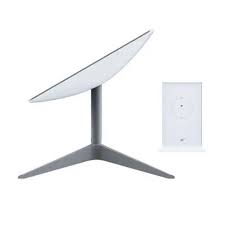
Starlink Standard Kit Gen 3
Shop Starlink Standard Kit Gen 3 in Uganda for fast, reliable satellite internet with WiFi 6. Ideal for homes and offices. Order your kit today.
Contact us for current pricing in Uganda
Contact us for current pricing in Uganda
Product Details
Starlink Standard Kit Gen 3: 7 Powerful Internet Benefits
Starlink Standard Kit Gen 3 in Uganda
The Starlink Standard Kit Gen 3 provides satellite internet without requiring a fibre, copper or other fixed broadband line to reach the property.
This makes it particularly useful for locations where conventional broadband infrastructure is unavailable or does not adequately meet the customer's connectivity requirements.
The system consists of an outdoor Starlink terminal that communicates with the Starlink satellite network and indoor networking equipment that distributes connectivity to phones, computers, televisions and other devices.
Unlike the older Standard Actuated Starlink, the newer Standard terminal does not contain a built-in motor for initial self-orientation. Instead, the user manually positions the terminal with guidance from the alignment tool inside the Starlink app. Once correctly positioned, its electronic phased-array antenna tracks satellites electronically without needing to physically rotate.
This simplified hardware design makes the Standard Kit well suited to permanent roof, wall and pole installations.
What Comes with the Starlink Standard Kit Gen 3?
The exact contents should always be confirmed against the particular Standard configuration being purchased.
For the current Standard 4 X configuration, Starlink lists the following equipment.
Table 1: Starlink Standard Kit Gen 3 Contents
| Component | Purpose |
|---|---|
| Standard Starlink Terminal | Connects to Starlink satellites |
| Integrated Kickstand | Initial or flat-surface mounting |
| Router 3 | Provides local WiFi and Ethernet |
| 15 m Starlink Cable | Connects terminal and networking equipment |
| 1.5 m AC Power Cable | Connects system to mains electricity |
| Power Supply Unit | Provides appropriate operating power |
| Optional Mounts | Available separately for permanent installation |
This provides the main equipment needed to establish a basic Starlink internet connection.
Additional mounting, cabling and networking accessories can then be selected according to the property.
Starlink Standard Gen 3 Dish
The newer Standard terminal is a flat rectangular electronic phased-array antenna.
Starlink identifies both Standard 4 and Standard 4 X as rectangular terminals without a built-in motor for self-orientation and with a kickstand-style mount.
Electronic phased-array technology allows the terminal to communicate with satellites moving overhead without physically turning the dish every time the satellite position changes.
This should not be confused with initial alignment.
The terminal still needs to face the appropriate direction when it is first installed. The Starlink app provides an alignment tool that guides the installer in manually adjusting the terminal.
Once it is correctly aligned and has suitable sky visibility, regular physical adjustment should not be necessary.
Starlink Standard Kit Gen 3 Router
The Standard 4 X comes with Router 3, whereas the older Standard Actuated system comes with the Gen 2 WiFi Router.
Router 3 provides a more modern networking platform for homes and businesses.
It supports WiFi 6, making it suitable for environments where numerous modern wireless devices need internet connectivity.
This can include:
- Smartphones
- Laptops
- Desktop computers
- Smart televisions
- Tablets
- CCTV systems
- Smart-home equipment
- Network printers
- Gaming devices
- Other internet-connected equipment
For larger installations, the router can also form the starting point for a broader Ethernet and WiFi network.
Table 2: Standard Gen 3 Networking Features
| Feature | Benefit |
|---|---|
| Router 3 | Modern Starlink networking |
| WiFi 6 | Improved modern wireless networking |
| Built-in Ethernet | Easier wired networking |
| Mesh Expansion | Helps extend WiFi coverage |
| Network Switch Support | Allows additional wired devices |
| Third-Party Networking | Useful for advanced installations |
| Separate Router | Flexible router positioning |
The appropriate network design depends on the size and construction of the property.
WiFi 6 with Starlink Standard Gen 3
WiFi 6 is particularly useful in homes and offices where many devices may be connected simultaneously.
A modern household can easily have dozens of internet-connected devices when phones, laptops, televisions, security cameras and smart-home equipment are counted.
A business can have even greater networking requirements.
WiFi performance, however, is affected by more than the internet connection.
Router location, concrete walls, multiple floors, metal structures, distance and wireless interference can all reduce coverage.
Customers should therefore distinguish between Starlink internet performance and indoor WiFi performance.
A property can have a strong Starlink satellite connection but weak WiFi in a distant room.
In that situation, the solution may be additional networking equipment rather than changing the Starlink terminal.
Built-In Ethernet Connectivity
Wired networking is another advantage of the newer Router 3 configuration.
Ethernet connections can be useful for equipment where consistent local network connectivity is preferred.
Examples include desktop computers, network switches, smart televisions, access points and CCTV networking equipment.
For businesses, one Ethernet connection can feed a network switch, which can then distribute connectivity to multiple wired devices.
This makes the Starlink Standard Kit Gen 3 much easier to integrate into a structured network than relying exclusively on WiFi.
Table 3: WiFi vs Ethernet with Starlink
| Requirement | WiFi | Ethernet |
|---|---|---|
| Smartphones | Excellent | Usually unnecessary |
| Laptops | Excellent | Optional |
| Desktop Computers | Good | Excellent |
| Smart TVs | Good | Excellent where practical |
| CCTV Network | Possible | Often preferred |
| Network Switch | No | Yes |
| Wireless Access Points | Wireless possible | Wired backhaul useful |
| Business Network | Useful | Often important |
Many installations benefit from combining both technologies rather than choosing only one.
Starlink Standard Kit Gen 3 for Homes
The Standard Kit is particularly suitable for fixed residential installations.
It can support everyday online activities such as browsing, streaming, remote work, online learning, video conferencing and gaming.
The key installation requirement is suitable sky visibility.
Starlink specifically warns that objects blocking the path between the terminal and satellites—including trees, poles and parts of a roof—can cause service interruptions. Its app includes a Check for Obstructions tool to help identify an appropriate installation position.
This is why terminal placement should be considered carefully.
A convenient location is not always the best Starlink location.
Starlink Standard Kit Gen 3 for Businesses
The Starlink Standard Kit Gen 3 can also be incorporated into business networks.
A small office may only need the supplied router.
Larger businesses can combine Starlink with Ethernet switches, access points and other network infrastructure.
Potential applications include:
- Offices
- Retail locations
- Remote branches
- Farms
- Schools
- Construction sites
- Lodges
- Temporary project offices
- Remote facilities
The network should be designed according to the number of users, building layout and applications being used.
A single WiFi router should not automatically be expected to provide ideal coverage throughout a large multi-storey commercial property.
Starlink Standard Gen 3 for Remote Areas
One of Starlink's main practical advantages is that the local connection does not depend on a fibre or copper cable reaching the building.
This can make Standard Starlink useful for rural properties and remote facilities where extending terrestrial broadband infrastructure would otherwise be difficult.
However, satellite connectivity does not eliminate other infrastructure requirements.
The installation still needs:
Power — the terminal and networking equipment require electricity.
Sky visibility — obstructions can interrupt satellite communication.
Suitable mounting — permanent installations should secure the terminal appropriately.
Local networking — large buildings may need additional WiFi access points or Ethernet.
Planning these elements together produces a more reliable installation.
Installing the Starlink Standard Kit Gen 3
Starlink's setup process begins with finding a location that provides a clear view of the sky.
The Starlink app can be used to check the location for obstructions.
The Standard terminal is then connected to its equipment and power before being manually aligned using guidance from the app. Starlink notes that when Standard 4 X is aligned within approximately five degrees, the app considers the terminal properly aligned.
Table 4: Standard Gen 3 Installation Process
| Stage | Main Task |
|---|---|
| Site Survey | Find suitable terminal location |
| Obstruction Check | Check sky visibility |
| Mount Selection | Choose appropriate mounting method |
| Terminal Installation | Secure Starlink |
| Cable Routing | Route Starlink cable safely |
| Router Installation | Position Router 3 |
| Power Connection | Connect power equipment |
| Alignment | Follow Starlink app |
| WiFi Setup | Configure network |
| Testing | Confirm connectivity and coverage |
Professional installation becomes especially valuable where roof access, long cable routes or advanced networking are required.
Starlink Standard Gen 3 Mounting Options
The integrated kickstand allows quick deployment of the Standard terminal.
Starlink says the kickstand can flip out for temporary deployment, fold away for storage or be secured to a suitable flat surface.
For more permanent installations, Starlink provides compatible accessories including wall, pivot and pipe-adapter mounting solutions. Its current Standard documentation also lists X-frame, roof-rack and other mounting accessories.
The best mount depends on the property.
A roof installation may work well where surrounding buildings and trees create ground-level obstructions.
A wall mount can be suitable where the building orientation provides a clear satellite view.
A pipe adapter can be useful when an existing suitable pole is available.
Mount selection should therefore follow the site conditions rather than simply choosing one universal mounting method.
Starlink Standard Gen 3 Cable
The Standard 4 X kit includes approximately 15 m (49.2 ft) of Starlink cable.
Starlink also offers hardware-specific longer cable options for compatible installations.
Cable length matters because the best terminal position and best router position may be very different.
The Starlink terminal should prioritise sky visibility.
The router should ideally be placed where it can provide effective WiFi coverage and connect conveniently to other networking equipment.
Correct cable planning allows both pieces of equipment to be positioned appropriately.
Starlink Standard Gen 3 Alignment
The Standard Gen 3-style terminal does not automatically rotate itself during initial installation.
Instead, the Starlink app tells the installer how the terminal should be oriented.
The installer physically adjusts it until the alignment is correct.
This differs from the Standard Actuated terminal, which uses a built-in motor for initial self-orientation.
After correct alignment, both systems use electronic phased-array technology to track satellite signals without continually physically moving.
Standard Gen 3 vs Standard Actuated
The newer Standard hardware and older Standard Actuated kit can both provide Starlink connectivity, but their physical design and networking equipment differ.
Table 5: Standard Gen 3 vs Standard Actuated
| Feature | Standard Gen 3 / 4 X | Standard Actuated |
|---|---|---|
| Antenna | Electronic phased array | Electronic phased array |
| Initial Alignment | Manual with app | Motorised |
| Built-In Motor | No | Yes |
| Router | Router 3 | Gen 2 Router |
| WiFi | WiFi 6 | Earlier WiFi generation |
| Base | Integrated kickstand | X-shaped base with mast |
| Cable | Approx. 15 m | Approx. 15 m |
| Power Supply | Separate | Integrated into router |
| Permanent Mounts | Available | Available |
Starlink confirms these distinctions in its current comparison of Standard 4 X and Standard Actuated hardware.
Standard Gen 3 vs Starlink Mini
Standard and Mini are designed around different priorities.
Mini places greater emphasis on portability and lower power consumption.
Standard is a larger fixed-installation-oriented system with separate networking equipment.
Table 6: Standard Gen 3 vs Starlink Mini
| Feature | Standard Gen 3 | Starlink Mini |
|---|---|---|
| Primary Use | Home/business installations | Portable/compact use |
| Terminal | Larger Standard terminal | Compact Mini terminal |
| Router | Separate Router 3 on 4 X | Integrated WiFi |
| WiFi | WiFi 6 with Router 3 | Integrated WiFi |
| Ethernet | Through Router 3 | Integrated LAN capability |
| Power Requirement | Higher | Lower |
| Portability | Moderate | Excellent |
| Fixed Installation | Excellent | Possible |
| Larger Networks | Better suited | Additional equipment may be needed |
Starlink's current hardware catalogue separately identifies Standard 4/4 X and Mini, with all three using rectangular, non-actuated terminal designs.
Starlink Standard Kit Gen 3 with Mesh WiFi
Mesh networking can help when Router 3 cannot provide adequate coverage throughout a building.
A mesh system uses additional compatible nodes to extend wireless connectivity into areas where the main router signal is weak.
This can be useful for:
- Multi-storey homes
- Large houses
- Offices
- Lodges
- Schools
- Buildings with thick walls
However, mesh is not always the best answer.
For larger commercial installations, wired access points connected through Ethernet can provide a more structured network.
The correct approach depends on the building and number of users.
Starlink Standard Kit Gen 3 with Network Switches
A network switch can significantly expand the usefulness of Starlink in a business environment.
Instead of connecting only one or two Ethernet devices directly to the router, a switch can provide additional wired ports.
Those connections can serve computers, access points, televisions and other network equipment.
Managed switches can provide even more control where VLANs, network segmentation and other advanced business networking features are required.
The Starlink terminal can therefore serve as the internet source while the internal network is designed independently around the organisation's requirements.
Starlink Standard Gen 3 and Backup Power
Starlink requires electricity to operate.
Customers in areas experiencing outages can therefore combine the Standard Kit with an appropriately sized UPS, portable power station, inverter-and-battery system or solar installation.
Battery capacity should be selected according to:
- Starlink consumption
- Router consumption
- Additional networking equipment
- Desired backup duration
- Inverter efficiency
- Battery usable capacity
A backup system designed only around Starlink may provide much less runtime when laptops, switches, access points or other equipment are connected to the same battery.
Starlink Standard Gen 3 Accessories
A Standard installation can be expanded with compatible accessories according to the property.
Starlink's current Standard 4 X documentation lists accessories and installation guides covering equipment such as wall mounts, pivot mounts, pipe adapters, Router Mini, Router 3 mounts, power-supply mounts, X-frame bases, roof-rack mounts and cable-routing solutions.
Customers should ensure accessories are compatible with their exact hardware.
Starlink generations do not necessarily share identical cables, mounts and power arrangements.
Choosing the Starlink Standard Kit Gen 3
The Standard Kit is particularly suitable for customers who want a permanent Starlink connection for a home, office or other fixed location.
Before purchasing, consider:
- Starlink service availability
- Sky visibility
- Installation location
- Mounting requirements
- Number of users
- WiFi coverage
- Ethernet requirements
- Backup power
- Additional networking equipment
For smaller portable applications, Mini may sometimes be more convenient.
For a fixed residential or business installation requiring modern WiFi and straightforward Ethernet integration, the Standard configuration with Router 3 can be a practical option.
Why Buy Starlink Standard Kit Gen 3 from Starlink Uganda Installers?
Starlink Uganda Installers can help customers turn the Standard Kit into a properly planned installation rather than simply placing the terminal outside and connecting the router.
The installation can include appropriate terminal positioning, mounting, cable routing, router placement and connectivity testing.
Customers with larger properties can also receive assistance with Ethernet cabling, switches, mesh routers and wireless access points.
Backup power can be considered where electricity reliability is a concern.
This approach allows the complete Starlink system to be designed according to the home, office or remote site where it will actually operate.
FAQs
1. What is the Starlink Standard Kit Gen 3?
The term commonly refers to Starlink's newer flat rectangular Standard hardware without a built-in motor for self-orientation. Starlink's current hardware catalogue identifies newer versions as Standard 4 and Standard 4 X.
2. What comes with the Starlink Standard Gen 3 Kit?
The Standard 4 X setup includes the Standard Starlink terminal, kickstand, Router 3, approximately 15 m Starlink cable, 1.5 m AC power cable and power supply.
3. Does Starlink Standard Gen 3 have WiFi 6?
The Standard 4 X configuration comes with Router 3, which provides the newer networking platform associated with this Standard configuration.
4. Does the Starlink Standard Gen 3 dish move automatically?
No. The newer Standard terminal is manually aligned during initial setup using guidance from the Starlink app. It then tracks satellite signals electronically through its phased-array antenna.
5. How long is the Starlink Standard Gen 3 cable?
Standard 4 X includes an approximately 15 m (49.2 ft) Starlink cable. Longer hardware-specific cable options are available for compatible installations.
6. Can I install Starlink Standard Gen 3 on a roof?
Yes. The Standard hardware supports additional mounting options for suitable roof, wall and pole installations.
7. Can I use Starlink Standard Gen 3 for a business?
Yes. Standard hardware can be used for residential or business installations, and the network can be expanded with switches, access points and other networking equipment where required.
8. Can I extend the WiFi coverage?
Yes. Additional compatible networking equipment can be used where the main router does not adequately cover the entire property.
9. Can the Starlink Standard Kit work with backup power?
Yes. A correctly sized UPS, portable power station, inverter battery or solar system can provide backup power. Battery capacity should be calculated from the total load and required runtime.
10. Where can I buy the Starlink Standard Kit Gen 3 in Uganda?
Customers can contact Starlink Uganda Installers for equipment and assistance with installation, mounting, configuration, WiFi expansion, Ethernet networking and backup-power planning.
Conclusion
The Starlink Standard Kit Gen 3 provides a modern Starlink solution for homes, offices, businesses and remote locations. Its flat electronic phased-array terminal removes the motorised initial self-orientation mechanism used by the older Standard Actuated system, while the Standard 4 X configuration pairs the terminal with Router 3 and a separate power supply.
Its flexible installation options allow the terminal to be deployed using the integrated kickstand or compatible permanent mounting equipment. For larger properties, the local network can also be expanded using Ethernet cabling, switches, mesh equipment and wireless access points, allowing the Starlink connection to serve more comprehensive residential and business networks.
For the Starlink Standard Kit Gen 3, professional installation and network configuration in Uganda, contact Starlink Uganda Installers. Customers can get assistance with mounting, cable routing, router configuration, WiFi expansion and backup-power planning for a complete Starlink deployment. Visit starlinkugandainstallers.co.ke for more information.