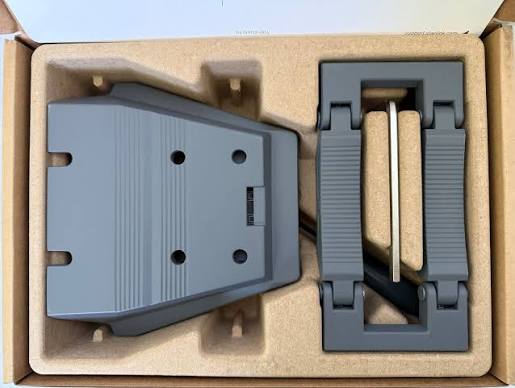
Starlink Standard Roof Rack Mount
Buy Starlink Standard Roof Rack Mount in Uganda for secure vehicle installation, easy removal and reliable Standard Starlink mounting. Order today.
Contact us for current pricing in Uganda
Contact us for current pricing in Uganda
Product Details
Starlink Standard Roof Rack Mount: 7 Powerful Travel Benefits
Starlink Standard Roof Rack Mount in Uganda
Starlink Standard can be packed up and taken to different locations when used with an appropriate service plan. Starlink describes Standard 4 X as suitable for fixed Residential or Business installation or portable use with Roam service.
Once Starlink is being transported regularly, however, terminal placement becomes an important consideration.
Placing the terminal on the ground every time may not always be convenient.
The ground could be:
- Muddy
- Uneven
- Surrounded by people
- Close to vehicles
- Covered by vegetation
- Obstructed by nearby equipment
The Starlink Standard Roof Rack Mount provides a dedicated mounting location on a compatible vehicle roof rack.
What Is the Starlink Standard Roof Rack Mount?
The Standard Roof Rack Mount is a purpose-built bracket that attaches Starlink Standard to compatible vehicle roof-rack crossbars.
Starlink describes the accessory as designed to fit varying roof racks and allows users to easily remove Standard from the mount when it is not in use.
This combination of secure mounting and easy terminal removal makes the accessory particularly useful for portable setups.
Instead of permanently modifying the vehicle roof itself, the mount attaches to an appropriate existing roof rack.
Starlink Standard Roof Rack Mount Specifications
Table 1: Standard Roof Rack Mount Specifications
| Specification | Details |
|---|---|
| Product | Standard Roof Rack Mount |
| Primary Application | Vehicle roof-rack mounting |
| Compatibility | Starlink Standard, Starlink Enterprise |
| Supported Rack Thickness | 15–44.5 mm |
| Thickness in Inches | 0.59–1.75 in |
| Maximum Rack Width | 95 mm / 3.74 in |
| T-Slot Compatibility | Yes, compatible T-slot racks |
| Mount Width | Approx. 185 mm / 7.3 in |
| Mount Height | Approx. 165 mm / 6.5 in |
| Adjustable Dimension | Approx. 95–125 mm / 3.7–4.9 in |
| Package Dimensions | 228.5 × 321.5 × 77 mm |
| Package Weight | 1.6 kg / 3.5 lb |
These dimensions and compatibility specifications come from Starlink's current Standard Accessories Guide and installation documentation.
What Comes with the Roof Rack Mount?
Starlink supplies the hardware needed for the standard crossbar mounting configuration.
Table 2: Standard Roof Rack Mount Package Contents
| Component | Quantity | Purpose |
|---|---|---|
| Roof Rack Mount Base | 1 | Supports the Starlink terminal |
| Grip Pad | 1 | Clamps around compatible crossbar |
| M8 Flanged Head Screws | 4 | Secures mount and grip pad |
| Allen Key | 1 | Tightens mounting screws |
| Screwdriver | 1 | Assists installation |
| Starlink Terminal | Not included | Installs into completed mount |
| T-Slot Hardware | Not included | Required separately for T-slot installation |
Starlink confirms the mount base, grip pad, four M8 flanged-head screws, Allen key and screwdriver are included. T-slot installation is supported through the two centre holes, but Starlink notes that the required T-slot hardware is not included.
Compatible with Starlink Standard
The Roof Rack Mount is officially compatible with Starlink Standard.
This is the newer rectangular terminal without the built-in motor used by the older Standard Actuated system. Starlink currently identifies newer hardware within its Standard 4 and Standard 4 X families.
Customers may commonly refer to this hardware as:
- Starlink Gen 3
- Starlink V4
- Starlink Version 4
- Standard Gen 3
- Standard 4
- Standard 4 X
Checking the exact hardware before ordering remains important because Starlink mounting systems differ between generations.
Compatible with Starlink Enterprise
Starlink also officially lists Starlink Enterprise as compatible with the Standard Roof Rack Mount.
This can be useful for professional and field operations where Enterprise hardware needs to be transported between locations.
However, the complete installation must account for:
- Power supply
- Router or network equipment
- Cable routing
- Equipment storage
- Service-plan requirements
- Physical security
The Roof Rack Mount only handles the terminal mounting portion of the system.
Roof Rack Bar Compatibility
One of the mount's most important features is its adjustable grip pad.
Starlink supports roof-rack bars between 15 mm and 44.5 mm thick, with a maximum width of 95 mm.
The grip pad can be reversed depending on bar thickness.
For bars measuring 15–30 mm thick, Starlink instructs installers to use the short side of the grip pad.
For thicker bars, the long side is used, supporting bars up to 44.5 mm thick.
Grip Pad Orientation
Table 3: Roof Rack Grip Pad Selection
| Roof Rack Bar | Grip Pad Configuration |
|---|---|
| 15–30 mm thick | Short side |
| 29.5–44.5 mm thick | Long side |
| Up to 95 mm wide | Supported |
| Compatible T-slot rack | Centre-hole installation |
| Above 44.5 mm thick | Not within published clamp range |
| Above 95 mm wide | Not within published clamp width |
The small overlap between the published grip-pad ranges allows installers to select the appropriate orientation based on the actual bar profile.
Measure the roof rack before purchasing rather than assuming compatibility.
Compatible T-Slot Roof Racks
The mount can also be installed on compatible roof racks with T-slots.
Starlink provides two centre mounting holes for this configuration.
However, there is an important distinction:
T-slot installation hardware is not included.
Customers using this method need appropriate hardware suitable for their specific roof-rack system.
This is particularly important because T-slot dimensions and hardware can vary between roof-rack manufacturers.
Installing the Roof Rack Mount
Installation starts by identifying a suitable crossbar and determining the correct grip-pad orientation.
The mount is placed onto the crossbar, and the grip pad is flipped into its latched position underneath.
The four mounting screws are then tightened.
Starlink specifies tightening the screws in opposite corners, repeating the sequence until all four reach approximately 7.5 Nm (5.5 lb-ft).
This helps distribute clamping pressure across the mount.
Correct Mount Orientation
Orientation matters.
Starlink places an arrow on the Roof Rack Mount.
During installation, that arrow should point toward the front of the vehicle.
This makes it important to identify the front orientation before fully tightening the mount.
Do not install the bracket randomly and only consider orientation after all four bolts have been tightened.
Keep the Mount Level
Starlink also instructs installers to make sure the mount base is level to the ground and firmly attached after tightening.
This means the condition and orientation of the roof-rack crossbar itself matter.
A damaged, loose or incorrectly installed roof rack is not a suitable foundation for Starlink.
The mounting system is only as secure as the structure supporting it.
Cable Routing Through the Mount
The Standard Roof Rack Mount incorporates a cable-routing path.
Starlink instructs installers to route the Starlink cable through the opening in the mount and out through the front end.
The cable is then connected to Starlink before the terminal is slid into the bracket.
This creates a cleaner installation than leaving the connector and cable loosely positioned underneath the terminal.
Cable routing should continue to be carefully planned beyond the mount.
Installing Starlink into the Mount
After routing the cable, Starlink instructs the installer to plug the Ethernet cable fully into the terminal.
The Standard terminal is then slid into the Roof Rack Mount until it clicks into place.
This click helps confirm that the terminal has engaged with the mounting mechanism.
Before using the setup, inspect the installation and ensure:
- The terminal is fully seated
- The mount is firmly clamped
- The cable is connected
- The cable is not pinched
- The roof rack remains secure
Easy Starlink Removal
The Roof Rack Mount is not designed to make the terminal permanently inseparable from the vehicle.
Starlink specifically highlights the ability to easily remove Standard from the Roof Rack Mount when it is not in use.
This is useful for customers who do not want to leave Starlink exposed on the vehicle at all times.
For example, the terminal can be removed when:
- The vehicle is parked for extended periods
- Starlink is being stored
- The terminal is being moved to another setup
- Equipment security is a concern
- The system is not required
This flexibility is one of the mount's major advantages.
Standard Roof Rack Mount vs X-Frame Base
The Roof Rack Mount and X-Frame Base both support portable installations, but they serve different environments.
Table 4: Roof Rack Mount vs X-Frame Base
| Feature | Roof Rack Mount | X-Frame Base |
|---|---|---|
| Vehicle Installation | Yes | No |
| Ground Installation | No | Yes |
| Roof Rack Required | Yes | No |
| Easy Terminal Removal | Yes | Yes |
| Temporary Setup | Excellent | Excellent |
| Vehicle Space Efficiency | Excellent | Must be stored separately |
| Ground Space Required | No | Yes |
| Best Application | Vehicle-based setup | Ground-level setup |
The X-Frame Base is useful when Starlink will be deployed on the ground after arrival.
The Roof Rack Mount is better suited to keeping the terminal positioned on the vehicle's roof-rack system.
Standard Roof Rack Mount vs Mobility Mount
Starlink also offers a Standard Mobility Mount, but it has a different installation approach.
The Mobility Mount is designed for more permanent attachment to a suitable vehicle surface, while the Roof Rack Mount takes advantage of existing compatible roof-rack bars.
Table 5: Roof Rack Mount vs Mobility Mount
| Feature | Roof Rack Mount | Mobility Mount |
|---|---|---|
| Uses Existing Roof Rack | Yes | Not required |
| Direct Vehicle Surface Mounting | No | Yes |
| Roof Rack Clamping | Yes | No |
| Easy Terminal Removal | Yes | Different installation design |
| Vehicle Modification | Lower where rack exists | Installation dependent |
| T-Slot Support | Yes | Not primary purpose |
| Best For | Vehicles with compatible racks | Dedicated vehicle installation |
For a vehicle already equipped with suitable crossbars, the Roof Rack Mount can provide a convenient installation route without choosing a direct surface mount.
Standard Roof Rack Mount vs Mini Roof Rack Mount
These are different accessories.
Do not confuse them simply because the names are similar.
Table 6: Standard vs Mini Roof Rack Mount
| Feature | Standard Roof Rack Mount | Mini Roof Rack Mount |
|---|---|---|
| Primary Terminal | Starlink Standard | Starlink Mini |
| Enterprise Compatibility | Yes | No |
| Standard Compatibility | Yes | No |
| Mini Compatibility | No | Yes |
| Roof Rack Installation | Yes | Yes |
| Hardware-Specific Design | Yes | Yes |
| Interchangeable | No | No |
Always match the mount to the Starlink terminal.
Starlink Roof Rack Mount for Overlanding
Overlanding is a strong use case for roof-rack-mounted Starlink.
Vehicles used for long-distance travel often already carry:
- Roof tents
- Recovery equipment
- Storage boxes
- Spare tyres
- Solar panels
- Awning systems
The Starlink location therefore needs to be planned carefully.
The terminal should have as clear a sky view as practical and should not be blocked by large equipment installed immediately around it.
Measure available roof-rack space before ordering.
Roof Rack Mount for Camping
A roof-mounted setup can reduce the amount of equipment that needs to be placed around a campsite.
Instead of positioning Starlink on the ground where people may walk around it, the terminal can remain elevated on a compatible roof rack.
This can help protect it from:
- Foot traffic
- Mud
- Standing water
- Pets
- Camping equipment
However, surrounding trees can still obstruct the satellite view.
A roof mount cannot overcome heavy tree cover.
Roof Rack Mount for Field Teams
Engineering, surveying, research and humanitarian field teams may operate from vehicles in areas with limited terrestrial internet.
A roof-rack installation can help keep the Starlink terminal organised as part of the vehicle setup.
Equipment may include:
- Starlink
- Power station
- Laptop
- Router
- Network switch
- Field instruments
The Roof Rack Mount handles the terminal position while the remaining hardware needs secure power and storage arrangements.
Roof Rack Mount for Construction Teams
Construction teams frequently move between sites.
Portable Starlink can provide connectivity for:
- Site managers
- Engineers
- Cloud applications
- Project communication
- Documentation
- Remote meetings
A roof-rack-mounted Standard terminal can reduce setup clutter where a compatible vehicle is already being used as part of site operations.
The cable and power equipment should still be protected from construction traffic.
Roof Rack Mount for Safari and Remote Travel
Uganda has many areas where travellers may move beyond conventional fixed broadband coverage.
A portable Starlink setup can be useful where the applicable service plan permits the intended use.
The Roof Rack Mount can provide a dedicated location on an appropriately equipped vehicle.
However, Starlink service availability and plan conditions should always be checked for the intended location and type of use.
Mounting hardware does not itself determine what a Starlink service plan permits.
Does the Roof Rack Mount Improve Starlink Speed?
No.
The mount contains no networking electronics.
It does not increase:
- Download speed
- Upload speed
- Satellite capacity
- Router power
Its purpose is to securely position the Starlink terminal.
However, placement can affect connectivity.
A terminal surrounded by obstructions may experience interruptions, while a location with a clearer sky view provides a better operating environment.
Check for Roof Obstructions
Vehicle roofs frequently contain other equipment.
Before selecting the Starlink mounting location, check for:
- Roof boxes
- Roof tents
- Spare wheels
- Solar panels
- Luggage
- Antennas
- Raised air vents
- Other cargo
A roof rack may physically support the mount while still providing a poor satellite location.
The terminal needs open sky around its field of view.
Protect the Starlink Cable
Vehicle cable routing requires particular attention.
The cable should not be:
- Crushed by doors
- Pinched beneath roof-rack hardware
- Pulled tightly around sharp corners
- Left loose where it can flap
- Routed against hot components
- Placed where cargo can damage it
Starlink's installation guide specifically routes the cable through the opening in the Roof Rack Mount before connecting it to the terminal.
The remainder of the route should also be secured appropriately.
Check the Mount Regularly
Vehicle-mounted equipment experiences vibration and environmental exposure.
Periodic inspection is sensible.
Check that:
- The four screws remain secure
- The mount has not shifted
- The roof rack itself remains secure
- The grip pad remains properly positioned
- The cable is undamaged
- Starlink remains correctly seated
Starlink's installation specification calls for the four mount screws to reach 7.5 Nm (5.5 lb-ft) and for the base to be level and firmly attached.
Roof Rack Structural Strength Matters
The Starlink mount should not be attached to a weak or damaged roof rack.
The vehicle's rack needs to be correctly installed and capable of supporting the mounted equipment.
Starlink's terms place responsibility on users to ensure vehicle-mounted equipment is installed on an appropriate, structurally sound surface and properly secured for permitted uses.
The Starlink bracket cannot compensate for a loose crossbar.
Inspect the rack before installing Starlink.
Important Note About In-Motion Use
A roof-rack mount and permission to use Starlink while a vehicle is moving are not automatically the same thing.
Starlink's terms state that in-motion use is prohibited unless the specific kit model and/or mount is designated for in-motion use and the necessary approvals apply in the country of use.
Therefore, customers should check the current Starlink service terms and hardware eligibility before using Starlink while a vehicle is moving.
The Roof Rack Mount can still be valuable for vehicle-based portable setups where Starlink is used while the vehicle is parked.
Choosing the Roof Rack Mount
The Standard Roof Rack Mount makes sense when:
- You have Starlink Standard or Enterprise
- Your vehicle has compatible crossbars
- You want to avoid ground deployment
- You regularly travel with Starlink
- You want easy terminal removal
- You have sufficient roof-rack space
- The roof position provides a suitable sky view
Before ordering, measure both the width and thickness of the roof-rack bar.
Do not judge compatibility visually.
Why Choose the Starlink Standard Roof Rack Mount?
The Starlink Standard Roof Rack Mount provides several practical benefits:
- Purpose-built Standard compatibility
- Enterprise compatibility
- Support for different roof-rack bar sizes
- Compatible T-slot mounting
- Reversible grip-pad configuration
- Integrated cable-routing opening
- Secure four-screw clamping
- Easy terminal removal
- Compact installation
- Useful vehicle-based deployment
Starlink provides a dedicated installation guide for the accessory, including roof-rack measurement, grip-pad orientation, mount orientation, tightening and cable routing.
Why Buy from Starlink Uganda Installers?
Starlink Uganda Installers can help customers determine whether the Standard Roof Rack Mount matches their Starlink hardware and vehicle roof rack.
Compatibility checks are especially important because Standard, Mini, Standard Actuated and Performance terminals use different mounting systems.
Installation support can also include roof-rack assessment, mount fitting, Starlink cable routing, power planning, router setup and connectivity testing.
This helps create a cleaner vehicle-based Starlink setup while reducing the risk of purchasing the wrong mount.
Frequently Asked Questions About Starlink Standard Roof Rack Mount
1. What is the Starlink Standard Roof Rack Mount?
The Starlink Standard Roof Rack Mount is an official accessory designed to attach compatible Starlink hardware to suitable vehicle roof racks. It supports conventional crossbars within Starlink's published dimensions and compatible T-slot racks.
2. Which Starlink kits are compatible with the Roof Rack Mount?
Starlink officially lists the Standard Roof Rack Mount as compatible with Starlink Standard and Starlink Enterprise.
3. What roof-rack sizes does the mount support?
Starlink specifies roof-rack bars between 15 and 44.5 mm thick with a maximum width of 95 mm. The grip pad is reversible to accommodate different bar thicknesses.
4. Can I install the mount on a T-slot roof rack?
Yes. Starlink says the mount base is compatible with suitable T-slot racks using its two centre holes. However, the necessary T-slot installation hardware is not included.
5. What comes with the Standard Roof Rack Mount?
The package contains the Roof Rack Mount Base, Grip Pad, four M8 flanged-head screws, Allen key and screwdriver.
6. How much does the Standard Roof Rack Mount weigh?
Starlink lists the package weight at approximately 1.6 kg (3.5 lb) and package dimensions of approximately 228.5 × 321.5 × 77 mm.
7. Which direction should the Roof Rack Mount face?
Starlink places an orientation arrow on the mount. During installation, this arrow should point toward the front of the vehicle.
8. How tight should the Roof Rack Mount screws be?
Starlink instructs installers to tighten the four screws in opposite corners until they reach approximately 7.5 Nm (5.5 lb-ft). The base should then be level and firmly attached.
9. Can Starlink be removed from the Roof Rack Mount?
Yes. Starlink specifically designed the mount so users can easily remove Standard from the roof rack when it is not in use.
10. Where can I buy a Starlink Standard Roof Rack Mount in Uganda?
Customers can contact Starlink Uganda Installers for the Standard Roof Rack Mount and assistance with hardware compatibility, roof-rack assessment, mounting, cable routing, power planning and complete Starlink setup.
Conclusion
The Starlink Standard Roof Rack Mount provides a purpose-built way to install Starlink Standard or Enterprise on compatible vehicle roof racks. It supports conventional roof-rack bars between 15 and 44.5 mm thick and up to 95 mm wide, as well as compatible T-slot racks. The package includes the mount base, grip pad, four M8 flanged-head screws, Allen key and screwdriver, with a total package weight of approximately 1.6 kg.
For a secure installation, Starlink specifies the correct grip-pad orientation based on crossbar thickness, requires the arrow on the mount to face the front of the vehicle and instructs installers to tighten the four screws in an alternating pattern to approximately 7.5 Nm. The Starlink cable routes through the mount before the terminal slides into position and clicks into place. Customers intending to use Starlink while a vehicle is moving should separately confirm that their specific hardware, mount, service and country are authorised for in-motion use.
For a Starlink Standard Roof Rack Mount in Uganda, Starlink Uganda Installers can assist with compatibility checks, vehicle roof-rack assessment, mounting, cable routing, power planning and complete Starlink installation for overlanding, camping, field operations and other portable applications.