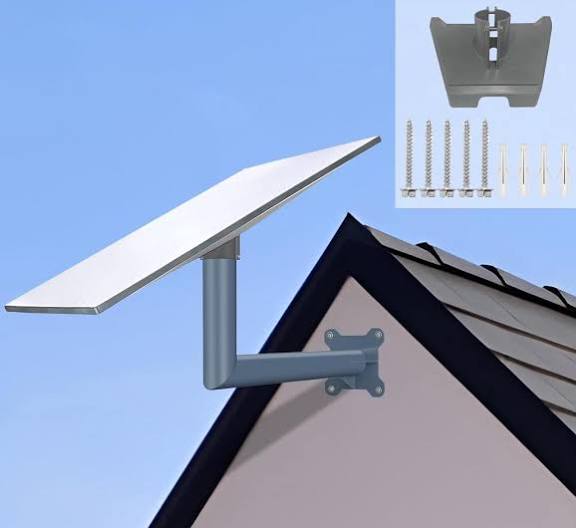
Starlink Standard Wall Mount
Buy Starlink Standard Wall Mount in Uganda for secure exterior installation, better positioning and durable Starlink mounting. Order yours today.
Contact us for current pricing in Uganda
Contact us for current pricing in Uganda
Product Details
Starlink Standard Wall Mount: 7 Powerful Mounting Benefits

Starlink Standard Wall Mount in Uganda
Correct Starlink positioning is one of the most important parts of a successful installation.
The terminal needs an open view of the sky, while the mounting system must provide a stable and secure foundation.
For some properties, ground-level installation works well. Others require the terminal to be elevated above walls, vegetation and other nearby structures.
The Starlink Standard Wall Mount provides another option by allowing compatible Starlink hardware to be mounted to an exterior wall near a building's gable or fascia.
Its elongated structure extends the terminal away from the mounting surface, helping create enough clearance around compatible roof edges.
What Is the Starlink Standard Wall Mount?
The Starlink Standard Wall Mount is a purpose-built permanent mounting system for compatible Standard and Enterprise hardware.
Starlink designed it specifically for exterior-wall installations near the upper part of a building.
Rather than placing the Starlink terminal directly on the ground or roof surface, the mount uses an extended arm and mast arrangement to support it away from the wall.
Starlink describes the accessory as a secure, long-reaching platform intended to provide flexibility in terminal positioning and alignment.
This can be useful where the side of a building provides easier installation access than the roof itself.
Starlink Standard Wall Mount Specifications
Table 1: Standard Wall Mount Specifications
| Specification | Details |
|---|---|
| Product | Starlink Standard Wall Mount |
| Primary Installation | Exterior wall |
| Recommended Position | Near top of gable or fascia |
| Compatibility | Starlink Standard and Enterprise |
| Maximum Overhang | 4 in |
| Overall Height | Approx. 460 mm / 18.1 in |
| Secondary Height | Approx. 246 mm / 10.9 in |
| Base Width | Approx. 72 mm / 2.8 in |
| Horizontal Dimension | Approx. 155 mm / 6.1 in |
| Lower Offset | Approx. 70 mm / 2.75 in |
| Package Dimensions | 280 × 470 × 105 mm |
| Package Weight | 1.6 kg / 3.5 lb |
Starlink's current accessory documentation confirms these dimensions, compatibility and the four-inch maximum overhang requirement.
What Comes with the Standard Wall Mount?
The latest Starlink installation guide provides a complete wall-mount assembly.
Table 2: Standard Wall Mount Kit Contents
| Component | Purpose |
|---|---|
| Wall Mount | Main building attachment |
| Closeout Cap | Completes mount assembly |
| Mast Adapter | Connects terminal mounting system |
| Mast | Supports Starlink above the wall bracket |
| Silicone | Helps seal mounting penetrations |
| 2 Lag Screws | Secures mount to suitable structure |
| 20 Cable Routing Clips | Secures Starlink cable along its route |
| Starlink Terminal | Purchased separately |
Starlink's current installation guide specifies two 3/8 × 3.5-inch lag screws along with the other mounting components.
Compatible with Starlink Standard
The Wall Mount is officially compatible with Starlink Standard.
This includes current Standard hardware supported by Starlink's Standard 4 X installation ecosystem. Starlink's current support documentation lists the Standard Wall Mount among the dedicated accessories and installation guides for Standard 4 X.
Customers may also encounter informal names such as:
-
Starlink Gen 3
-
Starlink V4
-
Starlink Version 4
-
Standard Gen 3
-
Standard 4
-
Standard 4 X
Because Starlink has several hardware generations, buyers should verify the exact terminal before purchasing mounting equipment.
Compatible with Starlink Enterprise
The Standard Wall Mount is also officially compatible with Starlink Enterprise.
This makes the same mounting system useful for both residential-style Standard installations and compatible Enterprise deployments.
Enterprise installations may involve more extensive networking infrastructure, including:
-
Third-party routers
-
Network switches
-
Access points
-
Structured Ethernet cabling
-
CCTV networks
-
Business network equipment
The Wall Mount handles the outdoor Starlink terminal placement while the rest of the network can be designed according to the property's requirements.
Designed for Gable and Fascia Installation
Starlink specifically recommends positioning the Standard Wall Mount on an exterior wall near the top of the gable or fascia.
This position can provide several advantages.
Mounting near the upper portion of a building can move Starlink away from some ground-level obstructions while avoiding the need to place the bracket directly through the main roof surface.
Potential advantages include:
-
Increased elevation
-
Reduced ground-level interference
-
Easier cable routing down the exterior wall
-
Reduced likelihood of accidental contact
-
Good access for suitable buildings
-
Cleaner permanent installation
The final location still needs sufficient sky visibility.
Maximum 4-Inch Overhang
One important specification is the roof overhang.
Starlink states that the Standard Wall Mount can accommodate a maximum overhang of four inches.
This means customers should inspect the roof geometry before ordering.
A wall may appear suitable from ground level, but a large roof overhang can interfere with the intended mounting geometry.
Measure the actual distance rather than estimating visually.
Where the building has a much larger overhang, another Starlink mounting solution may be more appropriate.
Long-Reaching Wall Mount Design
The Wall Mount extends away from the building instead of holding the terminal directly against the exterior wall.
Starlink describes this as a long-reaching platform that provides greater positioning flexibility.
The extension helps create clearance around the gable or fascia.
This can be particularly useful where the Starlink terminal needs to rise beyond the immediate edge of the roof.
However, the extended mount does not eliminate obstruction requirements.
Trees, taller buildings, water tanks and other structures can still interfere with satellite visibility.
Standard Wall Mount Dimensions
The current technical drawing shows an overall mount height of approximately 460 mm (18.1 inches).
Other key dimensions include approximately:
-
246 mm / 10.9 in vertical section
-
72 mm / 2.8 in base width
-
155 mm / 6.1 in horizontal section
-
70 mm / 2.75 in lower offset
These dimensions can help installers evaluate whether the bracket will fit the intended section of the building before drilling begins.
Recommended Installation Tools
Starlink identifies several tools for installation.
Table 3: Standard Wall Mount Installation Tools
| Tool | Purpose |
|---|---|
| Drill / Impact Driver | Creates holes and drives fasteners |
| 6 mm / 1/4 in Drill Bit | Creates pilot holes |
| 9/16 in Hex Socket | Tightens lag screws |
| Marker | Marks mounting points |
| Level | Helps position bracket correctly |
| Starlink App | Helps evaluate terminal location and alignment |
The drill, 6 mm drill bit, 9/16-inch hex socket, marker and level are specifically listed in Starlink's current Wall Mount documentation.
Additional safety equipment may be necessary depending on installation height and building design.
Finding the Best Wall Location
Do not choose the installation position based only on where drilling is easiest.
Starlink needs a suitable sky view.
Before installing, consider potential obstructions such as:
-
Trees
-
Adjacent buildings
-
Roof sections
-
Water tanks
-
Chimneys
-
Solar panels
-
Antennas
-
Utility poles
A higher mounting position can help, but height alone does not guarantee an unobstructed installation.
Use Starlink's installation and obstruction guidance when selecting the final position.
Structural Attachment Matters
The Standard Wall Mount should be secured to an appropriate structural part of the building.
The kit includes two substantial lag screws for mounting.
Starlink specifies 3/8 × 3.5-inch lag screws in its current installation guide.
The bracket should not simply be fastened into a weak decorative surface.
The exact fastening method may depend on the building material.
Possible wall types include:
-
Timber construction
-
Masonry
-
Concrete
-
Suitable fascia structures
-
Other structurally sound building surfaces
The supplied mounting hardware should be used only where appropriate for the specific construction material.
Weather-Resistant Construction
The Wall Mount remains outdoors continuously after installation.
Starlink therefore manufactures it using durable, weather-resistant materials intended to provide a sturdy foundation across different environmental conditions.
This is important for installations exposed to:
-
Rain
-
Sunlight
-
Humidity
-
Wind
-
Temperature changes
Weather-resistant hardware still requires correct installation.
Fasteners, cable routing and wall sealing should be inspected periodically.
Silicone for Installation Sealing
Starlink includes silicone in the Wall Mount kit.
This is important because drilling into an exterior wall creates potential water-entry points.
Proper sealing helps prevent moisture from travelling through mounting penetrations.
Particular attention should be given to buildings where water entering behind exterior finishes could damage:
-
Timber
-
Insulation
-
Interior paint
-
Ceilings
-
Electrical systems
The supplied silicone should be applied according to Starlink's installation guidance.
Cable Routing
The current Standard Wall Mount kit includes 20 cable-routing clips.
These clips help secure the Starlink cable as it travels from the terminal toward the building entry point and router.
Good cable routing should avoid:
-
Loose hanging cable
-
Sharp bends
-
Crushing
-
Door and window edges
-
High-traffic areas
-
Sharp roofing materials
-
Locations where water collects
The cable route should ideally be planned before the mount is permanently installed.
Standard Wall Mount vs Pivot Mount
Both accessories provide permanent elevated installations, but they attach to different parts of the building.
Table 4: Wall Mount vs Pivot Mount
| Feature | Standard Wall Mount | Pivot Mount |
|---|---|---|
| Exterior Wall | Excellent | No |
| Gable/Fascia Area | Excellent | Not primary use |
| Slanted Roof | No | Excellent |
| Roof Penetration | Generally avoided | Required |
| Wall Penetration | Yes | No |
| Adjustable Roof Angle | Not primary design | Yes |
| Elevated Installation | Yes | Yes |
| Best Application | Building side | Slanted roof |
A property with a suitable exterior gable may benefit from the Wall Mount.
Where the roof itself provides the better structural and obstruction-free location, the Pivot Mount may be more appropriate.
Standard Wall Mount vs X-Frame Base
The X-Frame Base provides a freestanding ground installation.
Table 5: Wall Mount vs X-Frame Base
| Feature | Wall Mount | X-Frame Base |
|---|---|---|
| Exterior Wall Required | Yes | No |
| Ground Installation | No | Yes |
| Permanent Installation | Yes | More portable |
| Elevated Position | Yes | Limited |
| Building Drilling | Yes | No |
| Easy Relocation | Limited | Excellent |
| Ground Space Required | No | Yes |
| Best Application | Fixed building | Open ground |
The X-Frame Base can be useful where the property has open ground with excellent sky visibility.
The Wall Mount becomes more attractive where elevation is needed or where keeping Starlink off the ground is preferred.
Standard Wall Mount vs Pipe Adapter
A Pipe Adapter uses a suitable existing pole rather than the building wall.
Table 6: Wall Mount vs Pipe Adapter
| Feature | Wall Mount | Pipe Adapter |
|---|---|---|
| Existing Pole Required | No | Yes |
| Exterior Wall Required | Yes | No |
| Dedicated Mast | Included in current kit | Uses pole arrangement |
| Elevation | Good | Depends on pole |
| Building Attachment | Yes | Not necessarily |
| Cable Routing | Down wall | Along pole |
| Permanent Setup | Yes | Yes |
| Best Use | Gable/fascia | Existing suitable pole |
Where a strong pole already exists in a clear location, a Pipe Adapter may avoid drilling into the building.
Where no suitable pole exists, the Wall Mount creates its own dedicated support system.
Standard Wall Mount for Homes
Residential properties are a major application for wall mounting.
The mount can position Starlink above common ground-level obstructions while keeping the terminal away from:
-
Children
-
Pets
-
Vehicles
-
Garden activities
-
Foot traffic
The exterior cable can then be routed toward the room containing Router 3 or other networking equipment.
For multi-room homes, additional mesh routers or access points may be required for complete indoor WiFi coverage.
The Wall Mount itself does not extend WiFi range.
Standard Wall Mount for Offices
An office installation can use the Wall Mount to create a permanent outdoor Starlink position.
A typical network may follow:
Starlink Standard → Wall Mount → Starlink Cable → Router 3 → Network Switch → Office Devices
Connected equipment can include:
-
Desktop computers
-
Printers
-
CCTV
-
Access points
-
VoIP phones
-
Smart devices
Larger offices may use more advanced third-party networking equipment depending on their requirements.
Standard Wall Mount for Schools
Schools often need the Starlink terminal positioned away from students and busy ground-level areas.
A suitable high exterior wall can provide a more protected installation.
The Starlink connection can then be distributed through a structured network serving:
-
Administration offices
-
Computer laboratories
-
Classrooms
-
Staff rooms
-
CCTV systems
The internal network should be designed separately from the outdoor mounting system.
Standard Wall Mount for Lodges and Hotels
Hotels and lodges may have vegetation and multiple structures across the property.
A high wall installation can potentially improve sky visibility compared with ground-level placement.
However, large trees may still create significant obstructions.
After establishing the Starlink connection, WiFi can be distributed using appropriately positioned access points or mesh nodes.
A single Starlink router should not automatically be expected to provide complete coverage throughout a large hospitality property.
Standard Wall Mount for Farms
Farm buildings can also benefit from wall-mounted Starlink.
Suitable locations may include:
-
Farmhouses
-
Workshops
-
Stores
-
Offices
-
Staff buildings
Elevation can help move the terminal above nearby fences and equipment.
However, tall trees, silos and other farm structures still need to be considered when selecting the installation location.
Standard Wall Mount for Commercial Properties
Commercial installations usually benefit from permanent, organised equipment placement.
The Wall Mount keeps the terminal off the ground and creates a dedicated exterior position.
Businesses should plan the complete system, including:
-
Terminal position
-
Cable route
-
Router location
-
Network switch
-
Access points
-
CCTV
-
Backup power
Mount selection is only one part of creating a reliable Starlink business network.
Maximum Roof Overhang Consideration
The four-inch maximum overhang deserves particular attention.
Before ordering, measure how far the roof extends beyond the intended mounting wall.
If the overhang exceeds Starlink's stated limit, do not assume the Standard Wall Mount will provide sufficient clearance.
Other options may include:
-
Pivot Mount
-
Pipe Adapter
-
Alternative structurally appropriate location
Selecting the correct mount before installation can avoid unnecessary modifications.
Does the Wall Mount Increase Starlink Speed?
No.
The Standard Wall Mount is a mechanical accessory.
It contains no:
-
Signal amplifier
-
WiFi radio
-
Satellite modem
-
Router
-
Network processor
Its purpose is to securely position compatible Starlink hardware.
However, positioning can affect connection quality.
A terminal obstructed by a building or tree can experience interruptions. Moving it to a better location may improve the operating environment because the obstruction has been reduced—not because the Wall Mount itself increases bandwidth.
Wall Mount Safety
Exterior-wall installation may require ladders or other access equipment.
High-level installations should be approached carefully.
Factors include:
-
Working height
-
Roof edges
-
Ladder stability
-
Weather conditions
-
Electrical cables
-
Structural condition
-
Correct tools
Where safe access is uncertain, use an appropriately equipped professional installer.
A technically correct mounting location is not worth creating an unsafe installation process.
Professional Installation
Professional installation can include more than attaching the bracket.
A complete service may include:
-
Site assessment
-
Obstruction checking
-
Mount selection
-
Structural mounting-point assessment
-
Drilling
-
Silicone sealing
-
Mast assembly
-
Terminal positioning
-
Cable routing
-
Router setup
-
WiFi testing
For businesses, the installation can also extend to switches, Ethernet cabling, access points and network configuration.
Why Choose the Starlink Standard Wall Mount?
The Standard Wall Mount is particularly useful when customers require:
-
Permanent exterior installation
-
Gable mounting
-
Fascia-area installation
-
Increased elevation
-
Standard compatibility
-
Enterprise compatibility
-
Weather-resistant construction
-
Long-reaching terminal positioning
-
Up to four-inch overhang accommodation
-
Organised cable routing
-
A dedicated Starlink mounting system
Its combination of elevation, long-reaching geometry and building attachment makes it a practical alternative to direct roof and ground installations.
Why Buy from Starlink Uganda Installers?
Starlink Uganda Installers can help determine whether the Wall Mount is suitable for the building before installation begins.
The roof overhang, wall construction, sky visibility, cable route and working height should all be evaluated.
Where the Standard Wall Mount is unsuitable, another accessory such as the Pivot Mount, Pipe Adapter or X-Frame Base may provide a better installation.
Professional assistance can also include Router 3 setup, Ethernet networking, WiFi expansion and complete Starlink connectivity planning.
Frequently Asked Questions About Starlink Standard Wall Mount
1. What is the Starlink Standard Wall Mount?
The Starlink Standard Wall Mount is an official mounting accessory designed for installation on an exterior wall near the top of a gable or fascia. Its elongated design provides a secure, long-reaching platform for positioning compatible Starlink hardware.
2. Which Starlink kits are compatible with the Standard Wall Mount?
Starlink officially lists the mount as compatible with Starlink Standard and Starlink Enterprise. Current Standard 4 X support documentation also lists a dedicated Standard Wall Mount installation guide among its compatible accessory resources.
3. What is the maximum roof overhang for the Wall Mount?
Starlink specifies a maximum overhang of four inches for the Standard Wall Mount. Customers should measure their roof overhang before ordering or installing the mount.
4. What comes with the Starlink Standard Wall Mount?
The latest installation guide lists the Wall Mount, Closeout Cap, Mast Adapter, Mast, silicone, two lag screws and 20 cable-routing clips.
5. What size are the supplied lag screws?
Starlink's current Wall Mount installation guide specifies two 3/8 × 3.5-inch lag screws. The mounting surface must still be structurally suitable for the installation.
6. What tools are needed to install the Standard Wall Mount?
Starlink recommends a drill or impact driver, 6 mm (1/4-inch) drill bit, 9/16-inch hex socket, marker and level. Additional safety equipment may be required for high installations.
7. What are the dimensions of the Standard Wall Mount?
The technical drawing shows an overall height of approximately 460 mm (18.1 in) and a base width of approximately 72 mm (2.8 in), together with other dimensions of approximately 246 mm, 155 mm and 70 mm across different sections.
8. How much does the Starlink Standard Wall Mount weigh?
Starlink lists the packaged Wall Mount at approximately 1.6 kg (3.5 lb). Its package dimensions are approximately 280 × 470 × 105 mm.
9. Is the Starlink Standard Wall Mount weather resistant?
Yes. Starlink describes the Wall Mount as being constructed from durable, weather-resistant materials intended to provide a sturdy foundation in varying environmental conditions.
10. Where can I buy a Starlink Standard Wall Mount in Uganda?
Customers can contact Starlink Uganda Installers for the Standard Wall Mount and assistance with compatibility checks, wall assessment, mounting, sealing, cable routing, terminal positioning and complete Starlink installation.
Conclusion
The Starlink Standard Wall Mount provides a purpose-built permanent mounting solution for Starlink Standard and Enterprise hardware. It is designed for exterior walls near the top of a gable or fascia and accommodates roof overhangs of up to four inches. Starlink's current documentation lists a 1.6 kg package weight, dimensions of approximately 280 × 470 × 105 mm and durable weather-resistant construction designed for outdoor installation.
The current kit provides the Wall Mount, Closeout Cap, Mast Adapter, Mast, silicone, two 3/8 × 3.5-inch lag screws and 20 cable-routing clips. This makes it a comprehensive mounting system rather than a simple bracket. Correct installation still requires careful consideration of the building structure, roof overhang, satellite obstructions, sealing and cable route. Where the exterior wall does not provide a suitable location, the Pivot Mount, Pipe Adapter or X-Frame Base may provide a more appropriate alternative.
For a Starlink Standard Wall Mount in Uganda, Starlink Uganda Installers can assist with mount selection, site assessment, professional wall installation, sealing, cable routing, Router 3 setup and complete Starlink networking for homes, offices, schools, farms, lodges and commercial properties.