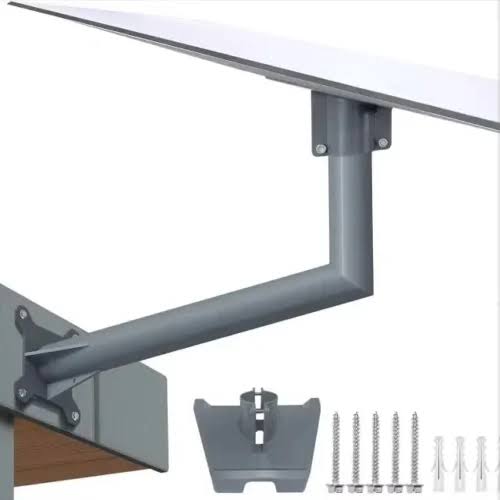
Starlink V4 Mount
Shop Starlink V4 Mount in Uganda for secure roof, wall and pole installations. Get durable mounting and professional Starlink installation today.
Contact us for current pricing in Uganda
Contact us for current pricing in Uganda
Product Details
Starlink V4 Mount: 7 Powerful Installation Benefits
Starlink V4 Mount in Uganda
A reliable Starlink installation depends on much more than simply buying the satellite kit.
The terminal needs a clear view of the sky, proper alignment and a secure installation position.
This is where the Starlink V4 Mount becomes important.
The newer Standard terminal is a rectangular electronic phased-array antenna without the motorised mast found on older Standard Actuated hardware. Initial alignment is performed manually with guidance from the Starlink app.
For temporary installations, the supplied kickstand may be sufficient.
For a permanent home, office or commercial installation, however, an appropriate mount can position the terminal more securely and help move it away from common obstructions.
What Is a Starlink V4 Mount?
A Starlink V4 Mount is a mounting accessory compatible with the newer Starlink Standard terminal, commonly referred to by customers as Starlink V4, Gen 3 Standard or Standard 4/4X.
Starlink's current Standard 4X kit includes:
- Starlink terminal
- Kickstand
- Router 3
- 15 m Starlink cable
- 1.5 m AC cable
- Power supply
The included kickstand is useful for initial deployment, but Starlink also provides dedicated mounting accessories for permanent installations.
Table 1: Starlink V4 Mount Options
| Mount Type | Typical Application |
|---|---|
| Standard Kickstand | Temporary or simple flat-surface setup |
| Standard Wall Mount | Walls, fascia and suitable building edges |
| Standard Pivot Mount | Slanted roofs |
| Standard Pipe Adapter | Existing metal poles |
| Mobility Mount | Suitable mobile mounting applications |
| X-Frame Base | Alternative ground/flat-surface deployment |
| Roof Rack Mount | Compatible vehicle roof-rack installations |
The correct option depends on the property, obstruction levels and available mounting surface.
Why Proper Starlink V4 Mounting Matters
Starlink needs an appropriate view of the sky to communicate with satellites.
Trees, buildings and other structures can interfere with the required view.
A mount allows the installer to position the terminal somewhere more suitable than the ground or a low temporary surface.
Common installation locations include:
- Rooftops
- Building walls
- Fascia areas
- Existing poles
- Towers
- Flat roofs
- Sloping roofs
The objective is not simply to install the Starlink as high as possible.
The objective is to find a secure location with suitable sky visibility and practical cable routing.
Starlink V4 Wall Mount
The Standard Wall Mount is designed for permanent installations where attaching the Starlink to a suitable building surface provides good sky visibility.
A wall installation can be useful where placing the terminal directly on the roof is undesirable.
It may also make future inspection and maintenance easier when the building design allows safe access.
Wall mounting can work particularly well on an exterior wall or suitable fascia area where the terminal can extend beyond the roofline and obtain the required sky view.
The exact installation position should be checked for obstructions before drilling.
Starlink V4 Pivot Mount
The Standard Pivot Mount is one of Starlink's dedicated mounting solutions for Standard hardware.
Starlink describes it as particularly suited to slanted, shingled roofs. Its swivelling mechanism allows adjustment across different angles and directions.
Table 2: Standard Pivot Mount Specifications
| Specification | Details |
|---|---|
| Compatibility | Starlink Standard and Enterprise |
| Typical Installation | Slanted/shingled roof |
| Adjustment | Pivoting |
| Overall Length | Approx. 448 mm |
| Height | Approx. 235 mm |
| Base Width | Approx. 140 mm |
| Package Weight | Approx. 1.9 kg |
| Installation Hardware | Included |
Starlink lists the kit with the Pivot Mount, sealant tape, lag screws and cable-routing clips.
This makes it a strong option where roof angle makes a simple fixed mount less appropriate.
Starlink V4 Pipe Adapter
Many properties already have a suitable metal pole.
Instead of installing an entirely new mounting structure, customers may be able to use the Standard Pipe Adapter Mount.
Starlink specifies compatibility with metal pipes approximately 31 mm to 63.5 mm in diameter. It explicitly states that the adapter is intended for metal pipes rather than PVC or plastic pipes.
Table 3: Starlink V4 Pipe Adapter Specifications
| Specification | Details |
|---|---|
| Compatible Terminal | Standard / Enterprise |
| Minimum Pole Diameter | 31 mm / 1.25 in |
| Maximum Pole Diameter | 63.5 mm / 2.5 in |
| Pole Material | Metal |
| PVC/Plastic Pole | Not intended |
| Approx. Adapter Height | 213 mm |
| Package Weight | Approx. 0.971 kg |
| Cable Routing Clips | 20 included |
The pole itself is not included with the adapter.
Starlink V4 Mount for Rooftops
Rooftops are among the most common locations for Starlink installations because they frequently provide better sky visibility than ground-level positions.
However, roof mounting needs careful planning.
The installer should consider:
Sky visibility → roof material → mounting surface → cable route → weather sealing → future access
Simply drilling into a roof without considering waterproofing can create unnecessary problems.
The correct mounting method should suit the particular roofing material.
For sloped roofs, the Standard Pivot Mount may be appropriate.
Other properties may be better suited to wall or pole mounting.
Starlink V4 Mount for Walls
Wall mounting can be an attractive alternative where the roof is difficult to access.
A wall-mounted Starlink may also make cable routing easier.
For example, the cable can enter the building near the installation location rather than crossing a large section of roof.
However, the terminal still needs an unobstructed sky view.
Installing it too low on a wall may leave the roof itself blocking part of the required view.
The installation position should therefore be evaluated before permanent mounting.
Starlink V4 Mount for Poles
Pole installations can be extremely useful where a building is surrounded by obstructions.
An existing metal mast can sometimes elevate the Starlink sufficiently to improve sky visibility.
The official Standard Pipe Adapter supports compatible metal poles from approximately 31 to 63.5 mm in diameter.
The pole itself must also be structurally appropriate for the installation.
Customers should not assume that any thin pipe is suitable simply because its diameter fits the adapter.
V4 Mount vs Included Kickstand
The Standard 4X already includes a kickstand.
Why purchase another mount?
Because the kickstand and permanent mounting accessories serve different installation requirements.
Table 4: V4 Mount vs Standard Kickstand
| Feature | Permanent Mount | Kickstand |
|---|---|---|
| Quick Setup | Good | Excellent |
| Permanent Installation | Excellent | Possible on suitable flat surface |
| Roof Installation | Mount dependent | Limited |
| Wall Installation | Yes with suitable mount | Not the main application |
| Pole Installation | Pipe Adapter | No |
| Portable Use | Limited | Excellent |
| Positioning Flexibility | High | Basic |
| Best Use | Fixed installations | Temporary/portable setup |
Starlink states that the Standard kickstand can be used for quick setup and can also be drilled into a suitable flat surface for permanent installation.
Dedicated mounts provide additional flexibility when the ideal Starlink location is not a simple flat surface.
Starlink V4 vs Standard Actuated Mounts
This is an important compatibility issue.
The newer Standard 4/4X hardware is physically different from the older Standard Actuated terminal.
The Standard 4X has a built-in folding kickstand and does not contain a motor for self-orientation. The older Standard Actuated terminal uses a mast and motorised self-orientation system.
Because the mounting interfaces differ, customers should not assume that an older Gen 2 mount directly fits the newer V4 terminal.
Starlink does list a Standard-to-Standard-Actuated Mount Adapter among the available Standard 4X accessories for appropriate conversions.
Always verify hardware generation before purchasing a mount.
How to Identify Starlink V4
The newer Standard hardware is relatively easy to distinguish from Standard Actuated.
Starlink describes Standard 4X as a rectangular terminal without a built-in motor for self-orientation and with a kickstand mount.
By comparison, Standard Actuated is rectangular but includes a motorised mast.
If your terminal has the newer folding kickstand instead of the older motorised mast, you are likely dealing with Standard 4/4X-style hardware.
This distinction matters when ordering mounting accessories.
Manual Alignment
Starlink V4 does not automatically rotate itself into position using a motor.
Instead, the customer or installer manually adjusts the terminal using guidance from the Alignment Tool in the Starlink app.
Once correctly aligned and installed with suitable sky visibility, normal satellite tracking is handled electronically by the phased-array antenna.
The terminal does not need to physically rotate continuously to follow individual satellites.
This is why the mount must allow the terminal to be positioned correctly during installation.
Selecting the Installation Location
Before installing the V4 Mount permanently, determine whether the location provides the required sky visibility.
Possible locations include:
- Roof ridge area
- Roof edge
- Exterior wall
- Existing pole
- Dedicated mast
- Flat rooftop
- Vehicle roof rack for appropriate applications
Do not select a location solely because it is convenient for drilling.
Satellite visibility is one of the most important considerations.
The Starlink app should be used to evaluate obstructions and guide alignment.
Cable Routing
The Standard 4X Kit currently includes a 15 m Starlink cable.
Mount location therefore affects cable routing.
Before drilling, determine:
- Where the Starlink terminal will be mounted.
- Where the cable will enter the building.
- Where the Router 3 and power equipment will be located.
- Whether the supplied cable length is sufficient.
- How the cable will be secured.
Starlink's Standard accessory range includes dedicated cable-routing accessories and installation guides.
Protecting Starlink Cables
A professional mounting installation should also protect the Starlink cable.
Avoid:
- Sharp bends
- Crushing the cable
- Pinching it beneath roofing materials
- Leaving unnecessary loose cable on the roof
- Routing across sharp metal edges
- Placing it where people frequently walk
Cable clips can help create a cleaner installation.
The Standard Pivot Mount package, for example, includes 20 cable-routing clips.
Mounting on Slanted Roofs
Slanted roofs require a mounting system that accommodates roof angle.
The Standard Pivot Mount is specifically designed for this type of installation.
Its adjustable mechanism allows the terminal position to be fine-tuned despite the underlying roof angle.
This can be preferable to improvising a mounting bracket that was never designed around the Starlink terminal.
Correct installation also needs appropriate sealing around roof penetrations.
Mounting on Flat Roofs
Flat roofs provide several mounting possibilities.
Depending on the building, customers may use:
- Suitable kickstand installation
- Pole installation
- Wall installation near the roof edge
- Another compatible Standard mounting system
The best solution depends on roof construction and obstruction conditions.
Where drilling into the waterproof roof membrane is undesirable, an alternative mounting structure may be considered.
Any permanent installation should account for wind, drainage and roof integrity.
Starlink V4 Mount for Businesses
Businesses often need a more permanent installation than residential customers.
A business Starlink may serve:
- Offices
- Shops
- Warehouses
- Construction sites
- Hotels
- Farms
- Schools
- Remote facilities
A securely mounted terminal reduces the need to repeatedly reposition equipment.
It also makes cable management and network integration easier.
Starlink confirms that Standard 4X can be used across both Residential and Business installation scenarios.
Starlink V4 Mount for Farms
Farms can present unusual mounting challenges.
Trees, buildings, silos and terrain can obstruct the terminal's view.
A pole or elevated building installation may therefore provide better positioning than placing Starlink close to ground level.
The Pipe Adapter is particularly useful where an appropriate existing metal pole is available.
For larger farms, the Starlink connection may then be distributed to other buildings using Ethernet, fibre, wireless bridges or access points.
The Starlink mount handles the satellite terminal; the local network handles distribution.
Starlink V4 Mount for Offices
Office installations usually benefit from permanent mounting.
The Starlink terminal can be installed on a suitable roof, wall or pole while Router 3 remains indoors.
Starlink's current Standard 4X package includes Router 3 as standard equipment.
Where the office requires broader WiFi coverage, additional networking equipment can then be connected downstream.
Mount selection should therefore be considered alongside cable entry and router placement.
Starlink V4 Mount for High Buildings
High buildings may already provide excellent sky visibility, but installation safety becomes increasingly important.
A mount installed several floors above ground should not be treated as a casual DIY project.
Professional installation may be preferable where work involves:
- Significant heights
- Difficult roof access
- Fragile roofing
- Specialised anchoring
- Complex cable routing
The physical security of the mount is particularly important because outdoor equipment is continuously exposed to wind and weather.
Weather-Resistant Mounting
Starlink describes its Standard Pivot Mount and Pipe Adapter as manufactured from durable, weather-resistant materials for outdoor Starlink installations.
However, the overall installation is only as reliable as its mounting surface and workmanship.
A high-quality mount attached poorly can still fail.
Installers need to consider:
- Fastener security
- Surface condition
- Weather sealing
- Wind exposure
- Cable protection
- Corrosion
- Structural stability
This is particularly important for long-term installations.
Original Starlink Mount vs Generic Mount
Customers may encounter both Starlink-designed and third-party V4 mounts.
Table 5: Official vs Generic V4 Mount
| Consideration | Starlink Mount | Generic Mount |
|---|---|---|
| Standard Compatibility | Documented for specified hardware | Must be verified |
| Installation Guide | Available | Depends on manufacturer |
| Dimensions | Documented | Varies |
| Included Hardware | Product-specific | Varies |
| Weather Claims | Documented by Starlink | Manufacturer dependent |
| Fit | Designed for compatible terminal | Must be checked |
| Options | Wall, Pivot, Pipe, Mobility etc. | Varies |
A third-party mount can potentially work well, but customers should verify fit, construction and installation requirements rather than assuming that every product advertised as a "Starlink mount" fits V4.
Choosing the Right Starlink V4 Mount
Different properties require different mounting solutions.
Table 6: Starlink V4 Mount Selection Guide
| Installation Situation | Mount to Consider |
|---|---|
| Slanted Roof | Pivot Mount |
| Exterior Wall | Wall Mount |
| Existing Metal Pole | Pipe Adapter |
| Temporary Flat Surface | Kickstand |
| Vehicle Roof Rack | Compatible Roof Rack Mount |
| Mobility Installation | Mobility Mount |
| Alternative Ground Setup | X-Frame Base |
| Existing Older Mount | Compatible mount adapter where applicable |
Starlink's current Standard 4X resources list Wall, Pivot, Pipe Adapter, Mobility, X-Frame, Roof Rack and mount-adapter installation guides.
The final choice should still be based on the actual installation site.
Professional Starlink V4 Mount Installation
A professional installation should begin with site assessment.
The installer determines:
Obstructions → mounting position → mount type → alignment → cable route → indoor equipment location
This avoids installing the terminal first and discovering later that trees or the building itself interfere with the required sky view.
The Starlink app's alignment tools can then assist with final positioning.
Once the system is correctly positioned and free from problematic obstructions, Starlink's electronic phased-array antenna handles satellite tracking without needing the physical motor used by older actuated hardware.
Why Buy a Starlink V4 Mount from Starlink Uganda Installers?
Starlink Uganda Installers can help customers select a mounting solution according to the building rather than simply selling a generic bracket.
The appropriate installation may require a Wall Mount, Pivot Mount, Pipe Adapter or another compatible mounting solution.
Professional installation can also cover alignment, cable routing, indoor router placement and network testing.
This is particularly useful where Starlink needs to be installed on a high roof, specialised roofing material or existing pole.
Frequently Asked Questions
1. What is a Starlink V4 Mount?
A Starlink V4 Mount is a mounting solution for the newer rectangular Starlink Standard terminal, commonly referred to as V4, Gen 3 Standard or Standard 4/4X. Compatible mounting options include Wall, Pivot and Pipe Adapter mounts, among others.
2. Does Starlink V4 come with a mount?
Standard 4X includes a folding kickstand for quick deployment and suitable flat-surface installations. Additional permanent mounting accessories can be purchased when another installation method is required.
3. Which mount is suitable for a slanted roof?
Starlink specifically describes its Standard Pivot Mount as suitable for slanted, shingled roofs. Its pivoting mechanism allows the terminal position to be adjusted during installation.
4. Can Starlink V4 be mounted on a pole?
Yes. The Standard Pipe Adapter supports compatible metal poles approximately 31–63.5 mm in diameter. Starlink states that the adapter is not intended for PVC or plastic pipes.
5. Can I use my old Gen 2 Starlink mount with V4?
Do not assume direct compatibility. Standard 4/4X and Standard Actuated have different mounting arrangements. Starlink does list a Standard-to-Standard-Actuated Mount Adapter among its Standard accessories for appropriate installations.
6. Does Starlink V4 automatically rotate after mounting?
No. Standard 4X has no built-in motor for physical self-orientation. Initial positioning is performed manually using guidance from the Starlink app, while satellite tracking is handled electronically by the phased-array antenna.
7. Can Starlink V4 be wall-mounted?
Yes. Starlink provides a dedicated Standard Wall Mount and installation guide for Standard 4X hardware.
8. Is the Starlink V4 Mount suitable for permanent installation?
Yes. Starlink provides several mounting accessories specifically for permanent Standard installations, including Wall, Pivot and Pipe Adapter options.
9. How do I choose the best V4 Mount?
Choose according to the installation surface and obstruction conditions. A slanted roof may suit a Pivot Mount, an exterior wall may suit a Wall Mount, and an existing compatible metal pole may suit the Pipe Adapter.
10. Where can I buy a Starlink V4 Mount in Uganda?
Customers can contact Starlink Uganda Installers for V4 mounting solutions and professional installation assistance, including roof, wall and pole installations, cable routing and Starlink alignment.
Conclusion
The Starlink V4 Mount provides a more permanent and flexible way to install newer Starlink Standard hardware than relying solely on the included kickstand. Standard 4X uses software-assisted manual alignment rather than the motorised self-orientation of the older Standard Actuated terminal, making correct mount selection and initial positioning particularly important.
Customers can choose from several mounting approaches according to their property. The Standard Pivot Mount is designed for suitable slanted roofs, while the Pipe Adapter supports compatible metal poles between approximately 31 and 63.5 mm in diameter. Starlink also provides Wall, Mobility, X-Frame and Roof Rack mounting solutions for supported applications.
For a Starlink V4 Mount in Uganda, contact Starlink Uganda Installers for help selecting the appropriate mount, checking the installation location, aligning the terminal and completing professional cable routing. Visit Starlink Uganda Installers for more information.