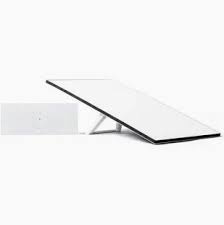
Starlink Version 4 Kit
Shop Starlink Version 4 Kit in Uganda for fast, reliable satellite internet with WiFi 6. Ideal for homes and businesses. Order your kit today.
Contact us for current pricing in Uganda
Contact us for current pricing in Uganda
Product Details
Starlink Version 4 Kit: 7 Powerful Benefits for Fast Internet
Starlink Version 4 Kit in Uganda
The Starlink Version 4 Kit is a popular choice for customers who want high-speed satellite internet without depending entirely on conventional fibre, fixed wireless or mobile broadband infrastructure.
It can be particularly useful in areas where terrestrial internet infrastructure is unavailable, unreliable or difficult to extend.
Unlike conventional fixed internet connections that require a physical cable from a local telecommunications network to reach the property, Starlink communicates with satellites through its user terminal.
The Version 4-style Standard terminal is a rectangular electronic phased-array antenna. Unlike the older Standard Actuated hardware, it does not contain motors that automatically rotate the dish during initial alignment.
Instead, installation uses software-assisted manual orientation. The Starlink app guides the user or installer toward the appropriate alignment. Once correctly positioned with a suitable view of the sky, the terminal electronically tracks satellites without physically moving.
This simpler physical design makes the Starlink Version 4 Kit suitable for permanent residential and business installations while also allowing it to be deployed temporarily when required.
What Comes with the Starlink Version 4 Kit?
The precise contents can vary according to the current Standard configuration and market, so customers should confirm the specific kit being purchased.
Starlink's Standard specifications show the core kit built around the terminal, mounting base or kickstand, networking equipment, Starlink cable, AC cable and power equipment. The Standard 4 X configuration specifically includes Router 3, a 15 m Starlink cable, 1.5 m AC cable and power supply.
Table 1: Main Starlink Version 4 Kit Components
| Component | Purpose |
|---|---|
| Starlink Terminal | Connects to the satellite network |
| Kickstand | Supports initial or suitable flat-surface placement |
| Starlink Router | Distributes internet locally |
| Starlink Cable | Connects Starlink equipment |
| AC Power Cable | Connects the system to electricity |
| Power Supply | Provides appropriate power to the system |
| Optional Mounts | Support permanent roof, wall or pole installations |
Additional mounts and networking accessories can be added according to the installation.
Starlink Version 4 Dish
The Version 4-style Standard terminal uses an electronic phased-array antenna.
Starlink's Standard specifications list a 110° field of view, IP67 Type 4 environmental rating and operating temperature range of approximately -30°C to 50°C. Starlink
The terminal measures approximately 594 × 383 × 39.7 mm and weighs about 2.9 kg without the kickstand or approximately 3.2 kg with it, according to Starlink's Standard specification. Starlink
The relatively thin rectangular design differs visibly from the older Standard Actuated terminal, which incorporates a mast and motors for self-orientation.
Table 2: Starlink Version 4 Terminal Specifications
| Specification | Starlink Standard |
|---|---|
| Antenna | Electronic phased array |
| Field of View | 110° |
| Orientation | Software-assisted manual orientation |
| Dimensions | Approx. 594 × 383 × 39.7 mm |
| Weight | Approx. 2.9 kg |
| Weight with Kickstand | Approx. 3.2 kg |
| Environmental Rating | IP67 Type 4 |
| Operating Temperature | -30°C to 50°C |
| Snow Melt Capability | Up to 40 mm/hour |
| Wind Rating | Operational at 96 kph+ |
Specifications are based on Starlink's published Standard hardware information. Starlink
Starlink Version 4 Router
Depending on the exact Standard kit configuration, the system can include Starlink's newer networking hardware.
The Standard 4 X configuration includes Router 3, while Starlink's newer Standard 4 naming distinguishes configurations based partly on the supplied router. Starlink
Router 3 supports WiFi 6 and uses a tri-band 4×4 MU-MIMO design. Starlink states that it can support up to 235 connected devices and coverage of up to approximately 297 m² (3,200 ft²) under suitable conditions.
Actual WiFi coverage will vary with the property layout, walls, floors, interference and router placement.
WiFi 6 with Starlink Version 4
WiFi 6 is one of the significant networking improvements available with Router 3.
Router 3 supports IEEE 802.11a/b/g/n/ac/ax standards and includes tri-band networking, 4×4 MU-MIMO and OFDMA.
These technologies help the router manage multiple connected devices efficiently.
For a modern home, this can include smartphones, televisions, laptops, tablets, CCTV equipment and smart-home devices.
Businesses can similarly connect workstations, phones and other equipment, although larger commercial properties may require additional networking infrastructure.
Table 3: Router 3 Specifications
| Feature | Specification |
|---|---|
| WiFi Generation | WiFi 6 |
| Standards | 802.11 a/b/g/n/ac/ax |
| Radio | Tri-band 4×4 MU-MIMO |
| Ethernet LAN Ports | 2 |
| Coverage | Up to approximately 297 m² |
| Connected Devices | Up to 235 |
| Security | WPA2 |
| Environmental Rating | IP56 |
| Operating Temperature | -30°C to 50°C |
| Mesh Support | Compatible Starlink mesh equipment |
Router specifications are based on Starlink's published Router 3 documentation.
Built-In Ethernet Ports
One useful improvement with Router 3 is built-in Ethernet connectivity.
Starlink confirms that Router 3 has two Ethernet LAN ports located beneath the cover on the rear of the router.
This is particularly useful compared with the older Gen 2 router, which requires a separate Ethernet Adapter to provide conventional wired connectivity.
The Ethernet ports can connect equipment such as:
- Desktop computers
- Smart TVs
- Network switches
- Additional networking equipment
- Wired mesh equipment
- Other Ethernet-enabled devices
A network switch can be added when more wired connections are required.
Starlink Version 4 for Homes
Residential users are one of the primary audiences for Standard Starlink hardware.
Starlink identifies the Standard 4 X as suitable for residential customers and everyday activities such as streaming, video calls and online gaming.
For households in areas with limited fixed broadband infrastructure, Starlink can provide an alternative internet connection without waiting for fibre or another wired network to reach the property.
It can support everyday activities such as working from home, online classes, entertainment, communication and smart-home connectivity.
The actual user experience depends on factors including Starlink network conditions, installation quality and WiFi coverage.
Starlink Version 4 for Businesses
The Starlink Version 4 Kit can also be useful for businesses that require internet at locations where conventional connectivity is limited.
Small offices may use the supplied router directly.
Larger businesses can integrate Starlink into a broader network involving switches, Ethernet cabling and wireless access points.
The two built-in Ethernet LAN ports on Router 3 make wired integration considerably simpler than the older Gen 2 router arrangement.
Businesses should design the local network according to the number of employees, floor area and applications rather than expecting a single router to cover every commercial environment.
Starlink Version 4 for Remote Areas
Satellite connectivity makes Starlink particularly useful in locations where building conventional internet infrastructure is challenging.
A Version 4 Kit can therefore be considered for farms, lodges, construction sites, rural homes and other locations with appropriate Starlink service availability.
The terminal still requires suitable power and an appropriate view of the sky.
Remote installations may therefore also need solar systems, batteries or other backup-power equipment where grid electricity is unavailable or unreliable.
Starlink Version 4 Installation
Installation begins with identifying a suitable location for the terminal.
The terminal needs a clear view of the sky so it can communicate effectively with the satellite network.
The Starlink app includes tools that assist with checking for obstructions and alignment.
Unlike Standard Actuated hardware, the Version 4-style Standard terminal uses manual physical alignment during initial setup rather than motorised self-orientation. Once correctly aligned, its electronic phased-array technology tracks satellites without requiring the terminal to physically rotate.
Table 4: Starlink Version 4 Installation Process
| Stage | What Happens |
|---|---|
| Site Assessment | Identify suitable installation area |
| Obstruction Check | Check available sky visibility |
| Mount Selection | Choose roof, wall, pole or suitable base |
| Terminal Installation | Secure Starlink terminal |
| Cable Routing | Route cable safely indoors |
| Router Setup | Position and connect router |
| Alignment | Use Starlink app guidance |
| Testing | Check Starlink and WiFi performance |
Professional installation can be particularly useful for permanent roof and pole installations.
Starlink Version 4 Mounting Options
The included kickstand provides a convenient starting point, but permanent installations may require a dedicated mount.
Starlink provides additional compatible mounting accessories for its Standard hardware.
The appropriate mounting solution depends on the building and desired terminal position.
Common installation approaches can include:
- Roof mounting
- Wall mounting
- Pole mounting
- Flat-surface installation
- Temporary kickstand placement
The goal is not simply to place Starlink as high as possible. The priority is obtaining suitable sky visibility while keeping the equipment securely installed.
Starlink Version 4 Cable
The Standard 4 X kit includes a 15 m Starlink cable. Starlink also identifies longer cable options for compatible Standard installations.
The cable route should therefore be considered when selecting the terminal location.
Customers should avoid placing the terminal in an inferior position simply because it is closer to the router.
Where appropriate compatible cabling is available, the terminal can instead be positioned where it receives better sky visibility while networking equipment remains in a suitable indoor location.
Cable routing should avoid unnecessary crushing, sharp bends and vulnerable high-traffic areas.
Starlink Version 4 Power Consumption
Power requirements matter particularly when Starlink is being operated from a UPS, portable power station, inverter or solar installation.
Published Starlink Standard specifications have listed average consumption in the 75–100W range, while Starlink's newer Standard 4 X comparison documentation lists an average draw around 62W for that configuration. Power draw varies with hardware revision, conditions and usage.
Customers planning backup power should therefore size the system conservatively rather than assuming Starlink consumes one fixed wattage continuously.
The power requirements of laptops, access points, switches and other equipment should also be included.
Table 5: Starlink Version 4 Applications
| Application | Suitable? | Additional Consideration |
|---|---|---|
| Home Internet | Yes | Good terminal placement |
| Remote Work | Yes | Backup power may help |
| Video Calls | Yes | Stable WiFi/network |
| Streaming | Yes | Suitable service capacity |
| Online Gaming | Yes | Network conditions matter |
| Small Office | Yes | Consider Ethernet |
| Large Business | Yes, with network design | Switches/access points |
| Rural Property | Yes | Sky visibility and power |
| Farm | Yes | Mounting and power backup |
| Temporary Site | Yes | Secure portable setup |
Starlink Version 4 vs Standard Actuated
One of the clearest differences between the newer Standard hardware and the older Standard Actuated system is alignment.
The Standard Actuated terminal contains motors that physically orient the terminal during initial setup.
The Version 4-style Standard terminal removes this motorised mechanism and instead uses software-assisted manual alignment.
Both remain electronic phased-array antennas and electronically track satellites after proper installation.
The newer Standard 4 X also uses Router 3 and a separate power supply, whereas Standard Actuated uses the Gen 2 router with power functionality integrated into that router.
Table 6: Version 4 vs Standard Actuated
| Feature | Version 4 / Standard 4 X | Standard Actuated |
|---|---|---|
| Terminal Shape | Rectangular | Rectangular |
| Orientation | Manual with app guidance | Motorised initial orientation |
| Satellite Tracking | Electronic phased array | Electronic phased array |
| Included Router | Router 3 | Gen 2 Router |
| WiFi Generation | WiFi 6 | WiFi 5 |
| Ethernet Ports | 2 on Router 3 | Requires Ethernet Adapter |
| Temporary Base | Kickstand | X-shaped base/mast |
| Power Supply | Separate | Integrated with Gen 2 router |
| Main Cable | Approx. 15 m | Approx. 15 m |
Starlink documents these hardware differences in its comparison of Standard 4 X and Standard Actuated.
Starlink Version 4 Mesh WiFi
Large properties may require additional WiFi coverage beyond the main router.
Router 3 supports compatible Starlink mesh equipment. Starlink's specifications state compatibility with Gen 2 and Router 3 mesh nodes, with support for up to three Starlink mesh nodes in the documented configuration.
Mesh networking can be useful for multi-storey houses and larger offices where walls and distance create weak WiFi areas.
However, very large commercial properties may be better served by a professionally designed network using Ethernet switches and dedicated access points.
Starlink Version 4 and Ethernet Networking
The two Ethernet ports on Router 3 allow Starlink to connect directly to wired devices or additional networking infrastructure.
For example, one Ethernet port can connect to a network switch.
The switch can then distribute Starlink connectivity to several computers, access points, smart TVs, CCTV equipment and other network devices.
This makes Version 4-style Standard hardware useful not only as a standalone WiFi solution but also as the internet source for a more comprehensive local network.
Starlink Version 4 and Backup Power
Starlink requires continuous electricity to remain connected.
Customers in locations with frequent power interruptions can therefore combine the kit with a suitably sized UPS, portable power station or inverter-and-battery system.
Solar and battery systems can also be designed for off-grid installations.
Battery sizing should account for the Starlink system, router, conversion losses and every additional device that must remain operational.
A business requiring Starlink, switches, access points and several computers will need substantially more backup capacity than a household powering Starlink alone.
Choosing the Starlink Version 4 Kit
The Version 4-style Standard hardware is particularly suitable where customers want a fixed Starlink system for a home, office or other property.
Before purchasing, consider:
- Service availability
- Installation location
- Sky visibility
- Building layout
- Required WiFi coverage
- Number of users
- Ethernet requirements
- Backup power
- Permanent mounting requirements
These factors help determine whether the Standard kit alone is sufficient or whether additional mounts, mesh routers, switches or backup-power equipment should be included.
Why Buy the Starlink Version 4 Kit from Starlink Uganda Installers?
Starlink Uganda Installers can help customers go beyond simply purchasing Starlink hardware.
A complete deployment may include site assessment, mounting, cable routing, router setup, alignment, WiFi configuration and connectivity testing.
Customers with larger homes and businesses can also receive assistance with mesh networking, Ethernet cabling, switches and access points.
This makes it possible to design the installation around the actual property rather than relying on the basic kit configuration alone.
FAQs
1. What is the Starlink Version 4 Kit?
The Starlink Version 4 Kit commonly refers to the newer flat rectangular Standard Starlink hardware that many customers have also called Gen 3. Starlink's updated naming identifies the hardware previously commonly called Gen 3 Starlink as Standard 4.
2. Does the Starlink Version 4 Kit have WiFi 6?
The Standard configuration using Router 3 provides WiFi 6 with tri-band 4×4 MU-MIMO networking.
3. Does Starlink Version 4 have Ethernet ports?
Router 3 has two built-in Ethernet LAN ports, allowing compatible wired devices or a network switch to be connected without the Gen 2-style Ethernet Adapter.
4. Does the Starlink Version 4 dish rotate automatically?
No. The newer Standard terminal uses software-assisted manual orientation during setup rather than the motorised self-orientation used by Standard Actuated. Satellite tracking itself is performed electronically through the phased-array antenna.
5. How long is the Starlink Version 4 cable?
The Standard 4 X kit includes a 15 m (49.2 ft) Starlink cable.
6. Is Starlink Version 4 suitable for businesses?
Yes. It can provide connectivity for offices and other business environments, while Ethernet switches, access points and other networking equipment can be added where a larger local network is required.
7. Can I use mesh routers with Starlink Version 4?
Yes. Router 3 supports compatible Starlink mesh equipment, allowing WiFi coverage to be expanded around larger properties.
8. Can Starlink Version 4 work with a power backup?
Yes. A properly sized UPS, portable power station, battery/inverter or solar system can provide backup power. Capacity should be calculated according to the complete electrical load and required runtime.
9. Is Starlink Version 4 suitable for rural areas?
It can be particularly useful where terrestrial broadband options are limited, provided Starlink service is available and the terminal can be installed with suitable sky visibility.
10. Where can I buy the Starlink Version 4 Kit in Uganda?
Customers can contact Starlink Uganda Installers for the Starlink Version 4 Kit together with assistance for installation, mounting, configuration, WiFi expansion and networking.
Conclusion
The Starlink Version 4 Kit combines modern Starlink Standard terminal hardware with a simplified non-actuated design suitable for homes, offices and remote installations. Its electronic phased-array antenna, software-assisted alignment and flexible mounting options make it suitable for both straightforward residential deployments and more comprehensive business installations.
When paired with Router 3, the system provides WiFi 6, two built-in Ethernet LAN ports and support for compatible Starlink mesh expansion. Customers can further customise an installation with permanent mounts, longer compatible cables, Ethernet switches, access points and appropriately sized backup-power systems depending on the property.
For the Starlink Version 4 Kit, professional installation and network configuration in Uganda, contact Starlink Uganda Installers. Customers can get assistance with equipment selection, mounting, cable routing, WiFi expansion and complete Starlink setup for residential and business locations. Visit starlinkugandainstallers.co.ke for more information.